12 Benefits of Cloud Migration
Cloud migration delivers a wide range of operational and technological benefits, including reduced IT costs, improved scalability, enhanced security and compliance, increased availability, and stronger disaster recovery capabilities. Beyond infrastructure improvements, it enables easier data access, better collaboration, streamlined IT management, faster deployment, application modernization, and the adoption of advanced technologies that drive innovation. For startups, these benefits support faster product experimentation, reduced infrastructure commitments, seamless SaaS and API integration, and quicker business setup.
For small businesses, cloud migration helps reduce the burden of in-house IT management, simplify system administration, access enterprise-grade tools, and minimize reliance on local hardware. Mid-sized businesses can leverage the cloud to strengthen technology governance, improve system integration, manage hybrid environments more effectively, and gain greater visibility and control over their applications.
Cloud migration becomes particularly valuable when organizations need to address aging infrastructure, accommodate growing scalability demands, adapt to changing business requirements, or modernize their applications. By aligning cloud migration strategies with business objectives, organizations can unlock the full potential of cloud adoption while ensuring a smoother transition and minimizing operational risks.
12 key benefits of cloud migration are:
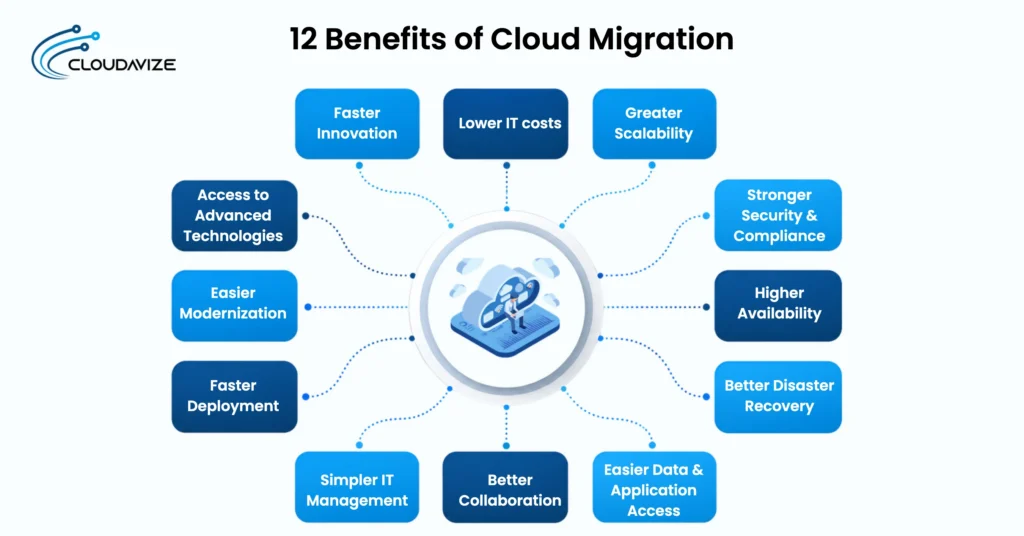
- Lower IT costs
- Greater scalability
- Stronger security and compliance
- Higher availability
- Better disaster recovery
- Easier data and application access
- Better collaboration
- Simpler IT management
- Faster deployment
- Easier modernization
- Access to advanced technologies
- Faster innovation
- Lower IT costs
Cloud migration can lower IT costs by reducing spending on physical servers, storage, networking equipment, data-center facilities, and ongoing infrastructure maintenance. It also shifts technology spending from large upfront capital expenditure (CapEx) toward operating expenditure (OpEx) through a flexible, pay-as-you-go operational model. Organizations migrating on-premises infrastructure to AWS reported a 20% reduction in technology infrastructure spend as a percentage of revenue after migration (Source: The Hackett Group, Global Cloud Services Study).
For SMBs, cloud migration can make IT spending more manageable by replacing costly infrastructure ownership with flexible, usage-based services. Businesses can match computing resources to current demand, reduce spending on unused capacity, and redirect limited IT budgets toward applications and services that support daily operations and business growth.
- Greater scalability
When business demand changes, cloud migration allows businesses, including SMBs, to scale compute, storage, and bandwidth without having to purchase and install new physical infrastructure. Cloud elasticity lets SMBs scale resources up or down based on current workloads, helping them match infrastructure capacity to changing demand.
Cloud migration also gives SMBs access to autoscaling capabilities that automatically adjust computing resources as demand changes. During traffic spikes, such as seasonal sales, marketing campaigns, or sudden increases in website traffic, cloud resources can scale up to maintain application performance. When demand falls, SMBs can scale resources down, reducing unused capacity and avoiding the cost of maintaining excess physical infrastructure.
- Stronger security and compliance
Meeting strict regulatory standards like GDPR, HIPAA, and SOC 2 becomes easier for SMBs when cloud migration provides access to built-in security controls and compliance tools. Encryption protects data at rest and in transit, while identity and access management (IAM) controls user permissions and access to resources. These cloud security controls help SMBs protect sensitive information and maintain compliance without managing every security function on-premises.
Cloud migration can support compliance through cloud platforms that maintain recognized certifications and attestations, such as ISO 27001 and PCI DSS. Under the shared responsibility model, cloud providers secure the underlying infrastructure, while SMBs remain responsible for their data, identities, access permissions, and workload configurations.
- Higher availability
Cloud migration can help businesses, including SMBs, maintain access to business applications and services by reducing dependence on a single server or location. Cloud redundancy distributes workloads and data across multiple resources, while load balancing directs traffic between available systems. Cloud providers also offer high-uptime performance guarantees, often meeting service level agreements (SLAs) of 99.99% or higher. Together, these capabilities help maintain service when demand increases or individual resources become unavailable.
This distributed setup also supports failover across multiple availability zones or regions. If a server, data center, or availability zone experiences an outage, failover mechanisms can redirect workloads to functioning cloud resources. As a result, cloud migration helps businesses reduce single points of failure, limit service interruptions, and maintain business continuity during infrastructure disruptions.
- Better disaster recovery
If hardware failure, cyber incidents, or unexpected outages disrupt business operations, cloud migration can help SMBs recover applications and data faster. Cloud backups, snapshots, and data replication create recoverable copies across cloud resources, reducing dependence on a single physical system. These capabilities give businesses multiple recovery points when primary data or infrastructure becomes unavailable.
A 2024 study focused specifically on SMEs found that cloud-based replication, incremental backups, and automated failover can reduce recovery time and potential data loss while supporting business continuity (Samira et al., 2024). This finding demonstrates how cloud-based disaster recovery can help SMBs restore services rapidly, minimize downtime, and maintain business continuity when primary infrastructure becomes unavailable.
- Easier data and application access
Cloud migration makes business data and applications easier to access without depending on systems located within a physical office. Cloud-hosted applications and data can be securely accessed through authorized internet connections, allowing employees to work across offices, remote locations, and supported devices while maintaining access to the resources required for daily tasks.
This accessibility also supports remote and hybrid work by providing consistent access to cloud resources across different locations. Identity and access management, authentication, and user permissions restrict resources to authorized users. As a result, cloud migration provides flexible access to business applications and data while keeping access controlled across locations and devices.
- Better collaboration
If teams work across different locations, cloud migration can improve collaboration by giving employees shared access to cloud-hosted applications and centralized business data. A 2026 study of 385 SME owners and managers found that cloud-enabled remote collaboration had a significant positive effect on operational efficiency (β = 0.550, p < .001), while real-time access to cloud-based data also significantly improved operational efficiency (β = 0.243, p = .002) (Ojobi et al., 2026).
Real-time synchronization keeps files and information updated across connected devices, allowing team members to work with the same data without relying on separate local copies. Employees can access updated files, collaborate on shared documents, and coordinate tasks regardless of location. These capabilities connect cloud migration with more consistent distributed teamwork and improved operational efficiency.
- Simpler IT management
In day-to-day IT operations, cloud migration simplifies management by bringing infrastructure, applications, and resources into a centrally managed environment. IT teams can monitor system health, performance, and resource usage from centralized tools, while automated provisioning deploys computing resources without requiring manual hardware configuration. This reduces repetitive administrative work and supports consistent infrastructure management.
Cloud migration also simplifies ongoing IT tasks through automated patching, infrastructure as code (IaC), and managed services. IaC enables teams to deploy infrastructure through reusable configuration files, while managed services can handle database maintenance, backups, and software updates. Automating routine infrastructure work allows IT teams to spend more time managing technology that directly supports business operations and priorities.
- Faster deployment
Cloud migration helps businesses deploy applications and IT resources faster by replacing manual infrastructure setup with automated provisioning. Development teams can create computing, storage, and testing environments as needed instead of waiting to purchase and configure physical hardware. This faster provisioning supports DevOps workflows and gives teams consistent environments across development, testing, and production.
Cloud migration also supports continuous integration and continuous delivery (CI/CD), which automates application building, testing, and deployment. A 2025 study found that fully automated CI/CD increased average deployment frequency from 8.9 to 15.4 deployments per week and reduced time-to-market by 38% (Source: Carignan & Enoch, 2025). As a result, businesses can shorten release cycles, deploy updates faster, and respond to changing application requirements with less infrastructure-related delay.
- Easier modernization
For SMBs, cloud migration can create a foundation for application modernization by providing access to technologies such as containers, serverless computing, microservices, APIs, and managed platforms. Development teams can use these cloud services to separate large applications into smaller components, connect systems through APIs, and reduce the infrastructure work required to manage databases and application environments.
Application modernization requires more than moving existing applications to cloud infrastructure. SMBs can refactor applications to use cloud-native services, containers, microservices, serverless functions, or managed platforms based on application requirements. Refactoring can make applications easier to update, scale, and maintain while supporting shorter development cycles and changing business requirements.
- Access to advanced technologies
When businesses need technologies that would otherwise require specialized infrastructure and technical resources, cloud migration provides access to cloud-native services such as AI and machine learning (AI/ML), data analytics, Internet of Things (IoT), managed databases, and serverless computing. These services can analyze data, automate processes, connect devices, and run applications without requiring dedicated infrastructure for each technology.
Cloud migration also makes it easier to adopt cloud-native technologies as business requirements change. Managed databases reduce database administration tasks, while serverless computing runs application code without requiring teams to manage servers. By providing these services within cloud environments, cloud migration helps businesses integrate advanced technologies into existing applications, processes, and workflows.
- Faster innovation
Cloud migration supports faster innovation by giving teams access to computing resources, development environments, and managed services for testing new ideas without investing in dedicated infrastructure. Rapid provisioning allows teams to create temporary environments for prototypes and experiments, while automation reduces repetitive setup and testing tasks.
As ideas move from experimentation to development, cloud migration provides the resources needed to refine them without lengthy infrastructure preparation. Managed services for databases, analytics, AI, and other development requirements reduce the technical work involved in building experimental solutions. Teams can test different configurations, validate product ideas, and refine applications through shorter product-development cycles, helping businesses turn tested concepts into practical products and services faster.
What Are the Benefits of Cloud Migration for Startups?
The benefits of cloud migration for startups include faster product experimentation, lower infrastructure commitments, easier SaaS and API integration, and faster operational setup as business requirements change. These advantages let startups test ideas, build technology operations, and adapt resources without investing heavily in physical IT infrastructure.
4 key benefits of cloud migrations for startups are:
- Faster product experimentation
Cloud migration lets startups test product ideas without buying and configuring dedicated infrastructure for every experiment. A 2025 study found that cloud-based prototyping reduced deployment time by approximately 40% compared with traditional local development environments, allowing development teams to test and iterate applications faster (Source: Nwankwo et al., 2025). As a result, cloud migration helps startups shorten experimentation cycles, validate product ideas faster, collect feedback, and refine features before committing resources to wider product development.
- Lower infrastructure commitment
When startups migrate to the cloud, they can reduce the upfront investment required to purchase servers, storage systems, networking equipment, and other physical infrastructure. Cloud services provide computing resources on demand, allowing startups to use infrastructure according to current requirements rather than investing in capacity based on uncertain future growth. Flexible resource usage also helps startups avoid long-term infrastructure commitments that may become underused or outdated.
- Easier SaaS and API integration
During cloud migration, startups can connect applications with SaaS tools, APIs, payment systems, analytics platforms, and other external services without building every function internally. Gartner’s 2024 API Strategy Survey found that 71% of organizations use third-party APIs, including SaaS vendors. Cloud platforms provide integration services and API management tools that help applications exchange data and connect with external systems.
- Faster operational setup
Cloud migration allows startups to set up core technology resources without waiting for physical infrastructure to be purchased, installed, and configured. Teams can rapidly provision computing infrastructure, databases, storage, development environments, and communication tools based on current operational requirements. As a result, cloud migration helps startups reduce infrastructure setup time, establish operations faster, and direct more resources toward product development and customer-facing activities.
What Are the Benefits of Cloud Migration for Small Businesses?
The benefits of cloud migration for small businesses include reduced in-house IT workload, easier system management, access to advanced IT tools, and less reliance on local hardware for daily business operations. Together, these advantages help small businesses simplify daily IT operations, reduce infrastructure responsibilities, and use technology resources that may otherwise require dedicated in-house expertise and hardware.
4 key benefits of cloud migration for small businesses are:
- Reduced in-house IT workload
Cloud migration reduces the time small businesses spend managing routine IT infrastructure by shifting more operational responsibilities to managed cloud services. Cloud providers can handle infrastructure maintenance, system patching, backups, platform administration, and other recurring tasks, reducing the manual infrastructure work required of internal IT teams. Supporting this broader operational benefit, a 2025 systematic review of 90 studies found that about 82% reported improved operational efficiency among SMEs after adopting cloud computing (Mkhize et al., 2025).
- Easier system management
For small businesses, cloud migration makes system management easier by bringing applications, infrastructure, resource usage, and performance monitoring into centralized dashboards. IT teams can monitor system health from one environment, while automated updates reduce the manual work required to keep cloud services and supported software current. As a result, cloud migration reduces day-to-day management complexity and helps small businesses maintain greater control over their IT systems.
- Access to advanced IT tools
If a small business has limited technical resources, cloud migration provides access to advanced analytics, backup, automation, and collaboration tools without requiring in-house development or maintenance. This access lets small businesses use advanced IT capabilities that might otherwise require significant investment in specialized infrastructure, software, and technical staff, helping them improve operational efficiency while keeping IT resources focused on core business needs.
- Less reliance on local hardware
Cloud migration reduces dependence on office servers, local storage, and other physical infrastructure by moving applications, data, and computing resources to cloud environments. Small businesses can access these resources without maintaining dedicated hardware at each location. Reduced dependence on physical infrastructure also limits the need for frequent hardware replacements, upgrades, and storage expansion. As technology requirements change, cloud resources can be adjusted without installing new equipment, helping small businesses reduce hardware maintenance and management responsibilities.
What Are the Benefits of Cloud Migration for Mid-Sized Businesses?
The benefits of cloud migration for mid-sized businesses include stronger technology governance, easier system integration, better hybrid environment management, and improved application oversight across growing IT operations. These advantages help mid-sized businesses manage expanding technology requirements while maintaining consistent control over connected systems, applications, cloud resources, and on-premises infrastructure.
4 key benefits of cloud migration for mid-sized businesses are:
- Stronger technology governance
Cloud migration helps mid-sized businesses establish centralized policies for managing users, applications, data, and infrastructure across growing IT environments. Centralized access controls define who can use specific resources, while monitoring tools provide visibility into system activity, configurations, and resource usage. Cloud governance applies consistent resource standards and records administrative actions for auditability, helping mid-sized businesses maintain control and accountability as their IT environments expand.
- Easier system integration
For mid-sized businesses, cloud migration makes it easier to connect applications, databases, APIs, SaaS platforms, and other business systems within an integrated technology environment. As mid-sized businesses add departments, customers, locations, and software platforms, disconnected systems can create data silos and manual workflows. Cloud integration helps these businesses synchronize customer, financial, inventory, and operational data across systems, giving growing teams consistent access to information while reducing the complexity of managing an expanding IT environment.
- Better hybrid environment management
If mid-sized businesses operate both cloud and on-premises systems, cloud migration can simplify management across both environments by providing centralized tools for monitoring, security, data access, and resource management. Centralized tools provide visibility into workloads, resources, and system performance, while secure connectivity links cloud and local infrastructure. IT teams can place workloads based on performance, security, and operational requirements while applying consistent access and resource policies. Therefore, this approach helps mid-sized businesses maintain better visibility, connectivity, and control across their hybrid IT environment.
- Improved application oversight
Cloud migration gives mid-sized businesses clearer visibility into application performance across their IT environment by centralizing performance metrics, resource usage, system health, and application activity through cloud monitoring tools. Centralized monitoring tools track application health, availability, resource usage, access activity, and performance from a common interface. IT teams can use this information to identify issues, review configurations, manage access, and adjust resources based on application requirements. As a result, mid-sized businesses can manage application performance, access, and resources more effectively as their application portfolio grows.
What Are the Main Limitations of Cloud Migration?
The main limitations of cloud migration include migration complexity, downtime, data integrity and compatibility risks, security concerns, unexpected costs, and workload performance issues. These challenges can increase migration effort, affect service reliability, and create technical or financial issues if not properly planned and managed.
7 key limitations of cloud migration are:
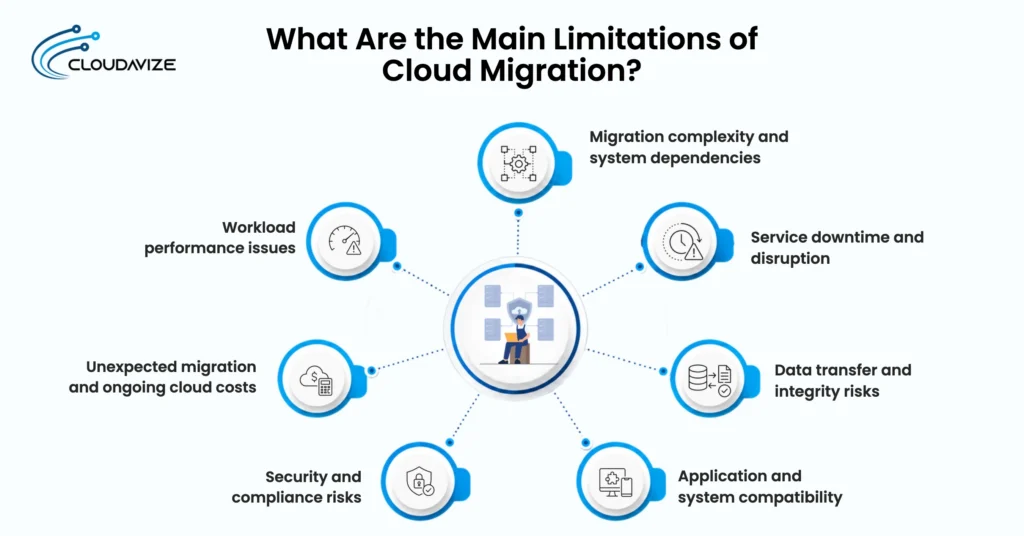
- Migration complexity and system dependencies
Cloud migration can become complex when applications, databases, and infrastructure depend on interconnected systems. Businesses must map these dependencies and migrate workloads in the correct sequence to prevent configuration issues or service disruption.
- Service downtime and disruption
Moving workloads during cloud migration can temporarily interrupt applications and business services. Careful scheduling, testing, failover procedures, and recovery planning can help limit downtime and maintain service access during the transition.
- Data transfer and integrity risks
Transferring large datasets through cloud migration can create risks such as incomplete transfers, synchronization errors, or data corruption. Backups, encryption, and validation checks help maintain data accuracy and integrity throughout the transfer.
- Application and system compatibility
Existing applications involved in cloud migration may depend on specific hardware, operating systems, databases, or local integrations. Some applications may require reconfiguration, refactoring, or replacement before operating correctly in the cloud.
- Security and compliance risks
Moving data and workloads through cloud migration changes how businesses manage identities, permissions, and infrastructure. Incorrect configurations can create security and compliance risks, requiring encryption, access controls, monitoring, and appropriate policies.
- Unexpected migration and ongoing cloud costs
Cloud costs can rise 20% to 30% above planned budgets when resources are overprovisioned, unused, or poorly managed. If you want to use a specific percentage in the article, though, it should be tied to a credible study rather than presented as a universal figure.
- Workload performance issues
Applications moved through cloud migration can experience latency or performance issues when cloud resources or network capacity do not match workload requirements. Performance testing can identify bottlenecks and support suitable resource configurations.
When Is Cloud Migration the Right Choice?
Cloud migration is the right choice when aging infrastructure, growing or variable workloads, scaling limitations, cloud-ready applications, security and compliance requirements, rising long-term costs, or modernization needs limit business growth and operational flexibility. These conditions indicate that cloud migration can address current infrastructure constraints while supporting future scalability, cost management, security requirements, and technology modernization.
Below are the key signs that indicate when cloud migration is the right choice:
- Aging infrastructure
Cloud migration becomes suitable when aging servers, storage, and networking equipment require frequent maintenance or replacement. Moving workloads to the cloud can reduce dependence on outdated hardware and avoid repeated investment in physical infrastructure.
- Growing or variable workloads
If your business experiences unpredictable traffic spikes, seasonal surges, or rapid expansion, the cloud’s elastic scalability effortlessly accommodates these fluctuating demands without causing performance bottlenecks or requiring manual server additions. Cloud migration services help businesses access this scalability while moving applications and workloads to a flexible cloud environment.
- Cloud-ready applications and data
Cloud migration is more suitable when applications and data can move to cloud environments without extensive redevelopment or compatibility issues. Assessing dependencies, data formats, integrations, and technical requirements helps determine migration readiness.
- Suitable security and compliance
SMBs should consider cloud migration when cloud services can meet their security, privacy, and regulatory requirements. Assess encryption, access controls, monitoring, data residency, and compliance requirements before moving workloads.
- Clear long-term cost value
Cloud migration becomes a practical choice when its long-term financial benefits justify the cost of moving and operating workloads in the cloud. Businesses should evaluate migration expenses, ongoing cloud usage, infrastructure maintenance, staffing needs, and future resource demand to determine the expected cost value.
- Modernization needs
Businesses that need to modernize legacy applications can use cloud migration as a foundation for adopting containers, serverless computing, managed services, APIs, and microservices. Applications may still require refactoring after migration to gain the intended modernization benefits.