16 Cloud Migration Challenges
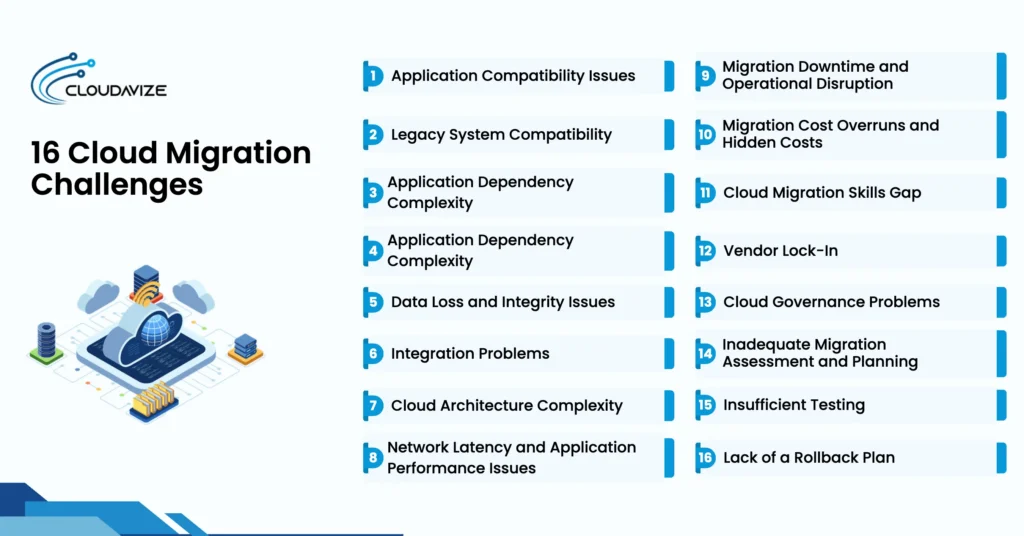
Cloud migration challenges can occur at different stages of the transition, from compatibility and dependency issues when assessing legacy workloads to data security, integration, data integrity, latency, and downtime risks when moving systems and information to the cloud. These problems can affect IT teams and business operations when existing applications, infrastructure, security controls, and dependencies do not align cleanly with the target cloud environment. Cost overruns, cloud skills gaps, vendor lock-in, and governance problems may become more apparent as teams deploy and manage cloud resources, while inadequate planning, insufficient testing, and a lack of a rollback plan can increase the impact of problems before, during, and after cutover.
Together, these challenges can delay migration timelines, increase costs, disrupt operations, and affect workload performance. When internal teams lack the cloud skills or resources to manage them, an experienced managed service provider (MSP) can support workload assessment, migration planning, testing, cutover, monitoring, and cost management. This added support helps businesses address migration risks at each stage while maintaining a more controlled transition to the cloud.
Cloud Migration Challenges, Risks, and Mitigation Strategies
| Cloud Migration Challenge | When It Commonly Occurs | Primary Risk / Impact | Key Mitigation |
| Application Compatibility Issues | During workload assessment and testing | Applications may not function correctly in the target cloud | Compatibility assessment, testing, rehost/replatform/refactor decisions |
| Legacy System Compatibility | During assessment and modernization planning | Older technologies may not be supported by modern cloud platforms | Legacy inventory, modernization, replacement, phased migration |
| Application Dependency Complexity | During discovery and migration-wave planning | Unidentified dependencies can break connected workloads | Dependency mapping, workload grouping, migration sequencing |
| Data Security and Compliance Challenges | Before, during, and after data/workload migration | Sensitive data, access controls, or regulatory requirements may be compromised | Encryption, IAM, least privilege, logging, compliance mapping |
| Data Loss and Integrity Issues | During data transfer, synchronization, and cutover | Records may become missing, duplicated, corrupted, or inconsistent | Backups, synchronization, reconciliation, checksums, post-transfer validation |
| Integration Problems | When cloud workloads connect with on-premises or third-party systems | APIs, applications, identity systems, or data flows may fail | Integration assessment, API testing, middleware and authentication validation |
| Cloud Architecture Complexity | During target-environment design and workload transformation | Poor architecture can affect scalability, resilience, performance, and management | Landing-zone planning, architecture design, resource sizing, availability planning |
| Network Latency and Application Performance Issues | During testing and after workloads move to the cloud | Users may experience slower response times or application performance | Performance baselines, network assessment, load testing, monitoring |
| Migration Downtime and Operational Disruption | During migration waves and production cutover | Applications or business processes may become unavailable | Replication, cutover planning, RTO/RPO targets, phased migration, rollback |
| Migration Cost Overruns and Hidden Costs | During planning, migration, and early cloud operation | Actual migration or cloud spending may exceed forecasts | TCO analysis, cost modeling, FinOps, rightsizing, ongoing cost monitoring |
| Cloud Migration Skills Gap | During planning, implementation, and cloud operations | Internal teams may lack required cloud capabilities | Skills assessment, training, documentation, MSP support |
| Vendor Lock-In | During architecture and service-selection decisions | Proprietary services can make future migration difficult or expensive | Open standards, portability planning, modular architecture, exit strategy |
| Cloud Governance Problems | As cloud resources and environments expand | Inconsistent access, policies, ownership, and spending can increase operational risk | RBAC, tagging, policies, budgets, ownership standards, monitoring |
| Inadequate Migration Assessment and Planning | Before workloads are migrated | Poor discovery and planning can cause delays, unexpected costs, and technical failures | Workload inventory, business case, risk assessment, migration strategy, wave planning |
| Insufficient Testing | Before cutover and during post-migration validation | Undetected functional, performance, security, or integration problems may reach production | Functional, integration, performance, security, UAT, data and rollback testing |
| Lack of a Rollback Plan | During cutover or when migration validation fails | Teams may be unable to restore the previous working environment quickly | Rollback triggers, go/no-go criteria, synchronization, backups, tested reversion procedures |
- Application Compatibility Issues
Existing workloads can encounter compatibility barriers when their operating systems, runtime environments, databases, APIs, application versions, third-party software, or hardware dependencies differ from those supported by the target cloud platform. Licensing constraints and unsupported features can create further obstacles during migration. Foundry’s 2025 Cloud Computing Survey found that 43% of IT leaders faced incompatibilities between on-premises and target cloud environments, highlighting the need to evaluate workloads before migration.
SMBs should assess cloud service compatibility and determine each application’s cloud readiness and platform suitability before selecting a migration approach. Application dependency mapping, workload testing, configuration validation, and licensing reviews can identify unsupported components and estimate remediation effort. Based on these findings, teams can determine whether an application is suitable for direct migration or requires remediation before choosing rehosting, replatforming, or refactoring.
- Legacy System Compatibility
Outdated applications, databases, operating systems, and infrastructure can create migration barriers when their underlying technologies do not align with the target cloud environment. End-of-life software, proprietary hardware, unsupported operating systems, legacy protocols, and limited vendor support can restrict available migration options. Technical debt, source-code limitations, and application dependencies can further increase the remediation effort required to adapt older workloads. Foundry’s 2025 Cloud Computing Survey found that 52% of IT leaders cited the complexity of modernizing legacy systems as an obstacle to cloud adoption.
Small and mid-sized businesses should inventory legacy workloads and evaluate their cloud readiness, vendor support, licensing constraints, and remediation effort before selecting a migration path. Based on this assessment, teams can decide whether to retain the workload on-premises, migrate it, move it to SaaS, replatform it, refactor it, replace or repurchase it, or retire it. A phased approach can address technical debt while limiting disruption to connected applications and business processes.
- Application Dependency Complexity
Cloud workloads rarely operate in isolation because applications depend on databases, APIs, authentication services, middleware, storage, and network components. Their connections can also involve DNS records, load balancers, identity providers, firewall rules, ports, protocols, service accounts, and third-party services. Overlooking these relationships during migration can disrupt application functionality or create incorrect migration sequencing. Flexera’s 2026 State of the Cloud Report identifies understanding application dependencies as the biggest challenge organizations face when migrating workloads to the public cloud, with 54% of respondents selecting it.
IT teams should map application relationships before migration and determine which workloads must move together. Application dependency mapping can reveal upstream and downstream connections, authentication paths, network rules, service accounts, and third-party dependencies that must remain available during cutover. This information helps IT teams establish migration sequences, group related workloads into appropriate migration waves, and reduce integration failures during the transition.
- Data Security and Compliance Challenges
Moving sensitive information to cloud environments requires businesses to address security, access, governance, and regulatory requirements throughout the migration process. Data at rest and data in transit require encryption, while least-privilege access, authentication, and security configuration help limit unauthorized access. Foundry’s 2025 Cloud Computing Survey found that 56% of respondents cited protecting data in the cloud as an obstacle, while 49% reported challenges adhering to government and industry regulations.
The cloud shared responsibility model requires businesses to understand which security controls they manage and which the cloud provider manages. Data residency and sovereignty requirements may affect where information can be stored. An MSP can help SMBs configure security controls, maintain audit and logging requirements, and map regulatory frameworks, such as HIPAA, PCI DSS, or SOC 2, when relevant to the workload.
- Data Loss and Integrity Issues
Migrating data between existing infrastructure and cloud environments can create problems with completeness, consistency, and accuracy. Foundry’s 2025 Cloud Computing Survey found that 53% of IT leaders faced data portability challenges, while 52% struggled with integrating cloud resources with on-premises systems. These figures point to migration difficulties rather than data-loss incidents. Schema conversion, changing data, incompatible formats, and live data updates can further affect transfer accuracy during migration.
Organizations should maintain reliable backups and recovery procedures before transferring business data. Source-to-target record counts, reconciliation checks, checksums or hash validation, synchronization testing, and post-migration verification can identify missing, duplicated, corrupted, or inconsistent records. Data validation should compare source and target environments after transfer, while backup and recovery procedures provide a controlled path when integrity checks identify problems.
- Integration Problems
Migrated workloads can experience communication failures when they connect with APIs, middleware, SaaS applications, databases, identity providers, and third-party applications. Application-to-application integration can fail when interfaces or data formats differ, while cloud-to-on-premises integration can depend on reliable network connectivity and compatible authentication protocols. Data integration problems can interrupt information exchange, and identity integration issues can prevent users or applications from authenticating correctly. A Fortra cloud migration survey of 254 professionals identified application integration and automation as important areas during cloud migration.
To prevent operational disruption, small business leaders should evaluate each integration path before migration and document the systems, interfaces, protocols, and dependencies involved. API testing, authentication verification, network connectivity checks, dependency mapping, and end-to-end testing can identify problems before cutover. An MSP can help SMBs assess hybrid integration requirements and validate connections between cloud workloads and existing systems.
- Cloud Architecture Complexity
Moving existing workloads into a cloud environment can create architectural challenges when compute, networking, storage, identity, security, availability, and workload design requirements differ from the current infrastructure. A suitable cloud landing zone must account for resource sizing, network topology, availability zones or regions, scalability, high availability, resilience, and disaster recovery. Poor architectural decisions can create inefficient resource allocation, weak recovery capabilities, or application performance problems. Gartner’s research examined cloud migration journeys for applications and databases among 27 CIO and technology or infrastructure research board members, providing context on the architectural considerations involved in migration.
Small and mid-sized businesses should evaluate existing infrastructure and define the target architecture before migration begins. Architecture planning should determine resource sizing, network topology, storage configuration, identity controls, availability requirements, and disaster recovery design. An MSP can support SMBs with landing-zone design and architecture assessment while helping determine whether workloads require rehosting, replatforming, or refactoring.
- Network Latency and Application Performance Issues
For resource-constrained small businesses, sudden application lag after a cloud migration directly undermines daily productivity. Geographic distance, network bandwidth limitations, packet loss, and DNS issues can affect latency and throughput when workloads move away from local servers. Database latency, storage IOPS, and CPU or memory utilization can also influence application response time after migration. These factors can create performance degradation even when the migrated application itself remains compatible with the cloud environment.
Overcoming speed bottlenecks demands robust pre- and post-migration benchmarks. Small business IT managers should establish a performance baseline and conduct load and performance testing before cutover, then compare cloud metrics against those measurements after deployment. Monitoring latency, throughput, packet loss, application response time, database latency, storage IOPS, and CPU or memory utilization helps identify bottlenecks. An MSP can assist with performance monitoring, cloud region selection, network assessment, and workload optimization.
- Migration Downtime and Operational Disruption
Cutover activities can create business continuity challenges when applications become unavailable or dependent business processes are interrupted during workload transfer. Caylent’s 2025 Database Migration Survey found that only 6% of respondents reported zero downtime during their most challenging database migration, while 6% completed their most challenging migration on time. These findings illustrate the operational and scheduling difficulties that can arise during complex migration projects. Business-critical workloads require defined RTO, RPO, maintenance windows, and cutover windows to establish acceptable recovery and service expectations.
Before migration, organizations should establish go/no-go criteria based on application readiness, data synchronization, backup validation, and recovery testing. Stakeholder communication should define expected service impacts and responsibilities throughout the cutover. Replication, phased migration, parallel environments, and tested rollback procedures help reduce operational disruption and provide recovery options when migration activities encounter unexpected issues.
- Migration Cost Overruns and Hidden Costs
Unexpected expenses can push a cloud migration beyond its original budget when businesses underestimate integration requirements, licensing changes, specialist labor, modernization activities, testing, and data transfer needs. McKinsey’s analysis of 443 cloud migration respondents found that 75% reported migration costs exceeding their planned budgets, while 28% exceeded their initial allocation by more than 20%. Migration expenses can include temporary environments, parallel operations, software licensing, data transfer or egress fees, and legacy infrastructure decommissioning.
Cloud operating costs create a separate financial consideration after workloads move. Resource consumption, storage, network usage, and inefficient resource sizing can increase recurring expenses. SMBs can use FinOps practices to monitor consumption, apply rightsizing, and evaluate reserved capacity or commitments. TCO analysis should account for both migration and ongoing operating costs, while an ROI or business case can help evaluate whether projected cloud spending aligns with expected business outcomes.
- Cloud Migration Skills Gap
A persistent technical skills gap can slow cloud migration initiatives for small and mid-sized businesses. Internal IT teams may lack specialized capabilities in cloud architecture, DevOps, cloud networking, IAM, infrastructure as code (IaC), modern security practices, FinOps, and cloud operations. Kubernetes and container management can also require specialized knowledge, especially when these technologies support the workload. A 2025 Infrastructure Modernization Survey found that only 27% of organizations felt they had the in-house skills to grow and expand their cloud footprint, indicating a significant need for capability development.
Small business leaders should conduct capability assessments before migration to identify specific knowledge gaps. Targeted certification and training, internal documentation, and practical knowledge transfer can develop required skills over time. Partnering with a managed service provider (MSP) can also provide specialized migration expertise while internal staff build capabilities in cloud architecture, security, automation, and ongoing cloud operations.
- Vendor Lock-In
Relying heavily on provider-specific APIs, proprietary databases, or single-vendor architectures can create vendor lock-in risks. Provider-specific dependencies can make future workload movement harder and may increase migration effort, data egress fees, or the changes needed to support another platform. Parallels’ 2026 State of Cloud Computing Survey found that 94% of respondents were concerned about vendor lock-in, while 49% operated multi-cloud environments and 33% used hybrid deployments.
Reducing unnecessary provider dependencies requires businesses to consider data portability and interoperability during architecture planning. IT teams should evaluate portable data formats, open standards, application dependencies, contract terms, data egress fees, and practical exit strategies before committing workloads to provider-specific services. Containerization and modular architectures can improve portability where practical, but they do not eliminate migration effort. An MSP can help assess provider dependencies and identify areas to improve portability.
- Cloud Governance Problems
As small and mid-sized companies scale across multiple cloud environments, inconsistent policies around access control, resource tagging, and budget limits create operational friction. Governance becomes more complex when businesses manage workloads across cloud accounts, subscriptions, and infrastructure environments. Flexera’s 2026 State of the Cloud Report indicates that 73% of organizations now run hybrid cloud environments, highlighting the need to coordinate policies across environments. Without consistent policy enforcement, businesses can develop unclear resource ownership, excessive permissions, unmanaged resources, inconsistent configuration standards, and gaps in compliance monitoring.
Building cloud governance requires cloud policies, account structures, RBAC, resource tagging, cost allocation, budgets, and clear ownership. Logging and continuous monitoring help identify configuration changes, access issues, and compliance gaps. FinOps connects cloud resource consumption with financial accountability. An MSP can help SMBs implement governance controls, monitor cloud environments, and maintain consistent policies as workloads expand.
- Inadequate Migration Assessment and Planning
Rushing into a cloud migration without evaluating legacy system dependencies, network bandwidth, application readiness, and business requirements can lead to project delays and performance bottlenecks. A complete assessment should establish migration objectives, business case, success criteria, and KPIs while creating an application inventory that identifies workload requirements and technical dependencies. Stakeholder input also helps align migration priorities with business needs. TCO analysis and risk assessment provide visibility into expected costs and potential migration risks before execution.
Small and mid-sized businesses should prioritize workloads based on business criticality, technical readiness, complexity, and migration risk. Mapping dependencies and documenting bandwidth requirements helps define practical migration waves and supports selection of an appropriate migration strategy from the 7 Rs: rehost, relocate, repurchase, refactor, replatform, retain, or retire. An MSP can support assessment, prioritization, roadmap development, and migration planning.
- Insufficient Testing
Skipping comprehensive testing to meet aggressive migration deadlines exposes small businesses to operational disruption after cutover. When teams fail to validate workloads under simulated production conditions, hidden issues such as security policy gaps, broken data flows, network errors, and configuration problems can surface after users enter the system. Limited testing can leave critical business workflows vulnerable to application failures and migration problems.
A complete testing process should include functional testing, integration testing, performance and load testing, security testing, user acceptance testing (UAT), data validation, and network/connectivity testing. Failover and recovery testing can verify resilience, while rollback testing confirms that recovery procedures work when migration criteria are not met. Post-migration validation should confirm application functionality, data integrity, access controls, integrations, and performance after deployment. An MSP can support testing when internal teams lack resources or cloud-specific expertise.
- Lack of a Rollback Plan
Executing a cloud cutover without a fully validated rollback plan increases operational risk when a critical workload fails during migration. Unexpected network failures, corrupted data synchronization, software errors, or unsuccessful validation can prevent a workload from meeting predefined migration requirements. Without a controlled reversal procedure, IT teams may face extended downtime while restoring the previous environment. A defined rollback trigger and go/no-go criteria establish clear conditions for continuing or reversing the cutover.
SMBs should define decision authority, rollback windows, recovery points, and recovery times before migration begins. Test backup restoration procedures alongside data synchronization, DNS and network reversal, and application recovery steps. Keeping the existing environment available during the initial deployment provides a practical fallback while the cloud workload is validated. An MSP can help document rollback procedures, test recovery processes, and coordinate technical decisions during cutover.
How Can Cloud Migration Challenges Be Solved?
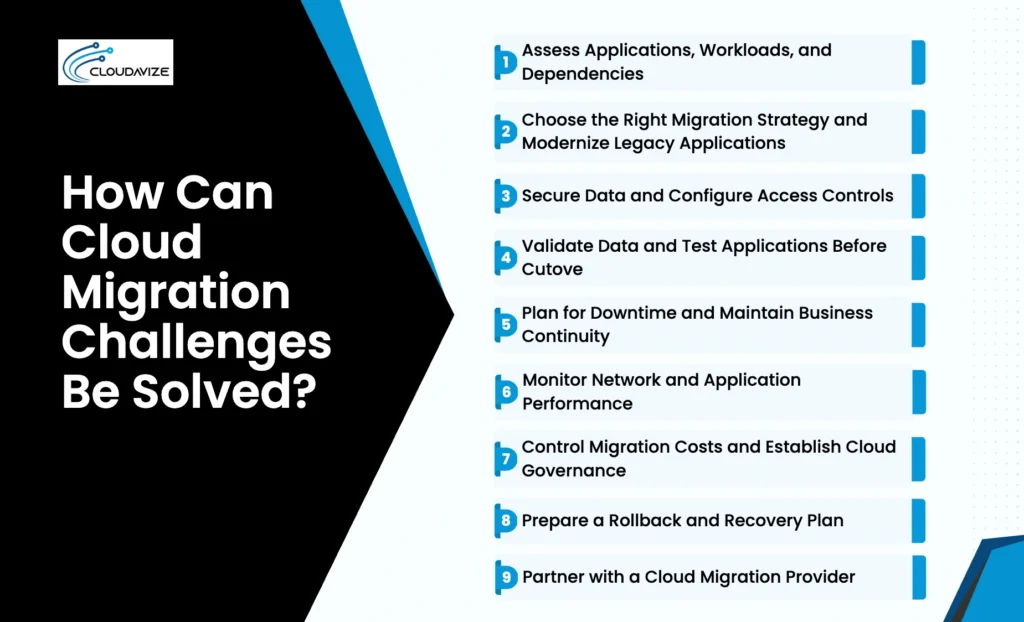
Cloud migration challenges can be solved through proper assessment, dependency mapping, migration strategy selection, security controls, testing, performance monitoring, cost governance, rollback preparation, and access to required expertise. A structured approach helps businesses reduce migration risks, protect data, maintain continuity, control costs, and improve workload readiness. These practices support successful cloud adoption by addressing technical, operational, security, and financial challenges throughout the migration lifecycle.
The key cloud migration solutions are outlined below:
- Assess Applications, Workloads, and Dependencies
Conduct a migration assessment and risk assessment for cloud migration to evaluate application readiness, workload requirements, compatibility, infrastructure, security needs, business criticality, and migration risks. Use application dependency mapping to identify relationships among applications, databases, APIs, networks, and identity systems before defining migration waves.
- Choose the Right Migration Strategy and Modernize Legacy Applications
Select a migration approach based on application compatibility, business requirements, workload complexity, architecture, cost, and modernization needs. Rehosting, replatforming, refactoring, replacing, retaining, or retiring can be appropriate depending on the workload, while incompatible legacy applications may require modernization before or during migration.
- Secure Data and Configure Access Controls
Protect migrated information with secure data transfer, encryption, authentication, identity management, controlled permissions, and least-privilege access. Align security and access controls with the workload’s data sensitivity and applicable compliance requirements to address data-security and compliance risks.
- Validate Data and Test Applications Before Cutover
Validate migrated data for completeness, accuracy, consistency, and synchronization while testing application functionality, integrations, permissions, security controls, and performance. Resolving compatibility, data-integrity, and integration problems before production cutover reduces the likelihood of migration failures.
- Plan for Downtime and Maintain Business Continuity
Define migration windows, prioritize critical workloads, communicate expected service impacts, maintain reliable backups, coordinate cutover activities, and prepare continuity measures. These steps help limit operational disruption while maintaining access to critical business functions where possible.
- Monitor Network and Application Performance
Monitor network latency, connectivity, resource utilization, application response times, and workload performance during and after migration. Continuous monitoring helps identify performance degradation, configuration problems, and resource bottlenecks that require optimization.
- Control Migration Costs and Establish Cloud Governance
Set migration budgets, review licensing and data-transfer costs, monitor cloud consumption, assign resource ownership, establish access policies, and define workload, security, and compliance standards. Ongoing cost and governance controls help organizations maintain visibility over cloud resources after migration.
- Prepare a Rollback and Recovery Plan
Define migration rollback plan triggers, backup requirements, recovery responsibilities, restoration sequences, data synchronization procedures, and validation steps before cutover. A tested recovery process provides a controlled way to recover workloads and maintain business continuity if predefined migration success criteria are not met.
- Partner with a Cloud Migration Provider
Organizations lacking internal migration expertise can work with an MSP for workload assessment, architecture planning, dependency mapping, migration execution, security configuration, testing, cutover coordination, rollback planning, and post-migration monitoring. Using cloud migration services can help organizations address capability gaps while maintaining a structured approach to migration planning, execution, testing, and recovery.