Is AI Automation Worth It for Your Business? Costs, ROI, and When It Makes Sense
Yes, AI automation is worth it for businesses when measurable benefits exceed implementation and operating costs. Unlike traditional rule-based automation, which follows predefined instructions, AI-powered automation can interpret unstructured information, classify requests, and generate responses. Automating customer support triage, invoice processing, data entry, and scheduling can reduce repetitive work, processing delays, and manual errors. High-frequency workflows with stable procedures and measurable outcomes offer stronger opportunities for positive ROI. However, recovered employee hours represent increased capacity rather than direct cash savings unless they reduce overtime, staffing expenses, or other expenditures.
AI automation may cost $50 to $5,000 monthly, with initial implementation expenses of $500 to $15,000 or more, depending on complexity and provider pricing. These are illustrative estimates, not universal industry benchmarks. Similarly, a 2-to-6-month payback period is a planning target, not a guaranteed outcome. For example, a business that invests $2,000 initially and generates $500 in monthly net savings would break even in four months. Small and mid-sized businesses should start with one measurable workflow and monitor costs, accuracy, and financial returns before expanding automation.
What Business Value Can AI Automation Deliver?
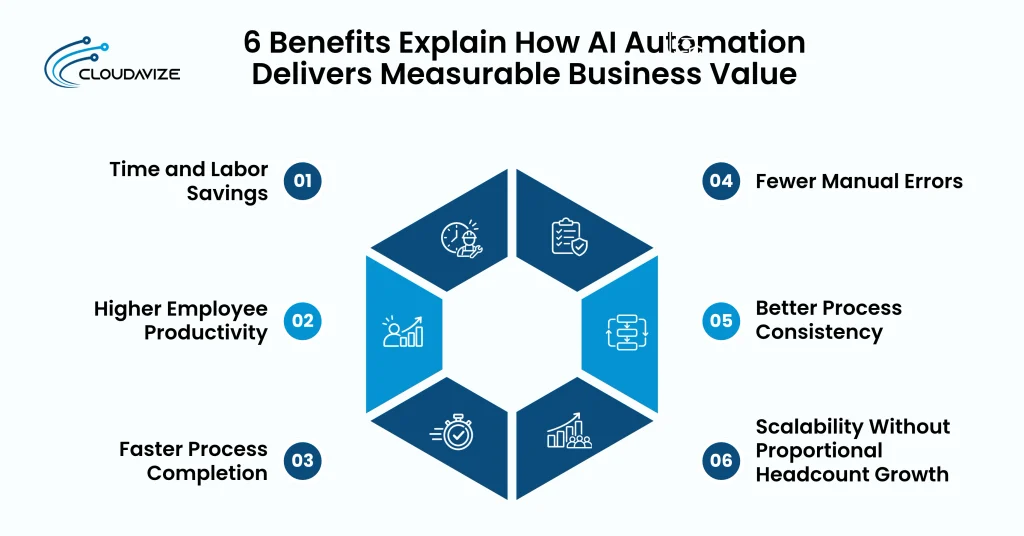
AI automation delivers business value through time and labor savings, higher employee productivity, faster process completion, fewer manual errors, better process consistency, and scalable operational capacity. It automates repetitive tasks such as data entry, email triage, invoice processing, and customer follow-ups, reducing manual effort across business processes. These operational improvements create measurable value by recovering working hours, reducing processing costs, increasing employee output, shortening response times, and expanding capacity to handle high-volume work.
The following 6 benefits explain how AI automation delivers measurable business value:
- Time and Labor Savings
AI automation can reduce the hours employees spend on repetitive tasks such as data entry, email triage, invoice processing, and customer follow-ups. An August 2026 U.S. Census Bureau report on its March 2026 survey found that 31% of recent workplace AI users reported saving one to two hours, while another 15% reported saving three to four hours. These figures reflect self-reported time savings rather than direct reductions in business expenditure.
- Higher Employee Productivity
Integrating AI automation into daily workflows helps employees complete routine tasks and focus on more complex responsibilities. Customer support provides a measured example: generative AI assistance increased issues resolved per hour by 15% on average in a 2025 study published in the Quarterly Journal of Economics. This finding shows AI assistance can increase employee output, but actual productivity gains depend on the task, employee experience, and implementation conditions. Businesses assess productivity by tracking completed requests, resolved cases, and output per employee, while accounting for task complexity and implementation quality.
- Faster Process Completion
Routine business workflows can move more quickly when AI automation handles information extraction, inquiry classification, document processing, and customer follow-ups. For example, automated invoice processing can extract document details, validate required fields, and route records for approval without repeated manual handling. Businesses should compare processing times before and after implementation to determine whether automation reduces workflow delays.
- Fewer Manual Errors
With appropriate validation rules and human review, AI automation can help identify missing information, flag discrepancies, and reduce mistakes during repetitive data processing. Improving process quality was a stated objective for 45.8% of businesses that adopted AI between 2020 and 2022, according to the U.S. Census Bureau’s 2023 Annual Business Survey. This percentage measures adoption motivation, not actual error reduction. Businesses evaluate accuracy by monitoring data-entry errors, failed validation checks, correction frequency, and time spent resolving processing mistakes.
- Better Process Consistency
AI automation applying predefined rules helps standardize recurring activities, including customer inquiry routing, record updates, and document handling. Process reliability also influenced adoption decisions. An automated customer support workflow can classify incoming requests into consistent categories, assign tickets based on routing rules, and flag exceptions for human review. However, inconsistent input data, AI-generated errors, or outdated workflow rules can still affect results.
- Scalability Without Proportional Headcount Growth
As transaction volumes increase, AI automation can expand the capacity to handle routine tasks without necessarily requiring equivalent growth in staffing. An April 2026 U.S. Census Bureau working paper reported AI adoption in at least one business function among 18% of firms during November 2025 to January 2026, while only 2% reported AI-related employment decreases. This distinction separates automation adoption from workforce reduction. Businesses evaluate scalability through processing volume per employee, staffing expenditure, automation operating costs, and human oversight requirements.
Which Business Tasks Are Worth Automating With AI?
Business tasks such as customer support triage, administrative data processing, meeting documentation, routine scheduling, and marketing content seeding are well suited to AI automation. These activities involve repetitive, high-frequency workflows with defined inputs, predictable steps, and measurable outcomes. AI automation reduces manual effort by sorting requests, processing records, documenting discussions, coordinating appointments, and preparing content drafts. Businesses evaluate the results through time savings, processing accuracy, employee productivity, and reduced workflow delays.
Below are the business tasks where AI automation delivers practical value:
- Customer Support Triage
AI automation organizes incoming customer support requests by identifying their intent, assigning priority levels, and routing tickets to the appropriate departments. For example, a billing inquiry goes directly to the accounts team, while a technical complaint reaches support staff. AI provides prepared responses for frequently asked questions, reducing the time employees spend sorting requests. Human agents handle complex complaints and sensitive issues, ensuring decisions requiring judgment receive appropriate attention.
- Administrative Data Processing
Processing invoices, updating customer records, and transferring information between business systems involve repeated manual steps. AI automation performs these activities by extracting relevant details, categorizing information, and validating entries before updating connected applications. In invoice processing, the system captures supplier details, payment amounts, and invoice numbers for verification. This reduces manual data entry and correction, leaving employees to review discrepancies and handle records that require further investigation.
- Meeting Documentation
Instead of spending time writing notes and organizing discussion points, employees use AI automation to document meetings and prepare follow-up records. The system transcribes conversations, summarizes decisions, and extracts assigned tasks with their deadlines. Following a project meeting, team members receive a structured record of responsibilities and agreed actions. Employees verify the summary for accuracy before distribution, while consent and applicable privacy requirements govern how meeting information is handled.
- Routine Scheduling
AI automation makes appointment booking more efficient by coordinating availability, calendar updates, confirmations, and reminders. Consider a customer requesting a consultation through a website. The automated workflow checks available slots, records the selected appointment, and sends confirmation details without repeated staff communication. Rescheduling follows the same defined process when suitable slots are available. Employees remain responsible for resolving unusual scheduling conflicts and decisions involving complex resource requirements.
- Marketing Content Seeding
Creating initial marketing drafts requires topic research, idea development, and preparation of content structure. AI automation supports this work by generating headline variations, article outlines, campaign summaries, and preliminary copy from approved briefs. For example, a marketing team provides campaign objectives and receives several draft concepts for refinement. This reduces preparation time while keeping content strategy, factual verification, brand messaging, and final publication approval under human control.
What Makes a Business Process Suitable for AI Automation?
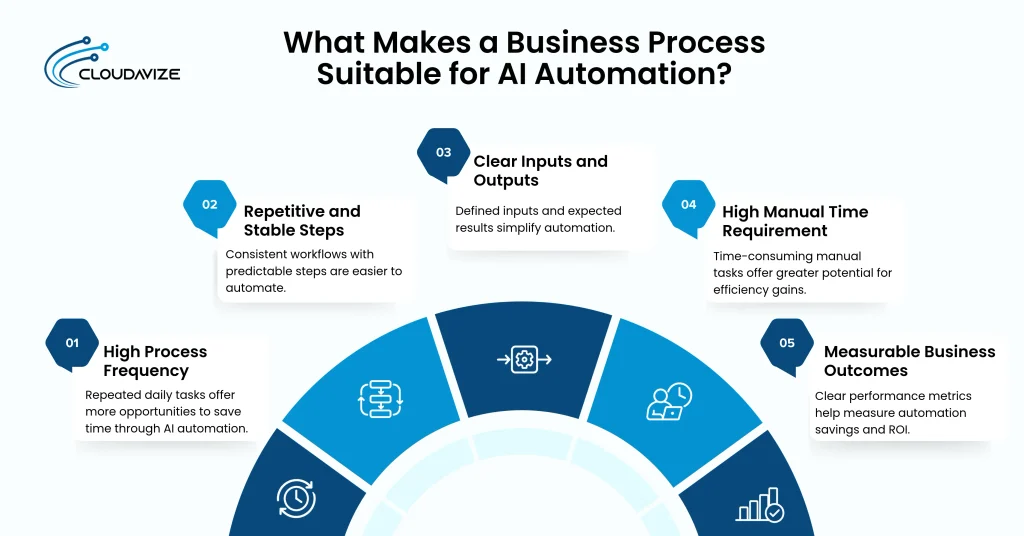
High process frequency, repetitive and stable steps, clear inputs and outputs, high manual time requirements, and measurable business outcomes make a business process suitable for AI automation. These characteristics help businesses identify workflows where automation reduces repetitive work and delivers practical operational value. Tasks such as invoice processing, email triage, and customer inquiry routing fit these criteria when they follow defined procedures. Businesses assess suitability through workload, task complexity, time savings, and expected return on investment.
5 key characteristics that help determine whether a business process is suitable for AI automation are:
- High Process Frequency
Tasks performed repeatedly throughout the day provide recurring opportunities to reduce manual effort through AI automation. For example, a customer support team handling hundreds of incoming inquiries spends time classifying requests and assigning them to the appropriate departments. Automating this process reduces repeated sorting work across every incoming request. Higher task frequency increases the total time recovered from each automated action, making transaction volume an important factor when evaluating automation costs and potential savings.
- Repetitive and Stable Steps
Consistent procedures make a business process easier to automate because the same sequence of actions applies across recurring transactions. Invoice processing illustrates this principle: AI automation extracts supplier details, checks transaction amounts, and transfers information into accounting systems according to established rules. The U.S. Census Bureau found that 45.8% of businesses adopting AI between 2020 and 2022 cited improving process or method quality and reliability as a motivation. Stable workflows support this objective, while frequent procedural changes require additional configuration and testing.
- Clear Inputs and Outputs
A business process becomes easier to automate when the required information and expected results are clearly defined. Consider an email triage workflow where incoming messages serve as inputs and categorized support tickets form the outputs. AI automation identifies the inquiry type and routes each message according to established criteria. Clear input requirements and output standards support workflow testing, validation, and error detection. Employees review exceptions when information is incomplete or results fail established requirements.
- High Manual Time Requirement
Workflows that consume substantial employee hours offer clear opportunities to save time through AI automation. Administrative data entry provides an example, as employees repeatedly collect information, update records, and transfer details between business systems. Automating these steps reduces the time spent on routine processing and releases employee capacity for other responsibilities. Businesses calculate potential savings by measuring the hours required for manual work and comparing them with the time needed for automated processing, monitoring, and correction.
- Measurable Business Outcomes
Clear performance metrics let businesses determine whether AI automation delivers enough value to justify its cost. Customer support workflows, for example, provide measurable indicators such as average response time, tickets processed per hour, and manual handling costs. Comparing these metrics before and after implementation identifies changes in operational performance. Businesses then calculate return on investment using quantified benefits and total automation expenses, including implementation, software usage, maintenance, and human review.
When Is AI Automation Not Worth It?
AI automation is not worth it when implementation and operating costs outweigh measurable business benefits or simpler rule-based solutions can handle tasks more efficiently. Low-volume activities, unstable workflows, poor data quality, and expensive system integrations can reduce potential returns. Decisions requiring significant human judgment also limit automation suitability. Businesses should evaluate process stability, data reliability, integration complexity, financial costs, and human oversight requirements before investing in AI automation.
Key situations where AI automation is not worth the investment are:
- Low-Volume or Low-Impact Processes
Infrequent tasks generate fewer opportunities to recover AI automation costs through time savings. For example, a small business processing ten routine inquiries each month spends relatively little time handling those messages manually. Developing an automated workflow introduces software fees, integration work, testing, and monitoring requirements that may exceed the value of the time saved. Businesses should compare projected annual savings with total implementation and operating expenses before automating tasks that employees already complete efficiently.
- Unstable or Poorly Defined Processes
Frequently changing procedures increase the maintenance burden of AI automation because workflows rely on established rules, consistent inputs, and defined outcomes. A business that regularly revises approval requirements, changes data formats, or modifies processing rules must update and test its automated systems accordingly. Poorly documented procedures also increase processing inconsistencies and the work required to correct them. Standardizing workflow steps, clarifying responsibilities, and defining validation requirements before implementation reduces unnecessary rework and provides a reliable foundation for automation.
- Poor Data Quality
Incomplete, inconsistent, outdated, or duplicated business data can reduce AI automation accuracy and increase correction costs. For example, automating customer records with missing contact details or inconsistent formatting may produce incorrect updates and duplicate entries. Employees must then spend additional time reviewing outputs and correcting mistakes. Businesses should improve data accuracy, standardize formats, and establish validation procedures before automating workflows that depend on unreliable information.
- Expensive System Integrations
Connecting AI automation to legacy software, incompatible applications, or systems without suitable APIs can require extensive development and maintenance. For example, integrating an AI invoice-processing tool with an outdated accounting system may require custom connectors, data transformation, and repeated testing. These additional expenses can exceed the financial value of automating a small workflow. Businesses should compare integration costs with projected savings and consider simpler automation alternatives before committing to complex implementations.
- Tasks Requiring Significant Human Judgment
Complex decisions involving sensitive information, exceptional circumstances, or serious consequences require human interpretation and accountability. AI automation should not serve as the sole decision-maker for serious customer complaints, exceptional financial approvals, or employee disciplinary decisions. Such situations involve contextual details and competing considerations that predefined rules cannot fully address. Extensive review requirements also reduce potential time savings. Businesses should retain human authority over consequential decisions while using AI to organize information, summarize records, and prepare supporting documentation.
What Can Reduce the Value of an AI Automation Investment?
Poor system integration, inaccurate AI outputs, weak monitoring or human oversight, and data privacy issues can reduce the value of an AI automation investment. These problems increase operational costs, disrupt workflows, and require additional employee intervention. Frequent errors and technical failures can also offset expected time savings. Businesses must evaluate system compatibility, output accuracy, ongoing monitoring requirements, and data-handling practices to maintain a positive ROI.
Common risks that can reduce the financial returns of an AI automation investment include:
- Poor System Integration
Connecting AI automation tools to incompatible software, outdated databases, or disconnected business systems can disrupt workflows and add manual work. Integration failures also increase implementation expenses, require frequent troubleshooting, and prevent businesses from realizing expected time and cost savings.
- Inaccurate AI Outputs
Errors in AI-generated responses, extracted data, or automated decisions can lead to incorrect records, customer dissatisfaction, and costly corrections. Businesses may need additional verification procedures and employee intervention, increasing labor costs and reducing automation’s financial benefits.
- Weak Monitoring or Human Oversight
Without regular performance checks, automated workflows may develop unnoticed errors, process incorrect information, or fail to respond to changing business requirements. Employees should review exceptions, track performance metrics, and address recurring problems before they increase operating costs.
- Security or Data Privacy Issues
Handling sensitive customer information, financial records, or confidential business data through AI systems introduces risks involving unauthorized access, data exposure, and regulatory noncompliance. Businesses may face remediation expenses, legal penalties, operational interruptions, and reputational damage that reduce automation’s financial value.
How Much Does AI Automation Cost Compared With Its Return?
AI automation costs $50 to $5,000 per month, with initial implementation expenses ranging from $500 to $15,000 or more. Total investment includes software, integration, AI usage, training, and maintenance. Businesses measure ROI through labor cost savings, fewer errors, saved employee hours, and additional revenue. AI automation pays for itself within 2 to 6 months, depending on workflow efficiency and operating costs. Starting with measurable workflows and tracking performance helps businesses improve returns and control expenses.
What Costs Are Involved in AI Automation?
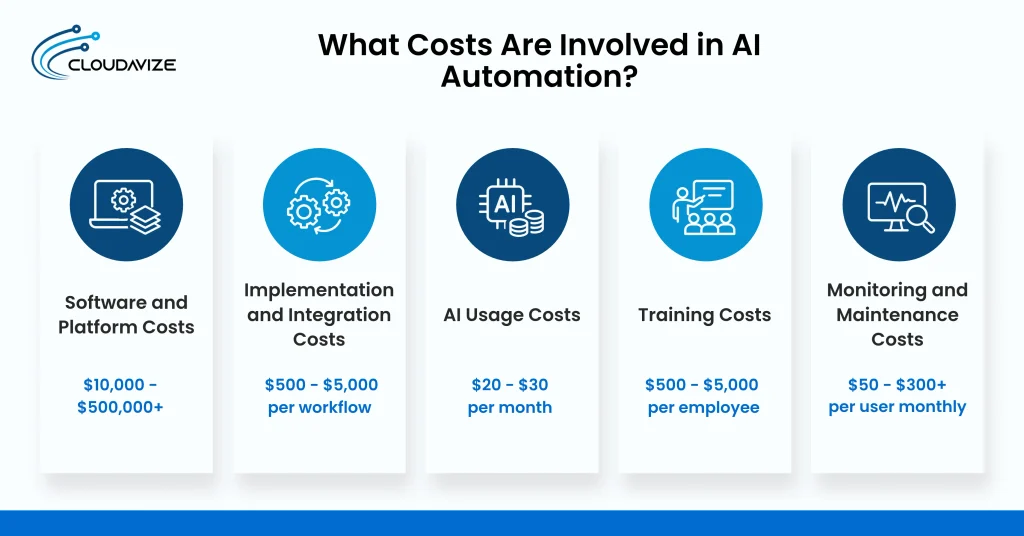
AI automation can cost $50 to $5,000 per month, with initial implementation expenses ranging from $500 to $15,000 or more, depending on workflow complexity and business requirements. Major expenses include software subscriptions, system integration, AI usage, employee training, and ongoing maintenance. Businesses should calculate both upfront and recurring costs to determine whether expected time savings and operational improvements justify the investment.
Below are the cost categories that determine the total investment required for AI automation:
- Software and Platform Costs
Custom AI automation software development costs range from $10,000 to over $500,000, depending on complexity, features, and technology stack. Subscription platforms cost $30 to $500 monthly, covering AI tools, databases, connectors, and user licenses. Usage-based pricing varies with API calls and workflow volume.
- Implementation and Integration Costs
Initial AI automation implementation costs approximately $500 to $5,000 per workflow, while complex integrations can exceed $15,000. Expenses cover workflow design, software connections, configuration, testing, and deployment. Custom development and multiple system integrations increase the initial investment.
- AI Usage Costs
AI usage costs can start at $20 to $30 per month for lightweight small-business workflows but increase with processing volume. API providers may charge per million input and output tokens, while additional tool calls and processing requirements affect expenditure.
- Training Costs
AI automation training costs range from $500 to $5,000 per employee annually, with comprehensive programs averaging $1,000 to $1,500 per employee per year, including training content, delivery, and software licenses. Free introductory resources and custom team workshops offer alternatives, with workshops costing $2,500 to $5,000.
- Monitoring and Maintenance Costs
IT monitoring and maintenance costs range from $50 to $300+ per user monthly or $50 to $200+ per device monthly for managed services. AI automation maintenance costs $300 to $2,000 monthly and covers performance monitoring, troubleshooting, software updates, integration adjustments, and error correction.
How Is AI Automation ROI Measured?
AI automation ROI is measured by comparing total automation expenses with labor costs saved, employee hours saved, reduced errors and delays, and recovered or generated revenue. Businesses should track these metrics before and after implementation to determine financial returns. ROI calculations must account for software subscriptions, integration, maintenance, and human review costs. Comparing total benefits against investment costs helps businesses assess profitability.
Here are the key metrics businesses use to measure AI automation ROI:
- Labor Cost Saved
Calculate labor cost savings by multiplying the hours of manual work eliminated by the applicable hourly labor rate. Account for remaining employee involvement, and determine whether automation reduces overtime, external service expenses, or the need for additional hires.
- Employee Hours Saved
Measure time savings by comparing how long employees spend completing tasks before and after automation. Track processing time, task frequency, and remaining manual intervention to see whether automation frees employees to handle higher-value work.
- Errors and Delays Reduced
Compare error rates, correction costs, processing delays, and missed deadlines before and after implementing AI automation. Fewer mistakes and faster processing can reduce rework expenses, improve operational consistency, and prevent avoidable disruptions that increase business costs.
- Revenue Recovered or Generated
Track additional revenue associated with faster lead follow-ups, improved customer response times, and fewer missed sales opportunities. Compare conversion rates, recovered transactions, and attributable sales before and after automation to measure its contribution to business growth.
How Can Businesses Improve AI Automation ROI?
Businesses can improve AI automation ROI by setting performance baselines, starting with one measurable workflow, tracking cost, time, and accuracy, and scaling proven automations. These practices help identify financially worthwhile processes, control implementation expenses, and measure actual improvements. Regular performance reviews also reveal inefficiencies, unexpected maintenance costs, and opportunities to increase savings. Businesses should expand automation only when measurable benefits justify additional investment.
4 practical ways businesses can improve AI automation ROI and maximize financial returns are:
- Set Performance Baselines
Record current labor costs, task completion times, error rates, and processing volumes before implementing AI automation. These baseline measurements provide a reference for evaluating improvements, calculating actual savings, and determining whether automation delivers sufficient financial value over time.
- Start With One Measurable Workflow
Select a repetitive, high-frequency task with clear inputs, predictable outputs, and measurable costs. Test automation on a limited scale before expanding implementation. This approach controls initial expenses, identifies technical problems, and provides evidence of potential financial returns.
- Track Cost, Time, and Accuracy
Monitor software expenses, employee hours saved, processing speed, error rates, and human review requirements after deployment. Compare results against established baselines to spot unexpected costs, evaluate workflow performance, and determine whether automation continues to deliver positive financial returns.
- Scale Proven Automations
Expand workflows that consistently demonstrate measurable cost savings, reliable performance, and positive ROI. Prioritize similar processes where existing automation components can be reused. Evaluate additional integration costs, maintenance requirements, and employee involvement before expanding automation across departments.
How Long Does AI Automation Take to Pay for Itself?
AI automation takes 2 to 6 months (60 to 180 days) to recover its initial investment, although high-impact workflows may reach break-even sooner. The payback period depends on implementation expenses, task frequency, labor cost savings, and ongoing maintenance. Businesses can estimate the payback period by dividing initial implementation costs by monthly net savings after recurring expenses. Actual returns vary with workflow performance and automation efficiency.
Is AI Automation Worth It for Small and Mid-Sized Businesses?
Yes, AI automation is worth it for small and mid-sized businesses when repetitive tasks consume significant employee time and automation costs remain below expected financial benefits. Automating customer inquiries, data entry, scheduling, and administrative workflows reduces manual workload, speeds processing, and supports growth without proportional hiring. Businesses get better returns by choosing stable, high-frequency processes, measuring savings, and deciding between DIY automation and managed providers based on technical capabilities and workflow complexity.
Should Small and Mid-Sized Businesses Use DIY AI Automation or Hire a Provider?
Small and mid-sized businesses should use DIY AI automation for simple workflows when they have in-house technical expertise, and hire professional AI automation providers for complex workflows that require specialized skills and ongoing support. DIY automation reduces external service costs and gives businesses direct control over implementation. Professional providers handle system integrations, technical challenges, security requirements, and maintenance. Businesses should compare both options based on costs, internal resources, and expected ROI.
When Does DIY AI Automation Make Sense?
DIY AI automation makes sense when businesses have straightforward processes, capable employees, and minimal technical dependencies. Internal teams handle configuration, testing, and maintenance without substantial external support. This approach reduces provider fees and gives businesses direct control over automation workflows, as long as implementation effort and ongoing maintenance stay manageable within existing resources and budgets.
- Simple or Single-Workflow Automation: DIY automation suits predictable tasks such as appointment scheduling, form processing, or automated email notifications.
- In-House Technical Capability: Employees with automation experience handle workflow configuration, troubleshooting, and performance monitoring.
- Limited Integration Requirements: Workflows that connect only a few compatible applications require less development and testing.
- Low Ongoing Maintenance Needs: Stable processes with infrequent changes reduce troubleshooting demands and recurring support expenses.
When Does a Managed AI Automation Provider Make Sense?
A managed AI automation provider makes sense when businesses need technical expertise, complex system connections, or ongoing operational support. Providers handle workflow design, implementation, testing, monitoring, and maintenance. This approach reduces pressure on internal teams and supports reliable automation, although businesses must compare provider fees against expected savings and long-term financial returns.
- Multiple Systems Need Integration: Providers connect CRM platforms, accounting software, databases, and other business applications into coordinated workflows.
- Internal AI Expertise Is Limited: External specialists manage technical implementation when employees lack the necessary automation skills.
- Complex Workflows Need Automation: Providers design workflows involving multiple decisions, conditional steps, and extensive data processing.
- Security, Governance, or Ongoing Support Is Required: Managed services support access controls, compliance requirements, performance monitoring, and regular system maintenance.
How Can an AI Automation Service Help Implement the Right Automation Strategy?
An AI automation service helps businesses implement the right automation strategy by assessing existing workflows, identifying high-value opportunities, and prioritizing processes with measurable returns. Providers map system integrations, define implementation requirements, and establish performance baselines before deployment. Through AI automation consulting services, businesses receive guidance on workflow design, system configuration, and integration planning. Providers then implement and test automated workflows, monitor performance, resolve technical issues, and provide ongoing support to maintain efficiency and improve long-term ROI.