10 IT Cost Optimization Strategies
The ten IT cost optimization strategies include optimizing software and SaaS costs, rationalizing applications, consolidating IT infrastructure, improving resource utilization, and automating IT operations. They also include managing vendor contracts, standardizing procurement, optimizing cloud costs, managing data storage, and strengthening IT cost governance. These strategies help businesses eliminate unnecessary technology spending while maintaining system performance and service reliability. IT cost optimization addresses both capital expenditures (CAPEX), such as hardware purchases, and operating expenditures (OPEX), such as software subscriptions, cloud services, and maintenance costs.
Businesses should choose IT cost optimization strategies based on their biggest cost drivers, resource utilization, and total cost of ownership (TCO), including acquisition, licensing, support, and maintenance. Small businesses may prioritize SaaS license reviews and vendor contracts, while larger organizations may focus on infrastructure consolidation and automation. Comparing implementation difficulty, expected financial impact, and suitability for different business sizes helps IT teams prioritize cost-saving initiatives and allocate technology budgets effectively.
The 10 IT cost optimization strategies are:
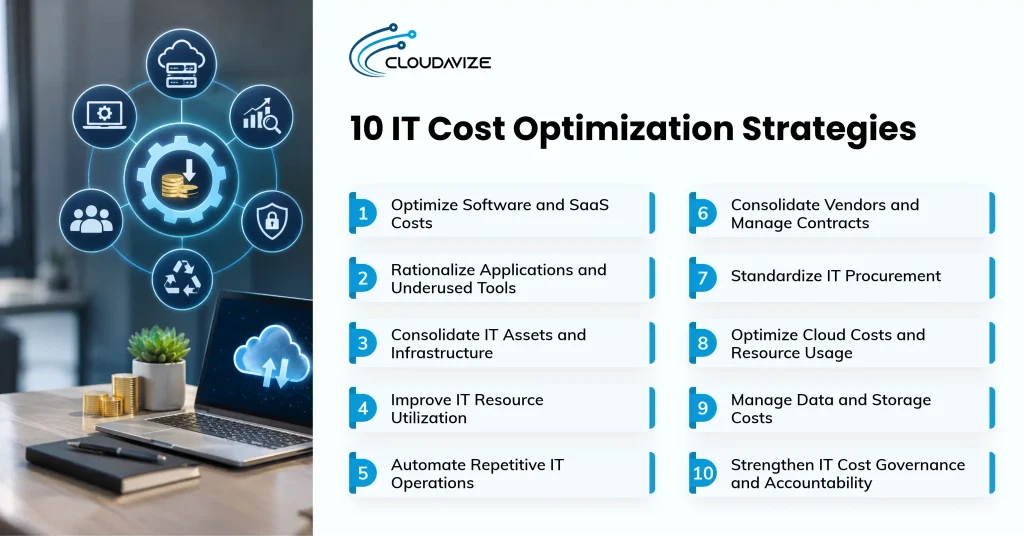
- Optimize Software and SaaS Costs
Unused software licenses, inactive SaaS accounts, and duplicate subscriptions increase recurring IT expenses. Small businesses can use Software Asset Management (SAM) and SaaS Management Platforms (SMPs) to track software usage, identify overlapping tools, and evaluate subscription tiers. These systems support license reclamation by identifying inactive accounts and reallocating unused seats to employees who need access.
Regular software audits and renewal management help businesses adjust subscriptions before contractual deadlines. For example, a company paying $30 monthly for 50 SaaS licenses spends $18,000 annually. If only 35 licenses are required, canceling 15 eligible seats saves $5,400 annually. However, inactive users do not automatically represent cancellable licenses. Annual contracts may require businesses to keep purchased seats until renewal or may prohibit mid-term reductions. IT teams should review cancellation terms, minimum commitments, and renewal dates before calculating achievable savings.
- Rationalize Applications and Underused Tools
Multiple applications with overlapping functionality increase licensing expenses, maintenance requirements, and administrative workload. Businesses should maintain an application inventory recording software ownership, usage frequency, operating costs, and business purpose. This assessment helps identify legacy systems, low-usage tools, and shadow IT applications purchased outside approved procurement processes. IT teams can then identify opportunities to consolidate overlapping software and reduce unnecessary maintenance requirements.
Application rationalization involves deciding whether to retain, consolidate, replace, or retire each tool based on functionality and operational requirements. For example, small businesses using separate applications for similar project management tasks can evaluate whether one platform meets their needs. Retiring redundant software reduces subscription expenses and support requirements. Before removing applications, IT teams should assess data dependencies, migration costs, integration requirements, and user access to prevent disruptions to business operations.
- Consolidate IT Assets and Infrastructure
Redundant servers, obsolete endpoints, and underutilized networking equipment increase technology ownership and maintenance expenses. Assessing physical servers, virtual machines, workstations, and networking assets helps identify equipment that no longer supports operational requirements. Hardware utilization reports, maintenance contracts, and replacement schedules can indicate which resources are suitable for consolidation or retirement.
Infrastructure consolidation reduces unnecessary equipment while maintaining required computing capacity. Virtualization, for instance, lets compatible workloads run on fewer physical servers, potentially lowering maintenance and energy costs. A 2025 GAO report found that 11 critical legacy IT systems across federal agencies collectively cost approximately $754 million annually to operate and maintain. Small businesses can review obsolete devices before purchasing replacements, using capacity planning and performance testing to guide consolidation decisions and maintain system reliability.
- Improve IT Resource Utilization
Overprovisioned computing resources, unused storage capacity, and underutilized computing resources increase IT expenses when allocated capacity exceeds actual workload demand. Businesses should monitor CPU utilization, memory consumption, storage usage, and peak workload requirements to identify overprovisioned resources. Capacity planning and forecasting help IT teams allocate computing power based on historical usage patterns, anticipated demand, and established performance thresholds, rather than buying unnecessary additional capacity.
For example, a server consistently using 20% CPU and 35% memory may have excess resources to reallocate. However, IT teams must examine peak utilization, response times, and workload fluctuations before rightsizing. Small businesses can use utilization reports to redistribute available capacity and delay unnecessary purchases. Continuous performance monitoring helps maintain operational efficiency while ensuring sufficient resources remain available during periods of increased demand.
- Automate Repetitive IT Operations
Manual IT tasks such as software provisioning, patch management, system monitoring, reporting, and user access administration consume recurring support time. Automating standardized, rule-based activities reduces repetitive work and improves operational consistency. For small businesses with limited IT resources, automated monitoring alerts, scheduled updates, and standardized account provisioning can reduce the need for repeated manual intervention.
By automating routine processes, IT personnel can spend more time on tasks that require technical judgment. The U.S. Census Bureau’s 2023 Annual Business Survey found that 51.8% of businesses adopting cloud-based technology and 49.8% adopting specialized software cited improving process quality or reliability as a reason for adoption. Businesses evaluating IT automation services in Dallas can identify suitable workflows while considering implementation costs, access controls, and ongoing maintenance.
- Consolidate Vendors and Manage Contracts
Overlapping technology providers and underused service agreements increase recurring IT expenses. Effective vendor management involves reviewing contract utilization, service-level agreements (SLAs), pricing structures, and renewal windows. Businesses should identify duplicate services, negotiate volume discounts, and compare vendor pricing against actual operational requirements. Centralized contract records help IT teams track renewal dates and avoid unnecessary commitments.
Contract renegotiation can reduce expenses by adjusting service levels, consolidating agreements, and improving pricing. However, businesses must evaluate termination fees, migration costs, and vendor lock-in before changing providers. Small businesses may benefit from consolidating overlapping IT support contracts, while retaining multiple vendors can be preferable when specialized expertise, service continuity, or reduced dependency outweigh potential savings. Regular vendor reviews help balance cost efficiency, contractual flexibility, and service reliability.
- Standardize IT Procurement
Uncoordinated technology purchases can create duplicate software subscriptions, inconsistent hardware configurations, and unnecessary vendor expenses. Standardized procurement procedures establish approved technology categories, purchasing authority, vendor selection criteria, and spending limits. These controls give IT and finance teams a consistent process for evaluating proposed purchases against existing operational requirements and available technology resources.
Technology purchasing decisions should account for total lifecycle costs, including acquisition, licensing, maintenance, support, and replacement expenses. For example, an approved list of laptops and software applications can help small businesses reduce fragmented purchasing and simplify technical support. Requiring IT approval before purchasing new subscriptions also helps identify existing tools with similar functionality. Periodic procurement reviews, documented purchasing decisions, and consistent vendor evaluation criteria strengthen spending accountability while reducing unnecessary technology commitments.
- Optimize Cloud Costs and Resource Usage
Idle cloud instances, oversized computing resources, and unnecessary storage allocations can generate recurring charges that exceed actual workload requirements. Regular cloud utilization reviews help identify resources you can resize, suspend, or remove. Autoscaling, provisioning controls, and cost alerts further support managing variable cloud expenses as demand changes.
Cloud cost optimization also involves evaluating workload placement, storage tiers, and reserved capacity commitments when usage is predictable. A 2024 U.S. Department of Energy report found that American data centers consumed approximately 176 terawatt-hours of electricity in 2023, representing 4.4% of total U.S. electricity consumption. Small businesses using cloud services in Dallas can assess resource allocation and recurring expenditure. Continuous monitoring helps maintain workload performance while reducing unnecessary cloud spending.
- Manage Data and Storage Costs
Growing data volumes, duplicate files, and outdated retention practices increase storage needs and recurring infrastructure costs. Reviewing stored information helps identify obsolete records, unnecessary duplicates, and data that can be archived. Retention periods should reflect operational, legal, and recovery requirements, not storage capacity alone. Regular assessments can also reveal opportunities to reduce unused storage allocations.
Storage optimization techniques include compression, deduplication, archival policies, and assigning information to appropriate storage tiers. For instance, infrequently accessed business records can move to lower-cost archival storage when retrieval requirements permit. Capacity monitoring also flags unusual data growth before the organization buys additional infrastructure. Before deleting or relocating information, IT teams need to verify backup integrity, recoverability, access permissions, and retention obligations. These checks help prevent data loss or operational disruption during storage changes.
- Strengthen IT Cost Governance and Accountability
Unassigned spending responsibilities and inconsistent purchasing controls increase recurring IT expenses. Technology Business Management (TBM) helps businesses categorize technology costs, while FinOps establishes shared accountability for cloud spending. Cost allocation assigns expenses to departments through showback reporting or chargeback billing. IT managers monitor resource utilization, finance teams track budget variances, and procurement personnel manage vendor contracts and purchasing approvals.
Effective IT cost governance requires clear budget ownership, spending limits, and regular financial reviews. A 2025 U.S. Government Accountability Office (GAO) review identified 463 unimplemented recommendations out of more than 1,800 recommendations concerning federal IT acquisition and management since 2010. Small businesses can assign monthly SaaS spending reviews to designated employees, while larger organizations can allocate technology expenses across departments. Documented approvals and continuous monitoring help prevent unnecessary recurring costs.
How to Build an IT Cost Optimization Framework
Build an IT cost optimization framework by assigning decision roles, defining measurable objectives, categorizing IT spending, and establishing cost and utilization baselines. Next, identify optimization opportunities, prioritize them by savings, effort, risk, and performance, establish spending controls, and define measurement criteria. Dallas businesses seeking structured technology planning can use professional IT consulting services to review expenditure and set priorities. Use this framework to guide cost decisions before implementation and track financial and operational outcomes.
Here are the 8 fundamental steps to construct an effective IT cost optimization framework:
- Set framework ownership and decision roles
Assign responsibility for IT cost optimization to designated stakeholders across IT, finance, procurement, and business operations. Clarify who collects spending data, evaluates proposed changes, approves expenditures, and tracks results. IT managers should assess technical requirements, while finance teams review budgets and projected savings. Procurement personnel can manage vendor contracts and purchasing decisions. Document responsibilities, establish reporting procedures, and schedule regular reviews to maintain accountability and prevent duplicated work or overlooked expenditure.
- Define IT cost objectives
Establish measurable financial and operational objectives before selecting optimization initiatives. Focus on reducing recurring expenses, improving license utilization, controlling infrastructure costs, or lowering technology spending per employee. Set specific targets, reporting periods, and acceptable performance levels. For example, aim to reduce unused software subscriptions by 15% within six months without affecting required application access. Align objectives with business priorities and review them periodically as technology needs and workloads change.
- Identify and categorize IT spending
Create an inventory of technology expenses across software licenses, cloud services, infrastructure, hardware, vendor contracts, maintenance, and IT support. Collect invoices, subscription records, and procurement reports to identify recurring and one-time costs. Group expenditure by category, department, vendor, and cost center to understand budget allocation. Separate fixed contractual commitments from usage-based charges. Use centralized spending reports to identify major cost drivers, duplicate purchases, and categories requiring further financial review.
- Establish cost and resource utilization baselines
Record current technology expenditure and resource usage before implementing optimization measures. Collect monthly spending, software license activity, server utilization, cloud consumption, and infrastructure maintenance costs over consistent periods. Compare purchased capacity with actual demand to establish utilization rates. Document service availability and system performance alongside financial data. Use these baselines to measure future savings, evaluate resource efficiency, and determine whether changes affect required operational performance or service reliability.
- Identify cost optimization opportunities
Examine spending reports, asset inventories, and utilization data to identify unnecessary expenses and inefficient resource allocations. Look for inactive software licenses, duplicate applications, idle cloud instances, oversized servers, overlapping vendor agreements, and unused equipment. Compare recurring service charges with actual usage and review manual processes suitable for automation. Estimate potential savings, document affected systems, and assess operational dependencies. Develop a list of practical initiatives for further evaluation and prioritization.
- Prioritize opportunities by savings, effort, risk, and performance
Rank optimization opportunities according to expected savings, implementation effort, operational risk, dependencies, and performance requirements. Compare each initiative’s financial value with the resources needed for implementation. Prioritize straightforward changes, such as removing unused subscriptions, when they offer measurable savings with limited disruption. Assess complex projects, including infrastructure consolidation, for migration costs and technical dependencies. Use a prioritization matrix to select initiatives that balance financial improvements with operational requirements.
- Define cost controls and approval requirements
Introduce spending limits, purchasing approval procedures, and budget ownership rules across technology categories. Require designated managers to authorize software subscriptions, cloud resources, hardware purchases, and vendor contracts before committing funds. Establish renewal schedules and document purchasing decisions to maintain expenditure visibility. Use centralized procurement records and spending alerts to identify unexpected charges. Assign responsibility for reviewing compliance with approved budgets and update controls as operational requirements and technology costs change.
- Set cost and performance measurement criteria
Select financial and operational metrics to evaluate optimization results. Track total IT expenditure, cost per user, software license utilization, infrastructure capacity, cloud spending, and recurring vendor expenses. Compare results with established baselines using consistent reporting periods. Include system availability, response times, workload capacity, and support performance to assess operational effects. Assign metric owners, schedule regular reporting, and investigate differences between projected savings and actual results before adjusting optimization measures.
How to Implement IT Cost Optimization Strategies
Implement IT cost optimization strategies by assessing current spending and resource usage, prioritizing initiatives, and testing selected changes before wider deployment. Next, execute approved measures, measure cost and performance results, and repeat the review cycle. Assign responsible teams, document implementation activities, and monitor financial outcomes throughout the process. Follow this structured approach to reduce unnecessary technology expenditure, address operational dependencies, and maintain required service performance as business technology needs evolve.
Follow these 6 key steps to execute your IT cost optimization strategy effectively:
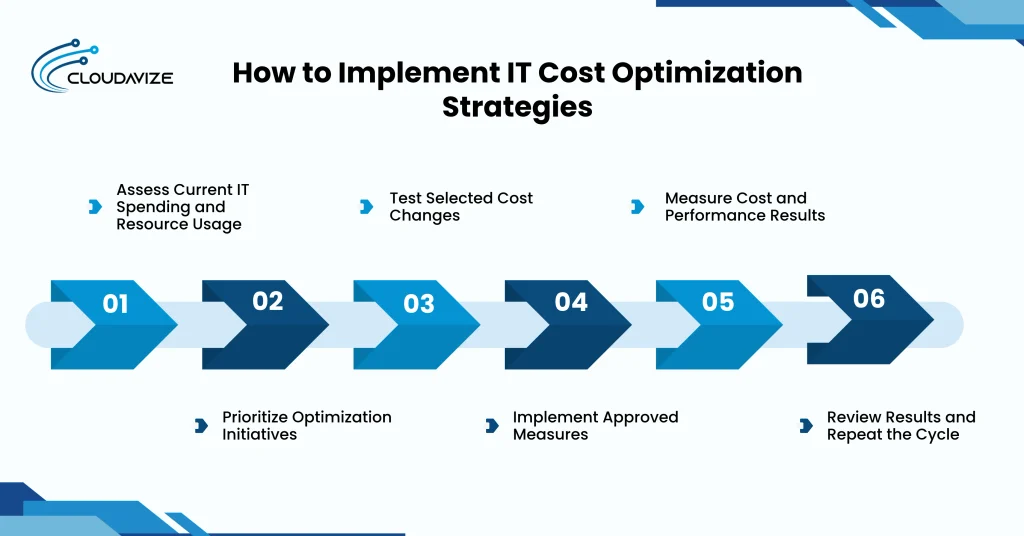
- Assess Current IT Spending and Resource Usage
Examine technology expenditure and resource utilization across software, cloud services, infrastructure, hardware, and vendor contracts. Collect invoices, licensing records, usage reports, and maintenance expenses to establish monthly spending baselines. Categorize costs by department, application, or business service to identify major expenditure areas. Compare purchased capacity with actual demand to identify idle resources, underutilized assets, and unnecessary expenses before selecting optimization initiatives.
- Prioritize Optimization Initiatives
Evaluate potential optimization measures based on expected savings, implementation costs, operational risks, dependencies, and business priorities. Compare projected net savings, return on investment, and payback periods to determine which initiatives warrant attention. Address straightforward changes, such as removing inactive licenses, before complex infrastructure modifications when appropriate. Develop an implementation schedule with assigned responsibilities, expected outcomes, and performance requirements to guide project selection and resource allocation.
- Test Selected Cost Changes
Validate proposed optimization measures through limited trials before applying changes across the technology environment. Define pilot duration, measurable success criteria, rollback procedures, and approval requirements before testing. For example, evaluate reduced virtual machine capacity against actual workload demand. Monitor expenditure, response times, availability, and resource utilization throughout the trial. Compare results with projected savings and required performance levels before authorizing wider implementation across affected systems.
- Implement Approved Measures
Assign implementation owners, confirm approval responsibilities, and schedule approved optimization initiatives according to operational priorities. Coordinate technical dependencies, communicate changes to affected departments, and prepare rollback procedures. Execute license adjustments, infrastructure consolidation, cloud rightsizing, or vendor contract updates through phased deployment where appropriate. Document configurations, expenditure changes, and implementation progress. Validate system performance after each stage and resolve unexpected issues to limit business disruption during implementation.
- Measure Cost and Performance Results
Compare post-implementation technology expenditure, resource utilization, and system performance against established baselines. Track monthly IT spending, license usage, cloud consumption, budget variance, and cost per user or workload. Calculate net realized savings after implementation costs and compare results with financial projections. Review service availability, response times, and support performance alongside expenditure changes. Document findings to determine whether initiatives meet agreed financial and operational objectives.
- Review Results and Repeat the Cycle
Reassess completed optimization initiatives through monthly spending reviews and quarterly evaluations of financial and operational performance. Assign stakeholders to examine resource utilization, vendor pricing, contract renewals, and changing software requirements. Investigate unexpected expenses or declining performance and adjust allocations where necessary. Incorporate previous findings into updated budgets and optimization priorities. Repeat assessments as workloads and business requirements evolve to maintain continuous technology cost control.
What Are the Benefits of IT Cost Optimization?
The benefits of IT cost optimization include reducing unnecessary IT spending, improving resource utilization, eliminating software, infrastructure, and vendor waste, increasing IT cost visibility, making technology spending more predictable, and reducing recurring IT expenses. These benefits help businesses control technology costs by aligning purchased resources and services with actual operational requirements. Small businesses can use IT cost optimization strategies to identify unused capacity, manage technology budgets, and maintain required system performance without paying for unnecessary resources.
Below are the 6 benefits of IT cost optimization:
- Reduce unnecessary IT spending
Businesses can eliminate unnecessary IT spending by identifying inactive software licenses, idle cloud instances, duplicate subscriptions, and oversized infrastructure. Regular spending reviews reveal technology resources that generate costs without supporting operational needs. Small businesses can cancel unused services, adjust subscription plans, and retire obsolete assets to cut costs while keeping the technology capacity needed for daily operations and service reliability.
- Improve resource utilization
Existing technology investments deliver greater cost efficiency when computing capacity, storage, hardware, and software licenses match actual usage. IT teams can monitor utilization rates, reallocate unused licenses, and right-size overprovisioned resources. For example, adjusting virtual machine capacity according to workload requirements can reduce infrastructure expenses while preserving the processing power, storage availability, and system performance needed for business operations.
- Reduce software, infrastructure, and vendor waste
Overlapping applications, obsolete servers, unused software subscriptions, and duplicated vendor services create avoidable technology expenses. Application inventories and infrastructure assessments help businesses identify resources that no longer justify their costs. Consolidating compatible tools, retiring unnecessary equipment, and reviewing vendor agreements can eliminate recurring waste while maintaining required functionality, technical support, and service availability across the IT environment.
- Improve IT cost visibility
Transparent spending reports help businesses identify where technology budgets are allocated and which resources generate the highest expenses. IT cost monitoring connects software subscriptions, cloud consumption, infrastructure maintenance, and vendor payments with departments or services. Centralized dashboards and regular financial reviews let IT and finance teams spot unusual spending patterns, compare costs, and find optimization opportunities.
- Make technology spending more predictable
Consistent budgeting, contract reviews, and resource forecasting help businesses anticipate upcoming technology expenses. IT teams can track software renewal dates, monitor cloud consumption, and plan hardware replacements before costs increase unexpectedly. Small businesses benefit from documented spending limits and capacity forecasts that support budget allocation, reduce unexpected purchases, and maintain greater control over recurring technology commitments.
- Reduce recurring IT expenses
Ongoing savings result from reclaiming unused licenses, rightsizing cloud resources, consolidating vendor contracts, and automating repetitive IT operations. Businesses can review monthly technology expenses to identify services that no longer match operational demand. Regular cost monitoring, procurement controls, and contract assessments help prevent unnecessary charges while maintaining system reliability and the technical support required.
Which IT Cost Optimization Strategies Work Best for Different Business Types?
Small businesses benefit most from SaaS license optimization and vendor cost reviews, while mid-sized businesses benefit from infrastructure optimization and automation. Enterprises should prioritize application rationalization and IT cost governance, cloud-heavy businesses should focus on cloud rightsizing and usage monitoring, and infrastructure-heavy businesses should emphasize server consolidation and hardware lifecycle management. Each approach targets the primary technology expenses tied to the business’s size, resource needs, and IT environment while maintaining performance.
The key IT cost optimization priorities for each business type are:
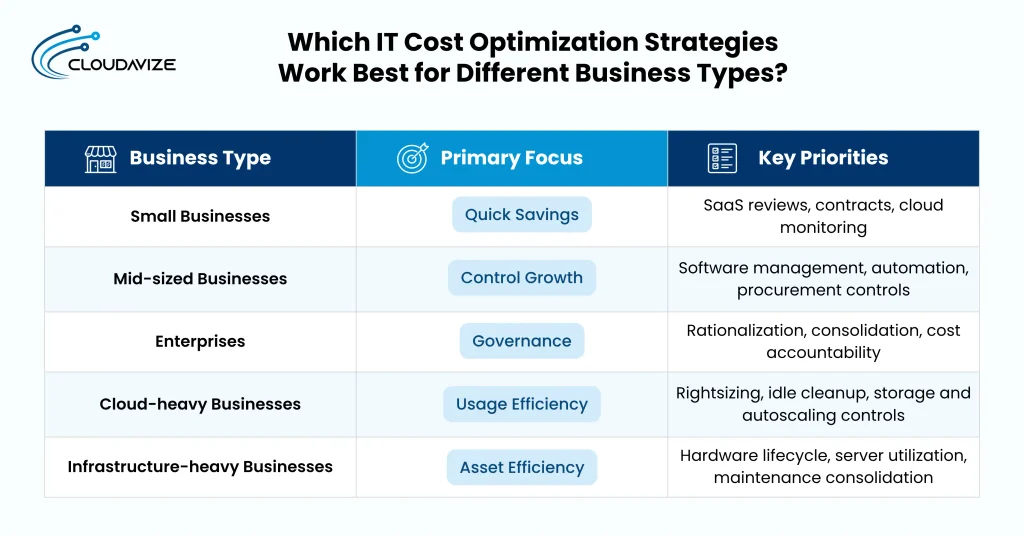
- Small businesses
Limited IT budgets make SaaS subscription reviews, vendor contract management, and cloud usage monitoring important priorities. Small businesses can cut unnecessary spending by removing unused licenses, reviewing outsourced IT services, and avoiding complex technology solutions that exceed operational needs.
- Mid-sized businesses
As technology environments grow, they need stronger software portfolio management, infrastructure utilization monitoring, and cloud cost controls. Mid-sized businesses can consolidate vendors, automate repetitive IT tasks, and establish procurement policies to manage increasing technology expenses while supporting operational growth and system reliability.
- Enterprises
Large organizations benefit from application rationalization, infrastructure consolidation, and centralized IT cost governance. Enterprises can review extensive software portfolios, negotiate vendor contracts, automate standardized operations, and allocate technology expenses across departments to identify redundant spending and improve financial accountability.
- Cloud-heavy businesses
Organizations that rely heavily on cloud infrastructure should prioritize rightsizing resources, removing idle instances, and continuously monitoring usage. Cloud cost optimization also requires reviewing storage consumption, reserved capacity commitments, autoscaling configurations, and provisioning controls to align spending with actual workload demand.
- Infrastructure-heavy businesses
Companies operating extensive physical infrastructure should evaluate hardware lifecycle costs, server utilization, and maintenance agreements. Virtualization, data center consolidation, and workload placement assessments can reduce unnecessary equipment expenses while preserving computing capacity, infrastructure reliability, and required system performance across business operations.
How Does IT Cost Optimization Differ From IT Cost Reduction?
IT cost optimization focuses on controlling technology spending and improving resource efficiency over time, while IT cost reduction primarily focuses on lowering expenses. Cost optimization evaluates software usage, infrastructure capacity, vendor contracts, and operational requirements to eliminate waste without compromising performance. In contrast, IT cost reduction may involve immediate budget cuts, service cancellations, or reduced technology investments to achieve short-term savings.
The key structural differences between long-term cost optimization and immediate cost reduction are:
| Dimension | IT Cost Optimization | IT Cost Reduction |
| Purpose | Improve spending efficiency and eliminate unnecessary IT costs. | Lower overall technology expenses. |
| Time horizon | Focuses on sustainable, long-term cost efficiency. | Often targets immediate or short-term savings. |
| Decision basis | Uses resource utilization, business requirements, and cost analysis. | Prioritizes budget targets and expense reductions. |
| Frequency | Requires continuous monitoring and periodic adjustments. | May involve one-time or periodic cost-cutting initiatives. |
| Resource approach | Rightsizes, reallocates, consolidates, or removes underused resources. | Reduces purchases, services, staffing costs, or allocated budgets. |
| Performance considerations | Maintains required system performance and service reliability. | May affect performance if reductions remove necessary resources. |
| Expected cost outcome | Sustainable savings through efficient resource allocation and spending controls. | Lower expenses, with long-term effects depending on the measures implemented. |
How Should Businesses Measure IT Cost Optimization Results?
Businesses should measure IT cost optimization results using total cost of ownership, license and asset utilization rates, unmanaged IT spend percentage, cost per user or workload, IT spend as a percentage of revenue, post-optimization unit costs, and system performance. Comparing these metrics across consistent monthly or quarterly periods helps identify actual savings, track spending against established cost ranges, and confirm that lower technology expenses do not compromise service reliability.
The following 7 metrics help businesses measure IT cost optimization results:
- Total cost of ownership
Calculate total cost of ownership (TCO) by combining acquisition, licensing, implementation, infrastructure, maintenance, and support expenses over a defined period. Include ongoing operating costs and anticipated replacement expenses to establish the full financial commitment. For example, a $20,000 system requiring $5,000 annually for maintenance and support has a five-year TCO of $45,000. Compare these costs across technology alternatives to evaluate long-term financial implications.
- License and asset utilization rate
Determine license and asset utilization rates by dividing actively used resources by total purchased or provisioned capacity and multiplying by 100. Apply this calculation to software licenses, hardware, cloud instances, and other technology assets. Consider a business purchasing 100 software licenses when only 75 remain active. Its utilization rate is 75%, indicating 25 potentially unused licenses. Review usage patterns before adjusting subscriptions or reallocating resources.
- Unmanaged IT spend percentage
Calculate unmanaged IT spend percentage by dividing expenditure outside approved purchasing processes by total IT spending and multiplying by 100. Include unauthorized subscriptions, unapproved vendor agreements, and purchases made outside procurement procedures. If unmanaged technology purchases total $15,000 of a $150,000 annual IT budget, the unmanaged spending rate is 10%. Monitor changes in this percentage to evaluate purchasing controls and identify unauthorized expenditure.
- Cost per user, workload, service, or transaction
Measure unit-level IT costs by dividing relevant technology expenditure by the number of users, workloads, services, or transactions supported during the same period. A company spending $10,000 monthly on technology for 100 employees incurs $100 per user. Alternatively, transaction-based businesses can measure infrastructure expenditure against completed transactions. Compare unit costs across reporting periods to identify efficiency changes independent of total spending fluctuations.
- IT spend as a percentage of revenue
Calculate IT spending as a percentage of revenue by dividing total technology expenditure by business revenue and multiplying by 100. An organization generating $5 million annually while spending $250,000 on IT allocates 5% of revenue to technology. Evaluate this ratio alongside business growth, operational requirements, and previous reporting periods. External comparisons should account for industry differences, company size, and accounting methods before drawing conclusions.
- Post-optimization unit cost
Compare unit costs before and after optimization by dividing technology expenditure by the same operating unit across equivalent reporting periods. Suppose monthly IT spending falls from $12,000 to $10,000 while the organization continues supporting 100 users. Cost per user decreases from $120 to $100, representing a 16.7% reduction. Include implementation expenses and performance changes when determining whether the adjustment delivers meaningful financial improvements.
- System and service performance
Evaluate system and service performance by comparing availability, response times, workload capacity, reliability, and support quality before and after optimization. Track uptime percentages, incident resolution times, and application response speeds alongside financial results. For example, maintaining 99.9% system availability after infrastructure consolidation indicates the previous availability target is still met. Investigate declining performance or increased support demands before treating expenditure reductions as successful optimization.
How Can Businesses Identify Unnecessary IT Spending?
Businesses can identify unnecessary IT spending by reviewing software licenses, cloud usage, infrastructure utilization, vendor contracts, and procurement records. Compare purchased resources with actual demand to detect inactive licenses, duplicate applications, idle cloud instances, oversized capacity, and unused equipment. Examine overlapping vendor services, unauthorized technology purchases, and recurring subscriptions with limited usage. Use centralized spending reports and asset inventories to spot cost discrepancies, assess operational needs, and prioritize opportunities to reduce waste without impacting essential IT services.
How Can AI Support IT Cost Optimization?
AI supports IT cost optimization by analyzing spending patterns, detecting cost anomalies, forecasting resource demand, and identifying underutilized technology assets. Machine learning models can examine cloud consumption, software usage, and historical spending to spot waste and recommend resource adjustments. AI can also assist with repetitive IT operations, including monitoring, reporting, and resource allocation. Validate recommendations against actual workload requirements, review data accuracy, assess integration compatibility, and compare implementation costs with projected savings before making changes.