
What is IT Support?
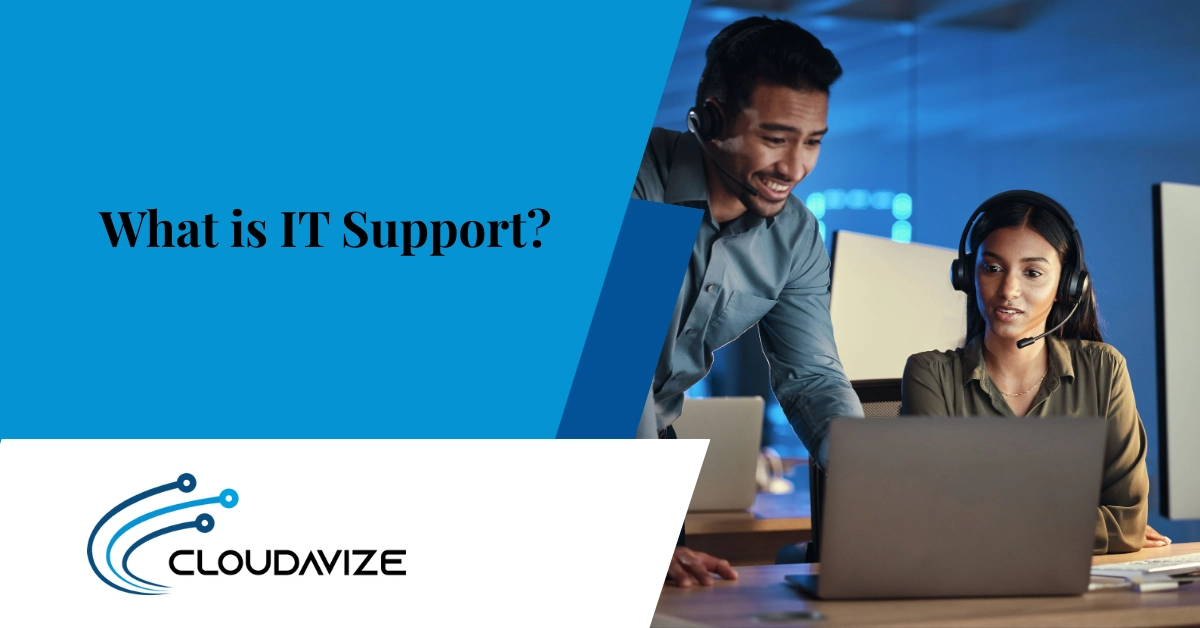
IT Support refers to technical assistance that helps customers, employees, and businesses solve IT issues. This involves diagnosing and resolving technical problems, performing system maintenance, applying software updates, managing networks, and ensuring that hardware, software, and cybersecurity systems operate efficiently and securely.
There are various types of IT support, such as on-site, remote, help desk services, and cloud-based support. Each IT support type offers tailored solutions for different business needs. For example, on-site support is essential for hardware repairs, while remote support handles digital troubleshooting. Depending on business size, budget, and technology infrastructure, companies can choose from per-user, per-device, or tiered pricing models to find the most cost-effective solution.
Three main benefits of IT support include increased efficiency, reduced downtime, and enhanced security. By addressing IT issues proactively, businesses can minimize disruptions and keep operations focused on growth. For SMBs, startups, and organizations in industries like healthcare or finance, the right IT support model ensures access to expert services that scale with the business, improving productivity and reducing the risk of technology-related setbacks.
What Does IT Support Do?
IT Support manages, troubleshoots, and maintains an organization’s technology systems to ensure operational reliability, data security, and business continuity. It provides structured technical assistance that keeps networks, hardware, and software performing efficiently while minimizing downtime. The primary goal of IT support is to prevent disruptions before they occur and to resolve issues quickly when they do.
Key responsibilities of reliable IT support and services include diagnosing system failures, installing and configuring software, managing network connections, and responding to end-user requests. For example, an IT support specialist might troubleshoot a failed printer connection, update security patches, or assist employees facing login issues. These actions help maintain stable and secure IT environments across diverse business operations.
According to the CISCO report (2024), organizations with dedicated IT and OT (Operational Technology) support teams experience 40% fewer security incidents compared to those relying on ad hoc troubleshooting. This finding applies broadly across small and medium-sized businesses (SMBs), healthcare organizations, financial services firms, and manufacturing enterprises, where uptime, compliance, and security are vital. Such evidence reinforces that reliable IT support services are not just reactive but proactively safeguard technological performance, ensuring consistent operations for every digital process within a business.
What Are the Different Types of IT Support?
IT Support includes On-Site, Remote, Help Desk, Network and System Administration, and End-User Training services. These support types address different business and user needs, ensuring that technology systems remain stable, responsive, and secure. On-site support focuses on physical fixes, remote and help desk services offer quick digital responses, while network and user-focused functions strengthen system performance and efficiency. Together, these models shape how well a business maintains uptime, secures data, and supports employee productivity.
On-Site IT Support
On-site IT support involves an IT technician visiting the location to handle technical issues that require physical attention. Field IT support is essential for resolving problems that remote teams cannot fix, such as hardware repairs, system installations, and network cabling. It provides immediate, hands-on troubleshooting to restore functionality and minimize downtime. For example, an IT technician may replace a failed hard drive, install new networking equipment, or configure workstations for a growing office. On-site IT support is indispensable for organizations with physical infrastructure, ensuring that systems are properly maintained, securely installed, and consistently operational.
Remote IT Support
Remote IT support allows IT technicians to resolve technical issues without being physically present, using secure remote-access tools and monitoring software. It is commonly used for software troubleshooting, system updates, password resets, and network diagnostics. For example, an IT technician can help an employee restore VPN access or fix an application error from another location within minutes. This model ensures quick response times, reduced operational delays, and cost efficiency, making it ideal for businesses with multiple sites or remote employees. Remote IT support is a cornerstone of modern service delivery, offering reliable, real-time assistance from virtually anywhere.
Help Desk Support
A help desk support acts as the first point of contact for users seeking immediate technical assistance and system-related guidance. It connects employees with trained customer service technicians who handle routine issues such as password resets, software installation errors, connectivity problems, and access requests. The goal of help desk support is to provide quick, reliable responses that minimize downtime and keep operations running efficiently. For example, a help desk agent might guide a user through setting up new software or resolving a login issue within minutes. This service enhances overall user experience and strengthens organizational productivity by ensuring consistent, responsive IT support.
Network and System Administration Support
Behind every reliable IT environment is consistent network and system administration support that keeps technology running securely and efficiently. Network and system administrators oversee servers, firewalls, network configurations, data backups, and monitoring systems to maintain connectivity and protect information assets. Their work includes configuring routers, managing bandwidth, updating software, and enforcing security policies to prevent system failures and cyber threats. For example, an administrator might identify a network bottleneck or restore access after a server outage. This support function ensures the stability, safety, and performance of business infrastructure across all operational levels.
End-User Training and Support
End-user training and support equip employees with the skills, knowledge, and confidence to use IT systems, software tools, and digital platforms efficiently. This service enhances operational productivity by addressing gaps in technical understanding through software onboarding, system orientation, troubleshooting guidance, and cybersecurity best practices. IT specialists deliver structured sessions or direct assistance to minimize user errors and strengthen self-sufficiency. For example, a support technician may train a new hire on enterprise software or teach teams how to manage secure file sharing. By improving digital proficiency, end-user support creates a more capable workforce and reduces the burden on technical staff.
What Are the Different Levels of IT Support?
IT support is structured into five levels, ranging from Level 0 (self-service) to Level 4 (external vendor support), each addressing different complexities. Level 0 allows users to solve basic issues using resources like FAQs, while Level 1 offers help desk support for common problems. Level 2 provides technical assistance for more complex issues, and Level 3 handles specialized support for critical problems. Level 4 involves external vendors for niche services. These IT support levels ensure businesses get the right expertise based on the issue at hand.
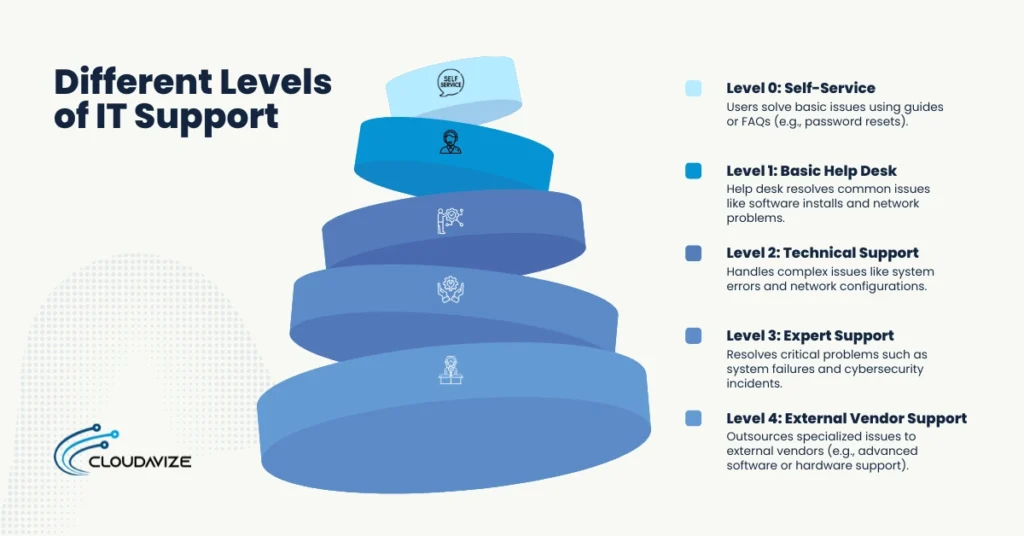
Level 0: Self-Service
Level 0 support allows users to resolve basic technical issues independently using available resources, such as knowledge bases, FAQs, or instructional guides. This level is designed for simple, common problems that do not require technician involvement, like resetting passwords or troubleshooting minor software glitches. By empowering users to solve these issues on their own, Level 0 reduces the need for IT staff intervention, saving time and resources. For businesses, it enhances productivity and minimizes the burden on support teams, allowing them to focus on more complex tasks.
Level 1: Basic Help Desk
Level 1 support is the first point of contact for users experiencing common IT issues, typically managed by a help desk or service team. Help desk technicians assist with routine problems such as password resets, software installations, and basic network connectivity or hardware troubleshooting. By quickly resolving these simple issues, Level 1 support minimizes disruptions and ensures that users remain productive, while allowing more specialized support teams to focus on complex problems.
Level 2: Technical Support
Level 2 support handles more complex technical issues that cannot be resolved at Level 1. IT support technicians at this level troubleshoot network configurations, system errors, and software issues that require specialized knowledge. They often work directly with the underlying technology to address problems that involve system performance or integrations. For example, an IT support technician may resolve server configuration problems or fix software compatibility issues between software applications. This level ensures critical issues are efficiently addressed, minimizing downtime and maintaining system reliability.
Level 3: Expert Support
Level 3 support tackles the most complex IT issues that require advanced expertise. IT support technicians resolve critical problems like system failures, cybersecurity incidents, or advanced software malfunctions. They may work with vendors or developers to fix issues that affect business-critical systems. For example, they might handle server crashes or address a data breach. This level ensures quick resolution of high-impact issues, minimizing downtime and security risks.
Level 4: External Vendor Support
Level 4 support involves outsourcing to external vendors for specialized IT services that in-house teams cannot handle. This level is typically used for complex issues requiring niche expertise or advanced technology, such as advanced software troubleshooting or custom hardware support. For example, a business might rely on an external vendor to manage enterprise software integrations or resolve highly specialized server problems. External vendors provide expertise and resources that ensure critical issues are addressed efficiently without overburdening internal IT teams.
How Can IT Support Benefit Your Business?
IT support benefits businesses by enhancing operational efficiency, minimizing downtime, strengthening cybersecurity, and supporting scalable growth. By resolving technical issues quickly, IT support keeps IT systems, hardware, and software running smoothly, reduces the risk of cyber threats, and ensures that the technology infrastructure can grow with the business. The benefits of IT support for business span across industries, ensuring stability, reducing disruptions, and helping each sector optimize performance and stay competitive. For example, healthcare organizations rely on IT support to protect sensitive data, manufacturing companies use it to maintain production systems, and educational institutions depend on it to keep learning platforms running without interruptions.
- Improves Business Efficiency
IT support improves business efficiency by minimizing downtime and ensuring systems operate at peak performance. With proactive maintenance and quick issue resolution, IT support prevents interruptions and keeps IT infrastructure, software, and network systems running smoothly. This allows SMBs and enterprises to focus on their core functions without technical delays, leading to faster decision-making, enhanced workflow, and overall productivity. - Enhances Security
By providing proactive monitoring and timely updates, IT support strengthens business security and safeguards critical data. IT support teams manage firewalls, perform system scans, and implement security patches to defend against cyber threats. For example, healthcare organizations depend on IT support and services to protect patient information, while financial services rely on it to prevent fraud and ensure regulatory compliance. - Increases Operational Uptime
With continuous system monitoring, proactive maintenance, and quick resolution of technical issues, IT support helps businesses maintain high operational uptime. IT support and service teams identify potential disruptions before they affect networks, servers, and critical software systems. This ensures smooth and uninterrupted business operations, particularly in industries like manufacturing, where downtime halts production, or retail, where system reliability directly impacts sales and customer satisfaction. - Cost Savings
Through proactive maintenance and efficient resource management, IT support helps businesses reduce costs by preventing expensive system failures and minimizing downtime. By quickly addressing issues and optimizing IT infrastructure, businesses avoid costly repairs and disruptions. For example, healthcare organizations save by reducing the risk of data breaches, while SMBs lower operational costs through improved system efficiency and reduced reliance on external IT services. - Enables Scalability
IT support helps businesses scale their technology infrastructure, network systems, and software solutions as they grow. By optimizing IT systems, businesses can expand hardware and network capacity to meet increased demand without disruptions. For example, e-commerce companies rely on scalable IT support and services to handle growing customer traffic, while manufacturers can expand production capacity while maintaining operational efficiency and system performance. - Boosts Employee Productivity
With reliable IT support, businesses can reduce downtime and keep employees focused on their work. By quickly resolving issues like software errors, network problems, and hardware failures, IT support ensures that employees have the tools they need to stay productive. For example, office workers can continue their tasks without delays caused by technical issues, while remote teams depend on IT support to maintain smooth communication and access to resources.
What Are the Costs Involved in IT Support?
IT support costs typically range from $100–$500 per employee per month or $1,000 to $10,000+ per month, depending on business size, service complexity, and whether the support is in‑house or outsourced. SMBs may pay around $75–$350 per user per month for IT support services, while larger companies requiring more advanced support and security may incur higher fees.
When budgeting for IT services, businesses must consider both direct and indirect expenses. Direct costs include salaries for in‑house IT staff, which average $57,097 per year per technician, as well as outsourcing fees to MSPs (Managed Service Providers) that often fall between $100–$500+ per employee per month. Indirect costs can include investments in IT infrastructure, software tools, and cybersecurity measures, which can add thousands of dollars annually, depending on the company’s size and needs.
Here is a breakdown of common IT support pricing models and their typical costs:
| Pricing Model | Typical Cost Range | Description |
| Break-Fix | $50 – $300 per hour | Pay only when issues occur; a reactive approach to IT support. |
| Per-Device | $15 to $500 per device per month | Pay per device covered by IT support, usually for hardware and software management. |
| Per-User | $100 – $500 per user per month | Pay per user for access to IT support services; scalable for growing businesses. |
| Tiered | $50 – $250+ per month based on tier | Service levels are provided at different pricing tiers based on the complexity of the services. |
| In-House IT Department | Average salary $57,097 per year per technician | Full-time internal staff handling all IT needs; high overhead costs with salaries and benefits. |
| Co-Managed IT Services | $2,000 – $10,000 per month | Shared responsibility between in-house staff and external service provider; a hybrid model. |
| Full Managed IT Services | $1,500 to $10,000+ per month | Outsource all IT management to a third-party provider, covering all IT needs proactively. |
| Retainer/Block Hours | $1,000 – $5,000 per month or hourly rates | Prepaid blocks of hours or a monthly retainer for IT support; flexible for specific issues. |
Ultimately, businesses must balance these costs with the long-term benefits of IT support. Outsourcing IT support often to MSPs offers a more cost-effective solution for SMBs that need expert help without the overhead of full-time staff. However, for larger businesses with more complex needs, in-house support may be the best choice, despite the higher upfront costs.
What Are the Most Common IT Support Issues?
The most common IT support issues businesses face include hardware failures, software problems, network connectivity issues, and cybersecurity threats. These problems can disrupt workflows, cause data loss, and reduce employee productivity. Regular maintenance and quick resolution of these issues are crucial for minimizing downtime and ensuring systems run smoothly.
- Hardware Failures
Critical equipment like servers, computers, hard drives, and network devices may malfunction due to wear and tear or unforeseen damage. For example, a failed hard drive can result in lost data, while a server crash can cause downtime for an entire department or company. - Software Problems
Businesses rely on operating systems, productivity software, and specialized applications, which can experience issues like software crashes, system freezes, bugs, or incompatibility between updates and other software. A CRM system freezing during data entry can delay customer service, affecting business operations. - Network Connectivity Issues
Wi-Fi problems, slow internet connections, or issues with VPN access can prevent employees from connecting to critical cloud-based systems or accessing internal networks. This can lead to delays in communication, file sharing, and task execution, impacting productivity. - Cybersecurity Threats
Increasing threats from malware, phishing, and ransomware put businesses at risk of data breaches and system compromise. For example, a phishing attack targeting an employee could lead to unauthorized access to sensitive business data, while ransomware can lock access to critical files and demand payment to restore them. - User Access Issues
Problems with user authentication, password resets, or permissions management can prevent employees from accessing the tools or data they need. For instance, an employee may be unable to log in to their email account due to incorrect credentials or account lockout, which can delay work and impact communication. - Performance Degradation
Slow system or application performance, such as lagging software, delayed response times, or unresponsive systems, can significantly reduce productivity. For example, a slow-loading website or unresponsive database queries can cause delays in tasks, reducing employee efficiency and frustrating customers.
How to Effectively Resolve Common IT Support Issues?
Effectively resolving IT support issues involves diagnosing the problem, following a structured troubleshooting process, escalating when necessary, documenting solutions, and following up with the user. These steps ensure quick resolutions and maintain system efficiency.
- Diagnose the Problem
Begin by identifying the root cause of the issue through system logs, user feedback, and diagnostic tools. Collecting relevant information is crucial in determining whether the issue is related to hardware, software, or network configurations. - Follow a Structured Troubleshooting Process
Use a step-by-step approach to isolate the problem. This involves verifying the issue, checking common causes, and performing basic checks before moving on to more advanced troubleshooting techniques, ensuring a quicker resolution. - Escalate to Higher Levels if Needed
If the issue cannot be resolved at the first level, escalate it to higher-level support or specialists who have the expertise to address more complex problems, such as system failures or cybersecurity breaches. - Document and Share Solutions
Keep detailed records of common issues and solutions. This helps IT teams to resolve similar problems more quickly in the future and allows for knowledge sharing across the team, improving efficiency and consistency. - Follow-Up with the User
After resolving the issue, check in with the user to ensure their problem is completely fixed and that they are satisfied with the solution. This improves customer satisfaction and helps identify any underlying issues that may have been overlooked.
What Are the Essential Tools for IT Support?
IT support relies on ticketing systems, remote desktop tools, system monitoring software, diagnostic tools, knowledge management systems, and backup and recovery tools to troubleshoot, manage, and maintain systems effectively. These essential IT support tools help IT teams provide efficient service and ensure the smooth operation of business IT systems.
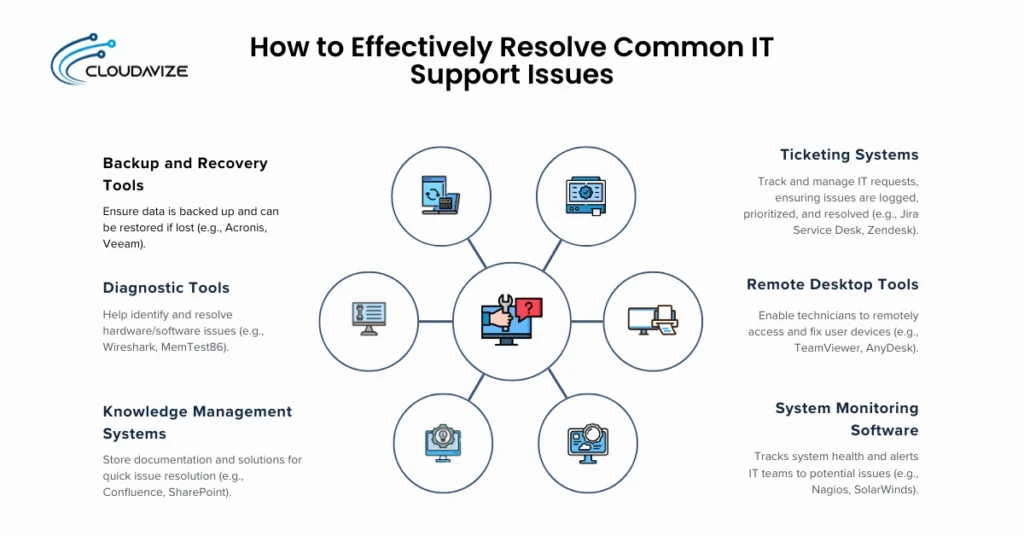
- Initial Triage
Track and manage IT support requests, ensuring that issues are logged, prioritized, and resolved on time. Examples include Jira Service Desk or Zendesk. - Remote Desktop Tools
Allow technicians to remotely access and fix issues on user devices without being physically present. Tools like TeamViewer or AnyDesk are commonly used for this purpose. - System Monitoring Software
Tracks the health and performance of IT systems, alerting IT teams to potential problems before they impact business operations. Nagios or SolarWinds are examples of system monitoring tools. - Knowledge Management Systems
Store IT support documentation, troubleshooting guides, and solutions to common problems, helping technicians resolve issues quickly. Confluence and SharePoint are popular examples. - Diagnostic Tools
Help IT teams identify and resolve hardware and software issues. Wireshark and MemTest86 are common diagnostic tools used in IT support. - Backup and Recovery Tools
Ensure data is backed up regularly and can be restored in case of system failure or data loss. Tools like Acronis or Veeam help businesses maintain data integrity.
What Is the Difference Between In-House and Outsourced IT Support?
In-house IT support is managed by full-time internal staff, providing direct control over company systems, data security, and IT strategy, while outsourced IT support is provided by Managed Service Providers (MSPs) who deliver specialized services at a lower cost. The major differences include control, cost, and access to expertise. In-house support allows businesses to have a dedicated team that fully understands their specific needs and environment, whereas outsourced IT support from an MSP offers flexible, scalable solutions and access to advanced technical knowledge without the need for maintaining a full-time staff.
Below is a table highlighting major differences between in-house and outsourced IT support:
| Factor | In-House IT Support | Outsourced IT Support (MSPs) |
| Control | Full control over IT infrastructure and decision-making | Less direct control, with operations managed externally |
| Cost | Higher due to salaries, benefits, and training | More cost-effective, pay-as-you-go model |
| Expertise | Limited to the internal team’s skill set | Access to a broad range of specialized knowledge and resources |
| Customization | Highly customizable, aligned with specific company goals | Standardized services, less flexibility |
| Response Time | Immediate, as the team is on-site or readily available | May involve delays based on the provider’s service level |
How to Become an IT Support Specialist?
To become an IT support specialist, you need a combination of technical expertise, relevant certifications, and practical experience with IT systems and end-user support. This role requires knowledge of hardware, software troubleshooting, network configurations, and the ability to communicate complex technical issues in simple terms to users.
- Education: A high school diploma is required, though a bachelor’s degree in IT or computer science enhances job prospects.
- Certifications: Certifications like CompTIA A+, MCITP, and CCNA are essential to demonstrate expertise in IT support and networking.
- Experience: Gain hands-on experience through internships or entry-level roles focused on hardware repairs, software troubleshooting, and network support.
- Skills: Develop key technical skills like network troubleshooting, system configuration, remote support tools, operating system knowledge (Windows, macOS, Linux), and proficiency in IT security practices. Strong problem-solving abilities and communication skills are also critical for user interaction.
IT Support Careers and Job Opportunities
IT support offers various career paths, from entry-level help desk roles to specialized positions in network administration or cybersecurity. As businesses increasingly rely on technology, the demand for IT professionals like IT support technicians, network engineers, IT support managers, and cybersecurity specialists continues to grow. IT support roles provide opportunities for career advancement, especially as specialists gain expertise in areas like cloud computing, cybersecurity, and data management.
- Help Desk Technician: The entry point for many IT support careers, handling basic user issues like software installations, password resets, and system troubleshooting.
- IT Support Technician: Provides broader support, including system upgrades, software troubleshooting, and assisting with more complex IT issues that go beyond the help desk role.
- Desktop Support Technician: Specializes in troubleshooting and providing support for end-user devices, including desktops, laptops, and printers.
- Network Engineer/Technician: Focuses on designing, implementing, and maintaining network infrastructure, including routers, switches, and firewalls.
- Cloud Support Engineer: Works on managing and supporting cloud-based platforms, ensuring businesses can efficiently store, access, and manage their data in the cloud.
- NOC (Network Operations Center) Technician/Engineer: Monitors and manages network performance to ensure uptime, identifying and resolving issues before they affect business operations.
- Systems Administrator: Manages servers, operating systems, and hardware to ensure reliable IT services across an organization.
- IT Support Manager: Oversees the IT support team, ensuring issues are resolved efficiently and ensuring the team is aligned with business objectives.
- Lead Technical Support Engineer: Leads a team of technical support specialists, providing advanced troubleshooting expertise, mentoring junior staff, and resolving complex technical problems.
- IT Manager/Director: Oversees the entire IT department, including strategic planning, budgeting, and aligning IT with business goals.
- Cybersecurity Specialist: Works to protect systems from threats, focusing on firewall configurations, encryption, and security protocols.
What Are the Future Trends in IT Support?
The future of IT support will be heavily influenced by the integration of emerging technologies like IoT, ITaaS, automation, and cloud computing. These trends are shaping the way businesses manage their IT infrastructure, enabling faster problem resolution, better scalability, and improved security.
- Integration of IoT (Internet of Things)
The growth of IoT devices is driving the need for more efficient IT support to manage and monitor these interconnected systems. IoT-enabled devices, such as smart sensors and wearables, will require constant updates, security monitoring, and troubleshooting, leading to a demand for specialized IT support to manage these devices and their data. - IT Support as a Service (ITaaS)
ITaaS offers businesses on-demand IT support through cloud-based platforms. This model enables companies to access scalable IT resources and services as needed, reducing the cost and complexity of managing in-house IT teams. ITaaS allows SMBs and enterprises to focus on their core functions while experts handle their IT needs. - Automation and AI Tools for Faster Problem Resolution and Proactive Support
The rise of automation and artificial intelligence (AI) tools is transforming IT support by enabling quicker issue resolution and proactive maintenance. AI-powered systems can predict system failures, automate routine tasks, and provide real-time support, reducing response times and enhancing system uptime. - Cloud-Based IT Support Services
As businesses shift to cloud infrastructure and cloud-based applications, cloud IT support is becoming essential. This model provides scalable, on-demand IT services, ensuring remote management, 24/7 monitoring, and secure access to cloud systems and data. It enables organizations to improve efficiency, reliability, and scalability without the need for physical infrastructure.
How to Choose the Right IT Support for Your Business?
Choosing the right IT support depends on your business size, needs, and long-term goals. Businesses should evaluate factors like the level of expertise required, the scope of services offered, and the cost-effectiveness of different support models. Whether opting for in-house IT teams, outsourced IT services, or managed service providers (MSPs), selecting the right solution ensures that your business can operate efficiently and scale as needed.
- Assess Your Business Needs: Determine the complexity of your IT systems and whether you need specialized support like cybersecurity or network management.
- Evaluate Service Levels and Expertise: Choose an MSP with the right expertise to meet your specific IT needs, such as cloud services, 24/7 support, or technical specialization.
- Consider Scalability and Flexibility: Select an IT support model that can grow with your business, offering flexibility like cloud-based support or ITaaS for easier scaling.
- Balance Cost and Value: Compare pricing models, such as per-user or tiered pricing, and ensure the chosen IT support solution provides adequate value in terms of security, uptime, and efficiency.