IT Technician: Duties, Responsibilities, and How to Become One
Every organization relies on technology to operate efficiently, and when systems fail or users need technical assistance, the IT Technician steps in to restore functionality. From resolving software glitches to replacing faulty hardware or setting up secure network access, their role ensures that day-to-day operations continue without disruption.
Becoming an IT Technician usually begins with a high school diploma, followed by industry-recognized certifications such as CompTIA A+ or Network+. To build practical skills, many candidates pursue internships, technical bootcamps, or entry-level jobs like Help Desk Technician, where they gain firsthand experience handling real-world technical issues.
As the role evolves, so do the expectations. A skilled IT Technician combines technical knowledge with strong communication to support end-users, troubleshoot connectivity issues, and manage systems effectively. With demand for IT support growing across sectors, certified technicians can advance into specialized paths like Network Support Specialist or Field Service Technician.
What is an IT Technician?
An IT Technician is a trained professional who supports, maintains, and troubleshoots computer systems, hardware, and software within an organization. Often serving as the first point of contact for support, they ensure systems run efficiently by resolving technical issues, performing updates, and assisting users with everyday tech problems.
Typical responsibilities of an IT technician include setting up new devices, managing system access, and fixing connectivity or software errors. In more complex settings, they may assist with network support, monitor system performance, or coordinate with other IT teams to resolve escalated issues. The role combines technical knowledge with clear communication, allowing technicians to solve issues while guiding users through solutions.
What Does an IT Technician Do?
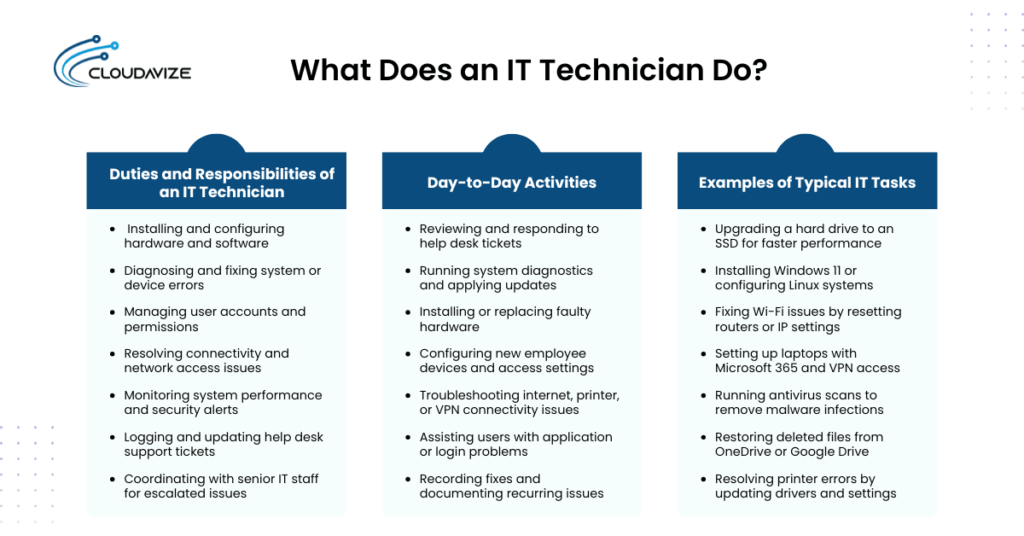
An IT Technician installs, maintains, and troubleshoots computer systems, networks, and devices to keep operations running smoothly. They respond to support requests, resolve software or hardware issues, and assist users with technical problems. By managing system updates, fixing connectivity errors, and minimizing downtime, technicians ensure reliable day-to-day performance across business environments. Businesses that need these technician capabilities can use IT support in Dallas for hardware, software, network, and end-user support.
Duties and Responsibilities of an IT Technician
IT Technicians are responsible for keeping computer systems, networks, and related technologies functional and secure. Their role spans both preventive maintenance and direct user support, ensuring that the IT infrastructure supports daily operations without disruption.
Typical responsibilities of an IT technician include:
- Installing and configuring hardware and software
- Diagnosing and fixing system or device errors
- Managing user accounts and permissions
- Resolving connectivity and network access issues
- Monitoring system performance and security alerts
- Logging and updating help desk support tickets
- Coordinating with senior IT staff for escalated issues
In practice, this can mean responding to a support ticket where a user cannot connect to Wi-Fi. The technician may test the network adapter, verify IP settings, restart the router, and confirm firewall rules. For hardware issues, such as a malfunctioning printer, they might replace drivers, check cables, or use diagnostic utilities before closing the issue in the designated platform.
Day-to-Day Activities
The workflow of an IT Technician is structured around keeping systems operational while responding quickly to user issues that disrupt productivity. Their daily activities balance preventive tasks with immediate troubleshooting, ensuring smooth business operations.
Common daily activities of an IT technician include:
- Reviewing and responding to help desk tickets
- Running system diagnostics and applying updates
- Installing or replacing faulty hardware
- Configuring new employee devices and access settings
- Troubleshooting internet, printer, or VPN connectivity issues
- Assisting users with application or login problems
- Recording fixes and documenting recurring issues
To carry out these tasks efficiently, technicians often rely on tools such as remote access software (TeamViewer, AnyDesk), ticketing platforms (ServiceNow, Freshdesk), and built-in diagnostic utilities. These tools allow them to solve issues quickly, even for users working offsite or in hybrid environments.
Examples of Typical IT Tasks
IT Technicians handle a wide variety of technical tasks that keep systems and users productive. Their responsibilities span hardware, software, and network layers, requiring both troubleshooting skills and adaptability to different scenarios.
Typical IT tasks performed by IT technicians are:
- Upgrading a hard drive to an SSD for faster performance
- Installing Windows 11 or configuring Linux systems
- Fixing Wi-Fi issues by resetting routers or IP settings
- Setting up laptops with Microsoft 365 and VPN access
- Running antivirus scans to remove malware infections
- Restoring deleted files from OneDrive or Google Drive
- Resolving printer errors by updating drivers and settings
How to Become an IT Technician?
To become an IT Technician, you generally need a high school diploma, a certification such as CompTIA A+, and practical experience through internships or entry-level roles. Many start as Help Desk Technicians to build troubleshooting and customer support skills. Employers value certifications and hands-on training more than formal degrees, making real-world experience the fastest path into the field.
Steps to Start Your IT Career
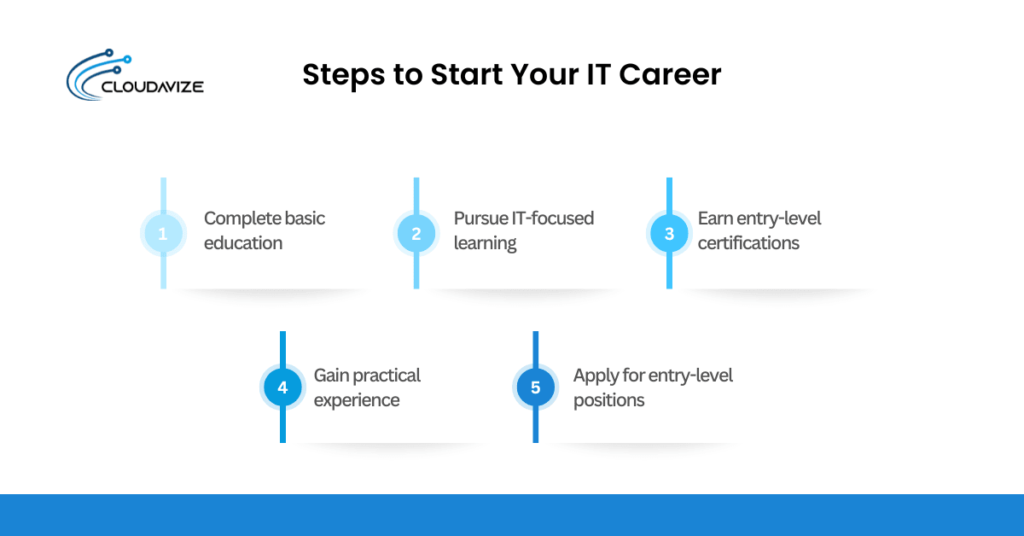
Building a career as an IT Technician requires a mix of formal learning, certifications, and hands-on practice. While there are different paths into the field, following a structured process helps candidates develop the technical and communication skills employers look for.
Steps to begin your IT career include:
- Complete basic education: Earn a high school diploma or equivalent.
- Pursue IT-focused learning: Join a degree program, diploma course, or technical bootcamp.
- Earn entry-level certifications: Obtain CompTIA A+ or Network+ to validate skills.
- Gain practical experience: Build confidence through internships, apprenticeships, or volunteer IT support.
- Apply for entry-level positions: Start with roles such as Help Desk Technician or Desktop Support.
Training and Experience Required
Becoming an effective IT Technician requires more than earning certifications. Employers expect candidates to demonstrate practical skills that show they can handle real-world technical challenges. Training programs and hands-on practice help bridge the gap between classroom learning and workplace requirements.
Common training and experience pathways for IT technicians include:
- Attending technical bootcamps focused on hardware, software, and networking
- Using virtual labs or simulators to practice troubleshooting scenarios
- Completing internships or apprenticeships with IT departments
- Providing volunteer IT support for schools, nonprofits, or small businesses
These opportunities help technicians gain confidence, sharpen troubleshooting skills, and demonstrate to employers that they can perform effectively under real conditions.
What Are the Job Roles of IT Technicians?
IT Technicians typically work as Help Desk Technicians, Network Support Specialists, or Field Service Technicians. These roles differ depending on company size, industry, and IT needs. While some positions focus on user-facing support, others emphasize maintaining systems and infrastructure.
Help Desk Technician
A Help Desk Technician is the primary user-facing support point in most organizations, handling the initial wave of technical issues employees encounter. Their daily work involves answering support calls or emails, logging and categorizing tickets in a help desk system, and guiding users through common problems such as login errors, printer malfunctions, or software glitches. When issues cannot be resolved at their level, they escalate the problem to network or system specialists for further action. To manage this workflow effectively, Help Desk Technicians rely on tools like Zendesk, Jira Service Management, or Freshdesk to track requests and maintain timely responses.
Network Support Specialist
A Network Support Specialist focuses on keeping an organization’s network infrastructure stable and secure. They are responsible for monitoring performance, resolving connectivity issues, and ensuring employees can access resources without interruption. Typical duties include installing and configuring routers or switches, troubleshooting internet or VPN problems, and assisting with network upgrades or security updates.
In many companies, they also track traffic patterns to identify bottlenecks or potential threats. To perform these tasks, Network Support Specialists often use tools such as Cisco IOS, Wireshark, or SolarWinds to manage, analyze, and troubleshoot network systems effectively.
Field Service Technician
A Field Service Technician provides on-site technical support when problems cannot be solved remotely. Their responsibilities include installing and configuring hardware, setting up network equipment, and performing physical maintenance such as replacing cables or upgrading components. They also troubleshoot localized issues like workstation failures, printer malfunctions, or peripheral device errors.
For example, a technician may travel to a client’s office to repair a server or reconfigure a network switch. To complete these tasks, they often use diagnostic kits, cabling tools, and manufacturer utilities to ensure equipment functions properly.
IT Technician Career Path
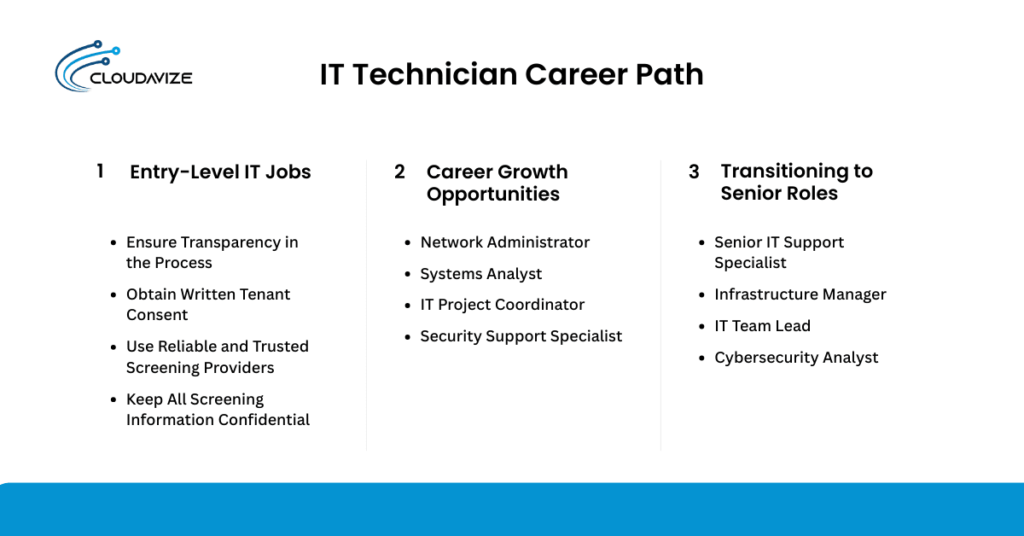
An IT Technician typically starts in entry-level roles such as Help Desk or Desktop Support to build core troubleshooting skills. With certifications and experience, they can advance to positions like Network Administrator or Systems Analyst. Over time, many transition into senior or specialized roles, including cybersecurity or cloud support, creating clear opportunities for career growth. For example, one career ladder may progress from Help Desk → Network Support → Systems Analyst, while another moves from Desktop Support → Security Specialist → IT Manager.
Entry-Level IT Jobs
Hands-on entry-level roles are the starting point for most IT professionals, giving them real-world exposure to troubleshooting and direct user support. These positions help newcomers apply technical knowledge in practical settings while developing essential communication skills.
Common starter positions for an IT technician include:
- Help Desk Technician: Provides first-line support for user issues
- Desktop Support Assistant: Configures devices and resolves workstation problems
- IT Support Intern: Assists with maintenance tasks and ticket resolution
- Service Desk Analyst: Manages support tickets and escalates complex issues
By working in these roles, aspiring IT Technicians gain the troubleshooting experience and user interaction skills required to progress into more advanced positions.
Career Growth Opportunities
As IT Technicians gain experience, they can move into roles that offer more responsibility, specialized expertise, and higher pay. Career growth often depends on continuous learning and earning advanced certifications.
Typical career growth opportunities for IT technicians include:
- Network Administrator: Oversees infrastructure and ensures secure, reliable connectivity
- Systems Analyst: Designs and optimizes IT systems to meet business needs
- IT Project Coordinator: Manages IT initiatives and coordinates between teams
- Security Support Specialist: Focuses on cybersecurity monitoring and protection
Advancement usually comes through a combination of certifications, cross-training, and proven workplace performance. For instance, a technician may start in desktop support, earn a Cisco CCNA certification, and progress into network administration. Others may specialize in cybersecurity or cloud computing, eventually moving into leadership roles such as IT Manager or Infrastructure Lead.
Transitioning to Senior Roles
IT Technicians typically qualify for senior positions after several years of hands-on experience in troubleshooting, system management, and user support. By this stage, they are expected to handle complex technical challenges and demonstrate the ability to manage larger responsibilities.
Examples of advanced roles for IT technicians include:
- Senior IT Support Specialist: Resolves advanced issues and mentors junior staff
- Infrastructure Manager: Oversees networks, servers, and overall IT stability
- IT Team Lead: Supervises daily operations and coordinates technician teams
- Cybersecurity Analyst: Specializes in safeguarding systems and data
Progressing into these roles requires more than technical knowledge. Strong soft skills such as leadership, problem-solving, and clear communication are vital. Certifications like CISSP, Microsoft Azure Administrator, or Cisco CCNP further validate expertise and help technicians transition into senior or specialized positions with greater responsibility.
IT Technician Certifications
Certifications are essential for validating the skills employers expect from IT Technicians. Key options include CompTIA A+ for foundational knowledge, Network+ for networking, Microsoft Certified: Modern Desktop Administrator, Cisco Certified Technician (CCT), Google IT Support Certificate, and IBM IT Support. Earning certifications strengthens credibility and significantly improves hiring prospects.
CompTIA A+ and Network+
For anyone starting as an IT Technician, CompTIA A+ and Network+ provide the foundation most employers expect and often make the difference in securing an entry-level job. These certifications are trusted worldwide because they validate both technical knowledge and problem-solving skills needed for frontline IT support.
Here is what each certification covers:
- CompTIA A+: Hardware setup, operating systems, and troubleshooting basics. Exams feature multiple-choice and performance-based questions, with no prerequisites.
- CompTIA Network+: Network setup, configuration, connectivity, and basic security. The exam focuses on applied scenarios and assumes general IT knowledge but no formal prerequisites.
Vendor-Specific Certifications
While CompTIA A+ and Network+ build core knowledge, vendor-specific certifications prove that an IT Technician can work directly with the platforms most organizations rely on, such as Windows environments, Cisco networking gear, or cloud-based tools. These credentials demonstrate applied expertise with specific technologies, making them especially valuable for enterprise roles.
Common vendor certifications that IT technicians should pursue are:
- Microsoft Certified: Modern Desktop Administrator: Focuses on configuring, securing, and managing Windows devices in enterprise settings.
- Cisco Certified Technician (CCT): Specializes in diagnosing and replacing Cisco networking equipment.
- Google IT Support Certificate: Covers troubleshooting, networking, operating systems, and customer service basics.
- IBM IT Support Professional Certificate: Provides training in hardware, software, networking, and help desk operations.
Which Certification Should You Get First?
The first certification most IT Technicians should pursue is CompTIA A+, as it provides broad coverage of hardware, operating systems, and troubleshooting skills with no prerequisites. Its wide industry acceptance makes it the best entry point for building credibility and confidence. After earning the CompTIA A+ certification, candidates can progress to Network+ to deepen networking expertise or choose a vendor-specific certification, such as Cisco CCT, if they plan to focus on infrastructure or enterprise systems.
What are the Skills and Educational Degree Required to Become an IT Technician?
An IT Technician needs a mix of technical skills, such as troubleshooting hardware and software, managing operating systems, and resolving network connectivity issues, along with soft skills like communication and customer service. While a high school diploma is the minimum requirement, many candidates pursue an associate degree in IT or computer science. Certifications like CompTIA A+ or Network+ further strengthen qualifications, and hands-on experience often carries more weight than formal education in hiring decisions.
Technical Skills Needed
Technical proficiency forms the foundation of an IT Technician’s performance, allowing them to resolve issues quickly and keep systems running smoothly. Employers expect candidates to demonstrate core technical skills that apply across hardware, software, and network environments.
Key technical skills that IT technicians require are:
- Installing and configuring operating systems
- Troubleshooting network and connectivity issues
- Using ticketing platforms such as Zendesk or ServiceNow
- Diagnosing and repairing hardware components
- Running system maintenance tasks and applying updates
These abilities are critical because they enable technicians to resolve problems independently and ensure business operations continue with minimal disruption.
Soft Skills and Communication
IT Technicians frequently interact with users and non-technical staff, making communication skills just as important as technical expertise. Their ability to understand user concerns and explain solutions clearly has a direct impact on productivity and user satisfaction.
Core soft skills necessary for IT technicians include:
- Active listening to understand user problems
- Explaining technical issues in simple terms
- Remaining calm under pressure during urgent issues
- Collaborating effectively with team members
- Training users on basic system functions
Strong communication not only resolves problems faster but also builds user trust, creating smoother interactions between IT teams and the rest of the organization.
Recommended Educational Paths
While degrees can support career growth, there are multiple routes to becoming an IT Technician, making the field accessible to people with different backgrounds and resources. Education choices vary in length, cost, and level of hands-on training.
Common education paths for IT technicians include:
- Associate degree in IT or computer science
- One-year diploma or certificate programs in information technology
- Technical bootcamps or fast-track training courses
- Online certification platforms such as Coursera or Udemy
The best option depends on time, budget, and whether programs provide hands-on labs that strengthen practical skills.
Tools and Technologies Used by IT Technicians
IT Technicians rely on hardware, software, and remote tools to keep systems running. Hardware tools like multimeters and cable testers help diagnose physical issues, while platforms such as ServiceNow or Freshdesk manage support tickets. Remote access tools like TeamViewer and AnyDesk allow off-site troubleshooting. Using these technologies ensures efficient problem-solving and reliable IT support for businesses.
Hardware and Diagnostic Tools
Physical and diagnostic tools are essential for IT Technicians when dealing with hardware-related tasks. These tools help identify faults, verify system performance, and ensure devices are configured correctly before returning them to users.
Some common hardware and diagnostic tools used by IT technicians include:
- Multimeter or cable tester for checking electrical connections and network cabling
- BIOS/UEFI settings access for hardware configuration and troubleshooting
- Built-in diagnostics, such as Windows Memory Diagnostic, for system checks
- Manufacturer tools like Dell SupportAssist for device-specific analysis
Remote Access and Network Equipment
IT Technicians use remote tools and physical network hardware to support users, resolve issues, and maintain connectivity. Remote access software allows them to troubleshoot systems offsite, improving efficiency and making it easier to manage distributed or hybrid work environments. At the same time, routers, switches, and structured cabling form the backbone of reliable business networks.
Key tools and components that IT technicians use are:
- Remote software such as TeamViewer or Chrome Remote Desktop
- Routers and switches for directing and managing traffic
- Network cabling and patch panels for structured connections
- Configuration utilities for IP setup, firewall rules, and security access
Common IT Software Platforms
IT Technicians depend on software platforms that streamline troubleshooting, monitor systems, and protect devices from security threats. These tools allow them to manage user requests, identify performance issues, and maintain IT environments efficiently.
Common software platforms include:
- Ticketing systems such as ServiceNow or Freshdesk for managing support requests
- Monitoring tools like Nagios or SolarWinds to track system performance
- Antivirus and endpoint protection, such as Bitdefender or Windows Defender
- Asset management platforms like Lansweeper or Spiceworks for tracking devices
Mastering these platforms helps technicians respond quickly, prevent recurring problems, and ensure IT systems remain reliable.
Salary and Job Outlook for IT Technicians
On average, IT technicians in the United States make around $76,205 per year, with entry-level positions starting closer to $58,019 and senior roles exceeding $64,699, as per Indeed. Job growth is projected to remain steady, with demand driven by expanding digital operations, hybrid work environments, and the need for reliable IT support. Employers increasingly seek certified technicians, meaning credentials like CompTIA A+ or vendor-specific certifications can directly influence earning potential and career opportunities.
Average Salary Ranges
IT Technician salaries vary based on experience, role, and location, but national averages provide a clear view of earning potential. Entry-level technicians earn less, while experienced professionals or those in specialized positions see higher pay.
| Level of Experience | Average Annual Salary Range | Median Pay Per Year |
| Entry-Level (0-1 year) | $47,000 – $71,000 | $57,000 |
| Mid-Level (1-3 years) | $49,000 – $77,000 | $61,000 |
| Senior-Level (10-14 years) | $57,000 – $94,000 | $73,000 |
Source: Glassdoor
Job Market Trends
The role of IT Technicians is becoming increasingly important as businesses rely on technology for everything from cloud operations to secure remote access. Organizations need technicians who can handle both traditional support tasks and modern requirements like cybersecurity awareness and hybrid infrastructure management. Industries such as healthcare, finance, and education are leading employers, as they depend heavily on uninterrupted system access and reliable technical support.
According to the U.S. Bureau of Labor Statistics (BLS), employment for computer support specialists, which includes IT Technicians, is projected to grow 6% from 2023 to 2033, faster than the average for all occupations. The BLS also reports about 62,700 job openings annually, reflecting both new demand and the need to replace retiring workers.
Salary Differences by Region
Salaries for IT Technicians vary by state, reflecting differences in demand, cost of living, and regional technology investment. States with strong tech industries or urban centers tend to offer higher pay, while rural or lower-cost states average less. This variation is a key consideration for technicians evaluating job opportunities across the U.S.
| State | Average Annual Salary | Approx. Hourly Rate |
| Washington | $54,362 | $26 |
| New York | $52,511 | $25 |
| Nevada | $48,876 | $23 |
| Minnesota | $47,009 | $23 |
| California | $47,369 | $23 |
| New Mexico | $46,513 | $22 |
| Texas | $44,717 | $21 |
| Michigan | $41,834 | $20 |
| Mississippi | $44,757 | $22 |
| West Virginia | $37,158 | $18 |
Source: ZipRecruiter
These figures show that states like Washington and New York lead with higher wages, while states such as West Virginia and Michigan sit at the lower end, reinforcing how geography directly impacts IT earning potential.