25 Cloud Security Best Practices for Businesses
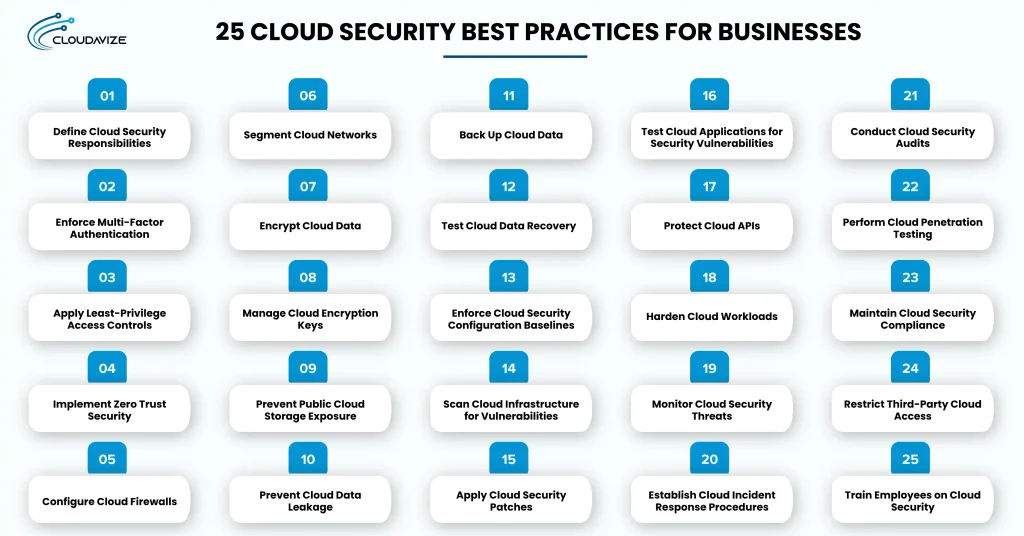
Cloud security best practices for businesses include defining security responsibilities, enforcing MFA, applying least-privilege access, adopting Zero Trust, configuring firewalls, segmenting networks, encrypting data, managing encryption keys, preventing public storage exposure, controlling data leakage, maintaining backups, and testing recovery. They also include enforcing configuration baselines, scanning vulnerabilities, applying patches, testing application security, protecting APIs, hardening workloads, monitoring threats, preparing incident response plans, conducting audits, performing penetration testing, maintaining compliance, restricting third-party access, and training employees.
Together, these practices protect cloud identities, sensitive data, applications, and infrastructure from cyber threats and unauthorized access. Businesses should prioritize controls based on security risks, business impact, and implementation requirements. Regular cloud security reviews should assess access permissions, configurations, backups, monitoring, and compliance. Document security gaps, assign remediation owners, and verify corrective actions to maintain protection as cloud environments evolve.
The 25 cloud security best practices for businesses are:
- Define Cloud Security Responsibilities
Businesses must clearly define cloud security responsibilities by identifying which controls their cloud provider manages and which remain the customer’s responsibility. The shared responsibility model varies across Infrastructure as a Service (IaaS), Platform as a Service (PaaS), and Software as a Service (SaaS). Under IaaS, providers manage underlying infrastructure while customers manage operating systems, applications, identities, and data configurations.
According to the Cloud Security Alliance’s 2026 survey, respondents cited security operations (51%), network operations (46%), cloud architects (46%), and DevOps (41%) as responsible for security policies. Businesses should review AWS, Azure, or Google Cloud responsibility documentation and assign accountability for access, configurations, monitoring, and incident response across internal teams and, where applicable, their managed service provider (MSP).
- Enforce Multi-Factor Authentication
Multi-factor authentication protects cloud accounts by requiring additional identity verification before users access applications, management consoles, or administrative resources online. Businesses should enforce MFA across employee accounts, privileged administrators, and cloud management portals. Phishing-resistant FIDO2/WebAuthn authentication provides stronger protection against credential phishing than SMS verification, which remains vulnerable to interception and social engineering.
According to Microsoft Research (2023), MFA reduced account compromise risk by 99.22% across the studied commercial accounts. Cloud administrators should enforce enrollment through identity policies and conditional access requirements. Microsoft Entra ID Conditional Access can require approved authentication methods based on access context. Emergency administrator accounts require restricted access, documented exceptions, and activity monitoring
- Apply Least-Privilege Access Controls
Least-privilege access controls limit cloud users and service accounts to the permissions they need for their assigned responsibilities, reducing unauthorized access to resources. Businesses can implement these restrictions through Identity and Access Management (IAM) policies, role-based access control (RBAC), and resource-level permissions. Limit administrative privileges to authorized personnel rather than assigning them through default account configurations.
The Cloud Security Alliance’s 2026 Cloud Security Index identified IAM policies allowing privilege escalation in 83% of assessed AWS accounts. Administrators should review excessive permissions, unused roles, and unnecessary administrative access. Use temporary privileged access mechanisms to limit elevated permissions to approved periods. Revoke access promptly when employees change responsibilities or leave.
- Implement Zero Trust Security
Zero Trust security requires continuously evaluating identity, device condition, session context, and resource sensitivity before granting access to cloud resources. This identity-centric approach removes implicit trust based on internal network location or previously established connections. Evaluate each access request using contextual signals rather than assuming authenticated users or connected devices remain trustworthy throughout their sessions.
Conditional access policies can restrict access to resources when device compliance, sign-in behavior, or session conditions change. For example, an organization may deny access to confidential cloud applications from unmanaged devices despite valid user credentials. Zero Trust extends beyond MFA and assigned permissions by continuously reassessing access conditions across distributed cloud environments.
- Configure Cloud Firewalls
Cloud firewalls control inbound and outbound network traffic by restricting connections to approved addresses, protocols, and ports within cloud environments. Businesses should establish default-deny policies and explicitly permit traffic required for authorized applications. AWS security groups, Azure Network Security Groups, and Google Cloud firewall rules provide mechanisms for controlling network access to cloud resources.
Network access control lists (ACLs) showed permissive ingress to sensitive ports in 84% of assessed AWS accounts (Cloud Security Alliance, 2026). To reduce exposure, administrators should review source IP addresses, destination ports, and outdated rules. Unrestricted access to SSH (port 22) or RDP (port 3389) can expose administrative interfaces to unauthorized connections. Document necessary exceptions and remove permissions that are no longer required.
- Segment Cloud Networks
Network segmentation isolates cloud workloads into security boundaries that restrict unnecessary communication between applications, databases, and administrative systems within shared environments. Businesses can use virtual private clouds (VPCs), private subnets, and workload-specific security boundaries to separate resources by function. Public-facing web applications should not receive unrestricted connectivity to internal databases or management systems.
Cloud architects should establish traffic restrictions between network segments, including east-west connections among internal workloads. Microsegmentation provides fine-grained communication controls that limit lateral movement after an attacker compromises a resource. For example, an application server may access a designated database port without reaching unrelated systems. Regular connectivity reviews help verify approved application dependencies.
- Encrypt Cloud Data
Cloud data encryption protects confidential information by converting readable records into ciphertext during storage and transmission across cloud computing environments and services. Enable encryption at rest for cloud databases, object storage, virtual disks, and backup volumes to help prevent unauthorized access to stored data. Encryption in transit uses Transport Layer Security (TLS) to protect information exchanged between applications, users, and cloud services.
IBM’s 2026 research found that only 37% of organizations that experienced a data breach encrypted sensitive data both at rest and in transit, highlighting a gap in data protection practices. Security teams should enable encryption across Amazon S3, Azure Storage, and Google Cloud Storage, verify that encryption covers sensitive data flows, and regularly review encryption settings and key management policies.
- Manage Cloud Encryption Keys
Encryption key management protects cloud data by controlling how organizations generate, store, access, rotate, and retire cryptographic keys throughout their lifecycle. Businesses can use AWS Key Management Service, Azure Key Vault, or Google Cloud KMS to manage encryption keys through centralized controls. Customer-managed keys provide organizations with greater control over key policies and lifecycle decisions than provider-managed keys.
The 2025 Thales Cloud Security Study found that 57% of surveyed organizations use five or more enterprise key management systems (Thales, 2025). Managing multiple systems requires consistent access controls, clearly assigned administrative responsibilities, and defined key rotation schedules. Administrators should also monitor unusual key usage and document retirement procedures, as premature key deletion can make encrypted data unrecoverable.
- Prevent Public Cloud Storage Exposure
Public cloud storage exposure occurs when access configurations allow unauthorized users to retrieve sensitive files from cloud storage resources without approval. Businesses should inspect Amazon S3 buckets, Azure Blob Storage containers, and Google Cloud Storage buckets for anonymous access and unintended external sharing. Bucket policies, access control lists, and resource permissions determine whether approved identities can access stored information.
Data from the Tenable Cloud Risk Report 2024 showed that 29% of surveyed organizations had public-facing cloud storage buckets, though some exposure was intentional. To manage storage exposure, administrators need to use provider-native access analysis and Amazon S3 Block Public Access where appropriate. Review intentional public access exceptions and regularly reassess storage permissions.
- Prevent Cloud Data Leakage
Data loss prevention (DLP) controls identify sensitive information and restrict unauthorized transfers through downloads, external sharing, and unapproved cloud applications. Businesses should classify customer records, financial documents, and confidential files by sensitivity. DLP policies can detect restricted information and block transfers that violate data-handling requirements.
According to Netskope’s 2025 Cloud and Threat Report, 26% of users sent data to personal applications each month, creating opportunities for sensitive business information to leave company-controlled environments. For example, an employee might upload customer records to a personal Google Drive account. Security teams should monitor unusual downloads, restrict unauthorized file transfers, and review sharing permissions. Microsoft Purview DLP can enforce data protection policies across supported Microsoft 365 services.
- Back Up Cloud Data
Reliable cloud backups preserve recoverable copies of business information and support operational continuity after ransomware attacks, accidental deletion, or system failures. Organizations should establish backup schedules based on data criticality, retention obligations, and acceptable data loss. Recovery point objectives (RPOs) help determine how frequently essential databases, application records, and cloud files require backup protection.
Backup administrators should maintain isolated copies that compromised production accounts cannot modify. Veeam’s 2025 Ransomware Trends Report reported that 57% of ransomware-affected organizations recovered less than half their data. Immutable storage and AWS Backup policies support recovery planning. Synchronization and replication cannot replace independent backups because unwanted changes may propagate across connected systems.
- Test Cloud Data Recovery
Recovery testing verifies that stored backups can restore critical applications and business data within established recovery objectives after disruptions occur. Organizations need to define recovery time objectives (RTOs) and recovery point objectives (RPOs) for essential cloud services. Controlled restoration exercises help determine whether available backup copies meet these requirements and whether recovered information remains complete and usable.
IT teams should restore representative databases, virtual machines, and application files in isolated testing environments. Each exercise should measure restoration duration, identify missing records, and verify application functionality after recovery. For example, a restored customer database should pass integrity checks before you consider it operational. Documented results help correct unsuccessful recovery procedures.
- Enforce Cloud Security Configuration Baselines
Configuration baselines establish approved settings for cloud accounts, computing resources, identity controls, and deployments to reduce preventable security misconfigurations. Businesses should define standardized configurations using applicable Center for Internet Security (CIS) Benchmarks and internal requirements. These baselines create consistent expectations for resource provisioning, account settings, administrative access, and infrastructure management.
Cloud Security Posture Management (CSPM) tools compare deployed resources against approved configurations. The Cloud Security Alliance’s 2026 survey found that 65% of respondents experienced a business-critical application outage caused by misconfigured security policies within 12 months (Cloud Security Alliance, 2026). AWS Config supports configuration evaluations, while Infrastructure as Code (IaC) templates standardize provisioning. Internal security teams or MSPs can track configuration deviations, assign remediation owners, and verify corrective actions.
- Scan Cloud Infrastructure for Vulnerabilities
Vulnerability scanning identifies known security weaknesses in virtual machines, operating systems, and workload components before attackers exploit exposed resources. Organizations assess relevant infrastructure with agent-based scanners or agentless tools, depending on resource compatibility and visibility needs. Scanning results can identify affected software versions, known Common Vulnerabilities and Exposures (CVEs), and assets requiring investigation.
Security teams should prioritize findings using vulnerability severity, internet exposure, exploit availability, and business impact. For example, a critical vulnerability affecting an internet-facing application server may require faster remediation than the same issue on an isolated testing system. Maintain accurate asset inventories, assign remediation responsibilities, and verify corrections. Regular assessments identify newly disclosed vulnerabilities across existing deployments.
- Apply Cloud Security Patches
Timely security patching closes known software vulnerabilities in customer-managed cloud resources and reduces exposure to attacks targeting outdated components and systems. Businesses must distinguish provider-maintained infrastructure from operating systems, applications, and software packages they must update. Security advisories and vulnerability assessments help administrators identify available fixes and prioritize affected resources according to risk.
IT teams should test patches in staging environments before deploying changes to critical production workloads when practical. Only 26% of critical vulnerabilities listed in CISA’s Known Exploited Vulnerabilities catalog were fully remediated according to Verizon’s 2026 Data Breach Investigations Report. Establish rollback procedures, verify successful installation, and document outstanding exceptions.
- Test Cloud Applications for Security Vulnerabilities
Application security testing identifies weaknesses in cloud software, source code, and third-party dependencies before vulnerabilities expose sensitive information or business operations. Developers should incorporate Static Application Security Testing (SAST), Dynamic Application Security Testing (DAST), and Software Composition Analysis (SCA) into development workflows. These methods examine insecure code patterns, exploitable application behavior, and vulnerable software dependencies.
Development teams should integrate automated security checks into continuous integration and continuous delivery (CI/CD) pipelines. SAST identifies unsafe coding patterns, while DAST detects certain vulnerabilities in running applications. Security findings should receive assigned owners, severity ratings, and remediation deadlines. Developers must retest corrected defects to confirm that changes resolve identified weaknesses without introducing additional problems.
- Protect Cloud APIs
API protection prevents unauthorized application requests by enforcing strong authentication, resource-level authorization, input validation, and controlled access to exposed endpoints. Businesses should use API gateways and application controls to verify requests before allowing access to sensitive operations. Token scopes, expiration policies, and request limits help restrict misuse of application interfaces and compromised credentials.
Developers must validate object-level permissions for every request involving customer records or restricted resources. For example, Broken Object Level Authorization (BOLA) can let authenticated users retrieve another customer’s information when ownership checks are missing. API gateways can enforce rate limits and reject malformed requests, while application logic must verify resource ownership. Regular endpoint testing helps identify authorization weaknesses before sensitive data becomes exposed.
- Harden Cloud Workloads
Workload hardening reduces attack surfaces by removing unnecessary services, restricting runtime privileges, and securing virtual machines, containers, and serverless functions. Establish workload-specific configurations for operating systems, container images, Kubernetes clusters, and serverless applications. These settings should disable unused services, restrict administrative capabilities, and limit access to host resources.
Infrastructure teams should deploy trusted container images and enforce runtime restrictions through supported policies. Sysdig’s 2025 Cloud-Native Security and Usage Report found that critical and high-severity vulnerabilities in running workloads had declined to less than 6%. Kubernetes security contexts can restrict container privileges, while serverless functions should use limited execution permissions. Verify workload isolation during deployment.
- Monitor Cloud Security Threats
Continuous cloud monitoring helps identify suspicious account activity, unauthorized configuration changes, and abnormal workload behavior. Security teams should collect authentication records, administrative activity logs, network events, and security alerts in a centralized monitoring system. AWS CloudTrail, Azure Monitor, and Google Cloud Audit Logs provide visibility into supported cloud activities and management operations.
Security Information and Event Management (SIEM) platforms can centralize records and correlate suspicious events. Organizations first discovered malicious activity internally in 43% of investigated cases, compared with 57% involving external or adversary notifications (Mandiant, 2025). Configure alerts for unusual sign-ins, privilege escalation, and unexpected data exports. Internal security teams or an MSP providing managed security monitoring can investigate findings, tune detection rules, and follow documented escalation procedures.
- Establish Cloud Incident Response Procedures
An incident response plan defines how organizations identify, contain, investigate, and recover from security incidents affecting critical cloud resources. Businesses should classify incidents according to severity, affected services, data sensitivity, and operational impact. Assigned response roles help internal IT teams, security personnel, and MSPs coordinate containment, investigation, and recovery during account compromises or unauthorized data access.
Response procedures should specify containment actions, evidence preservation requirements, communication responsibilities, and recovery approvals. For example, administrators may revoke compromised credentials, isolate affected workloads, and preserve activity logs. Conduct tabletop exercises to test decision-making and coordination. Following incidents, document root causes, assess control failures, and update response procedures to address identified weaknesses.
- Conduct Cloud Security Audits
Regular cloud security audits assess whether documented policies, technical safeguards, and operational procedures address risks to business information and cloud resources. Audit scope should cover identity permissions, infrastructure configurations, monitoring coverage, and applicable security policies. Each review should document findings, identify responsible control owners, and specify the evidence needed to verify that security controls are implemented correctly.
Auditors can examine access reviews, configuration reports, security logs, and remediation records. For example, an assessment may confirm whether privileged account reviews occurred according to organizational policy. Findings should document deficiencies, affected resources, corrective actions, and deadlines. Management must track unresolved issues and verify improvements. Unlike penetration testing, audits primarily evaluate control design, implementation, and operational effectiveness rather than exploitability.
- Perform Cloud Penetration Testing
Cloud penetration testing evaluates whether attackers could exploit weaknesses in applications, infrastructure, or access controls within an authorized scope. Before testing begins, establish written authorization, defined testing boundaries, rules of engagement, and operational restrictions. Cloud provider policies should also be reviewed to identify testing activities that require additional approval.
Qualified testers should assess relevant attack paths without causing unauthorized disruption to production services. For example, a scoped assessment may evaluate whether application vulnerabilities permit access to restricted resources. Testing reports should document validated weaknesses, exploitation conditions, affected assets, and recommended corrections. Prioritize remediation according to demonstrated risk and conduct retesting after significant fixes. Penetration testing complements vulnerability scanning by attempting controlled exploitation.
- Maintain Cloud Security Compliance
Regulatory compliance requires businesses to implement and document cloud controls that meet applicable legal, regulatory, and contractual information-protection obligations. Requirements depend on industry, business location, and the information processed. Healthcare organizations subject to HIPAA and businesses handling payment card data under PCI DSS must assess their specific obligations.
The Cloud Security Alliance’s 2025 Understanding Data Security Risk survey found that 59% of respondents identified compliance as a primary driver for reducing data risks (Cloud Security Alliance, 2025). Organizations should map requirements to controls, retain assessment evidence, and periodically review obligations. NIST guidance and CIS Benchmarks support security programs, while provider certifications do not replace customer compliance responsibilities.
- Restrict Third-Party Cloud Access
Third-party access restrictions limit permissions granted to vendors, contractors, service providers, and integrated applications handling business cloud resources. Organizations should approve external access according to documented requirements and assign permissions to identifiable accounts or service identities. Managed service providers and software vendors should receive only the resource access necessary for contracted responsibilities.
Administrators should apply time-limited permissions, review external accounts, and monitor vendor activity involving sensitive resources. For example, a contractor performing database maintenance may require temporary access to one database rather than unrestricted administrative privileges. Vendor assurance reviews should assess relevant controls before access approval. When contracts expire, revoke associated accounts, credentials, and integrations. Periodic reviews help identify unused connections.
- Train Employees on Cloud Security
Role-specific training teaches employees to recognize phishing attempts, handle credentials, manage sensitive files, and report suspicious cloud activity. Businesses should tailor instruction to job responsibilities rather than applying identical requirements across all roles. Cloud administrators need guidance on privileged access and configuration practices, while general employees require instruction on account protection and file sharing.
Verizon’s 2026 Data Breach Investigations Report found that non-malicious human involvement contributed to 62% of analyzed breaches (Verizon, 2026). Practical exercises should cover fraudulent login requests, phishing messages, and unsafe external sharing. Simulated attacks can identify recurring knowledge gaps. Review exercise results, provide refresher training, and establish clear incident reporting procedures.
What Are Cloud Application Security Best Practices?
Cloud application security best practices include threat-modeling application data flows, protecting CI/CD pipelines, verifying software dependencies, securing source code secrets, and enforcing session expiration. These measures address security risks throughout the application development lifecycle, from initial design to production access. Applying these controls consistently can reduce unauthorized data exposure, software supply chain attacks, credential leaks, and session hijacking.
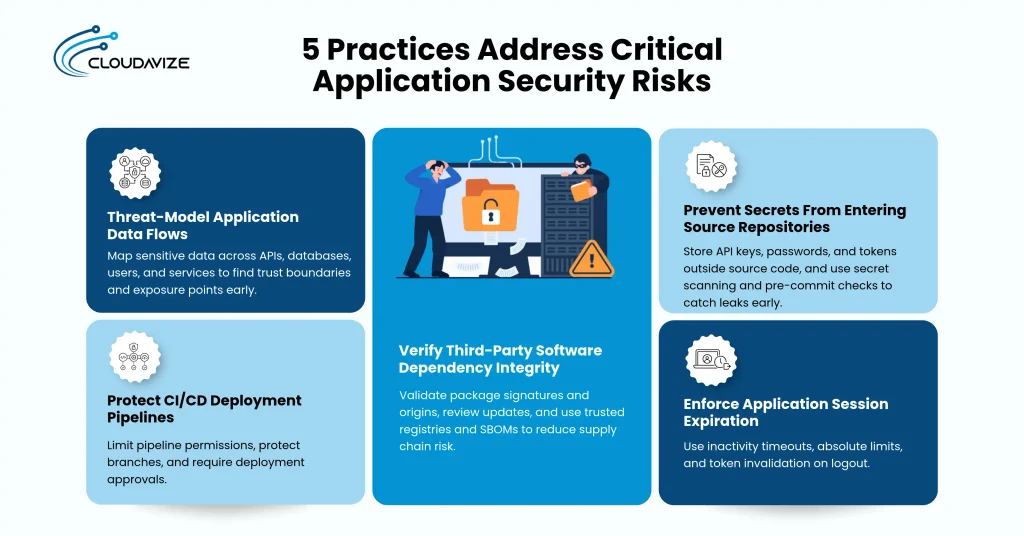
The following 5 practices address critical application security risks:
- Threat-Model Application Data Flows
Mapping sensitive data flows between APIs, databases, users, and external services reveals potential attack paths. Threat modeling identifies trust boundaries, unauthorized-access risks, and data-exposure points before application development or deployment.
- Protect CI/CD Deployment Pipelines
Restricting pipeline permissions, protecting source branches, and verifying deployment approvals prevents unauthorized software changes. Secure CI/CD workflows reduce the risk of compromised builds, malicious code injection, and unapproved releases reaching production environments.
- Verify Third-Party Software Dependency Integrity
Validating package signatures, verifying software origins, and reviewing dependency updates helps identify compromised components. Trusted package registries and software bills of materials (SBOMs) support dependency tracking and reduce software supply chain risks.
- Prevent Secrets From Entering Source Repositories
Storing API keys, passwords, and authentication tokens outside source repositories prevents accidental credential exposure. Automated secret scanning and pre-commit checks detect sensitive information before code commits or repository uploads expose application credentials.
- Enforce Application Session Expiration
Setting inactivity timeouts, absolute session limits, and logout-based token invalidation restricts unauthorized session reuse. These controls reduce exposure from unattended devices, stolen session tokens, and authenticated sessions that remain active beyond approved periods.
What Are Cloud Infrastructure Security Best Practices?
Cloud infrastructure security best practices include inventorying compute assets, restricting access to instance metadata, enforcing account guardrails, controlling infrastructure provisioning, and removing orphaned resources. These controls help businesses maintain visibility into cloud infrastructure, prevent unauthorized resource creation, and reduce exposure from unmanaged assets. Consistent infrastructure governance also supports secure deployments, configuration accountability, and resource lifecycle management.
Below are the 5 practices that address infrastructure security risks:
- Inventory Cloud Compute Assets
Maintaining an accurate inventory of virtual machines, containers, and compute instances identifies unmanaged infrastructure. Automated asset discovery records resource ownership, deployment locations, security configurations, and lifecycle status to support continuous infrastructure visibility.
- Restrict Instance Metadata Service Access
Limiting access to instance metadata endpoints prevents unauthorized retrieval of temporary cloud credentials. AWS EC2 Instance Metadata Service Version 2 (IMDSv2), for example, requires session tokens that strengthen protection against certain metadata access attacks.
- Apply Organization-Wide Cloud Account Guardrails
Enforcing centralized account restrictions prevents unauthorized infrastructure changes across cloud environments. AWS Service Control Policies and Azure Policy help restrict prohibited services, deployment regions, and resource configurations according to organizational security requirements.
- Control Production Resource Provisioning Through Infrastructure as Code
Requiring reviewed Infrastructure as Code (IaC) templates standardizes production resource deployment and limits manual configuration changes. Version-controlled templates, approval workflows, and automated policy checks help prevent unauthorized or insecure infrastructure provisioning.
- Remove Orphaned Cloud Resources
Identifying unused virtual machines, unattached storage volumes, and abandoned network interfaces reduces exposure from unmanaged infrastructure. Scheduled resource reviews verify ownership, confirm operational dependencies, and remove obsolete assets that no longer serve approved business functions.
What Are Cloud Network Security Best Practices?
Cloud network security best practices include protecting internet-facing services from DDoS attacks, restricting outbound traffic, using private endpoints, reviewing routing paths, and securing remote administration. These controls reduce network exposure, prevent unauthorized connections, and protect communication between cloud environments. Businesses can strengthen network security by controlling traffic flows, limiting public access, and verifying connectivity configurations.
5 practices that address critical cloud network security risks are:
- Protect Internet-Facing Services From DDoS Attacks
Deploying distributed denial-of-service (DDoS) protection helps maintain application availability during high-volume traffic attacks. AWS Shield and Azure DDoS Protection provide mitigation capabilities, while traffic monitoring helps identify abnormal request patterns and service disruptions.
- Restrict Unnecessary Outbound Network Traffic
Limiting outbound connections to approved destinations prevents cloud workloads from communicating with unauthorized external systems. Egress filtering, network firewall rules, and destination allowlists help reduce data exfiltration risks and restrict malicious command-and-control communication.
- Use Private Endpoints for Cross-Environment Connectivity
Establishing private connectivity between cloud workloads and supported services reduces reliance on public internet endpoints. AWS PrivateLink and Azure Private Link enable private service access, while VPNs or dedicated connections support connectivity between separate environments.
- Review VPC Peering and Routing Paths
Examining VPC peering connections, route tables, and transit gateway configurations identifies unintended network access paths. Regular routing reviews help detect overly broad connectivity, unauthorized network links, and routes that bypass established security boundaries.
- Restrict Public Remote Administration Access
Disabling unrestricted internet access to SSH, RDP, and administrative interfaces reduces exposure to credential attacks. Private management networks, identity-aware access gateways, and approved administrative sessions provide controlled alternatives to publicly accessible management ports.
How Should Businesses Prioritize Cloud Security Best Practices?
Businesses should prioritize cloud security best practices by ranking security gaps, assessing business impact, classifying control urgency, identifying dependencies, evaluating implementation effort, and reassessing changing risks. This risk-based approach directs security resources toward vulnerabilities that could cause significant operational or financial damage. When setting implementation priorities, organizations should consider exposed cloud assets, sensitive information, existing safeguards, and available technical resources. Prioritization should reflect measurable security risks, not arbitrary deployment schedules.
The following six steps help businesses establish cloud security priorities:
- Rank Security Gaps by Exposure
Evaluate cloud security gaps by exposure to identify weaknesses that attackers can reach or exploit through accessible resources. Internet-facing workloads, publicly accessible storage, and externally exposed administrative interfaces require closer examination than isolated internal systems. Security teams should assess network accessibility, exploit availability, existing protections, and affected assets. For example, an unprotected management interface accessible from the internet may warrant immediate attention because attackers can target it directly.
- Assess Business Impact
Measure the potential consequences of security failures to help businesses prioritize controls protecting critical operations and sensitive information. Assessments should consider financial losses, service interruptions, regulatory obligations, and reputational consequences. A compromised customer database may create greater business risk than an isolated development server containing non-sensitive test data. Security teams should document affected business processes, estimate recovery requirements, and identify systems whose disruption could significantly affect customers or essential services.
- Classify Security Controls by Urgency
Assign urgency levels to cloud security controls to distinguish immediate threats from improvements that can follow scheduled implementation cycles. Critical controls address actively exploited vulnerabilities, exposed sensitive information, or unauthorized administrative access. High-priority controls reduce significant weaknesses without confirmed exploitation, while lower-priority improvements address limited exposure. Security teams should define response deadlines for each category and escalate findings when threat intelligence or changing conditions indicate increased risk.
- Sequence Implementation by Dependencies
Identify technical dependencies to establish the correct implementation order and prevent cloud security controls from failing because prerequisite capabilities remain unavailable. For example, you may need to configure centralized identity management before conditional access policies can operate consistently. Asset inventories can support vulnerability assessments, while centralized logging enables broader threat monitoring. Security teams should document prerequisite systems, responsible owners, and deployment requirements before scheduling work. This sequencing reduces implementation conflicts and unnecessary reconfiguration.
- Account for Implementation Effort
Estimate implementation effort to help businesses balance security improvements against available budgets, technical resources, and operational constraints. Teams should evaluate licensing costs, deployment complexity, staff expertise, integration requirements, and potential service interruptions. Enabling an existing cloud security feature may require less effort than redesigning network architecture. However, low implementation cost should not outweigh significant security risk. Organizations should prioritize achievable improvements while allocating sufficient resources to complex, high-impact controls.
- Reevaluate Priorities as Risks Change
Review cloud security priorities regularly to ensure protection measures remain aligned with emerging threats, infrastructure changes, and evolving business requirements. New vulnerabilities, additional cloud services, and changes in data sensitivity can alter existing risk assessments. Security teams should reassess priorities after major deployments, incidents, audit findings, or relevant threat advisories. Updated risk registers should document revised severity ratings, responsible owners, and remediation deadlines. Continuous reassessment prevents outdated priorities from leaving critical cloud resources insufficiently protected.
How Can Businesses Verify Their Cloud Security Practices With a Checklist?
Businesses can verify cloud security practices by defining review scope, checking asset inventories, selecting benchmarks, collecting evidence, testing security controls, documenting failures, and confirming remediation. A structured cloud security checklist, supported by cloud security services, helps organizations determine whether implemented safeguards operate as intended across cloud accounts, applications, infrastructure, and data. Each verification step should produce documented findings that support accountability, corrective actions, and future security assessments.
The following 13 steps provide a practical cloud security verification checklist:
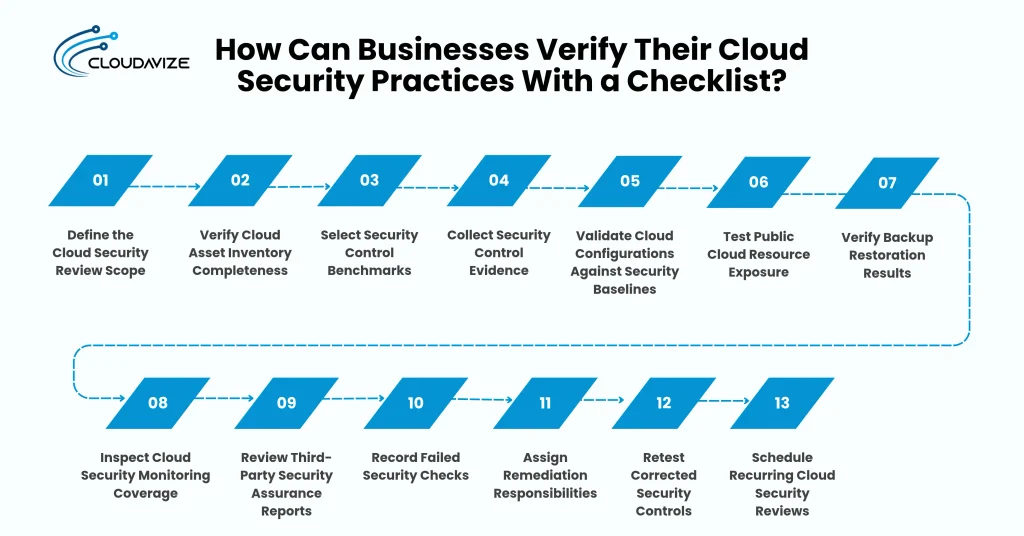
- Define the Cloud Security Review Scope
Identify the cloud accounts, applications, infrastructure, and data environments included in the security assessment. Document cloud providers, production workloads, sensitive data categories, and applicable compliance requirements. Establish review boundaries for AWS accounts, Azure subscriptions, or Google Cloud projects, including connected services. Assign assessment owners and document excluded resources with justification to prevent overlooking critical systems during verification.
- Verify Cloud Asset Inventory Completeness
Compare documented asset inventories against resources discovered through cloud management consoles, APIs, and automated discovery tools. Check virtual machines, databases, storage buckets, containers, and network components for missing records. Verify resource ownership, deployment regions, operational status, and security classifications. Investigate unregistered assets and reconcile discrepancies using AWS Config, Azure Resource Graph, or Google Cloud Asset Inventory where applicable.
- Select Security Control Benchmarks
Choose security benchmarks that align with cloud platforms, business risks, and applicable regulatory requirements. Reference CIS Benchmarks, NIST SP 800-53, or relevant cloud provider security guidance when establishing assessment criteria. Map selected requirements to specific cloud resources and security controls. Record benchmark versions, control identifiers, assessment methods, and approved exceptions to ensure consistent verification across different environments and review periods.
- Collect Security Control Evidence
Gather configuration exports, identity access reports, security logs, backup records, and policy documents that demonstrate implemented safeguards. Capture evidence directly from authoritative cloud management systems whenever possible. Record collection timestamps, resource identifiers, assessment periods, and responsible personnel. Store supporting documentation in an access-controlled repository with appropriate retention settings to preserve evidence integrity and support internal audits or external compliance assessments.
- Validate Cloud Configurations Against Security Baselines
Compare deployed cloud resource settings against approved security baselines to identify misconfigurations, unauthorized changes, and configuration drift. Use AWS Config, Azure Policy, or Google Cloud organization policy capabilities to evaluate supported settings. Review noncompliant resources against relevant CIS recommendations and internal requirements. Document affected configurations, expected values, observed deviations, and remediation actions, including justified exceptions requiring formal approval.
- Test Public Cloud Resource Exposure
Examine internet-facing cloud resources to identify unintended public access and excessive external permissions. Review storage bucket policies, network security rules, public IP assignments, and administrative endpoints. Use authorized exposure assessment tools to validate whether sensitive resources are reachable without appropriate restrictions. Record affected resource identifiers, accessible services, and exposure conditions. Escalate confirmed unauthorized access paths for immediate investigation and remediation.
- Verify Backup Restoration Results
Restore representative cloud backups in isolated testing environments to confirm data integrity, recoverability, and application functionality. Measure actual restoration duration against recovery time objectives (RTOs) and recovered data age against recovery point objectives (RPOs). Test databases, virtual machines, and critical application records using documented recovery procedures. Record unsuccessful attempts, missing information, recovery delays, and corrective actions before approving backup readiness.
- Inspect Cloud Security Monitoring Coverage
Review authentication logs, administrative activity records, workload events, and security alerts to confirm monitoring coverage across critical cloud resources. Verify AWS CloudTrail, Azure Monitor, or Google Cloud Audit Logs configurations where applicable. Check log retention, collection failures, alert thresholds, and SIEM integrations. Generate approved test events to confirm detection rules trigger notifications and responsible personnel receive alerts within established response timelines.
- Review Third-Party Security Assurance Reports
Examine vendor assurance documentation, including SOC 2 Type II reports, applicable ISO 27001 certifications, and independent security assessment findings. Verify reporting periods, covered services, identified exceptions, and complementary user entity controls. Determine whether vendor safeguards address contractual security requirements and relevant data processing risks. Document unresolved assurance gaps and request additional evidence when existing reports do not cover critical services.
- Record Failed Security Checks
Document failed cloud security checks in a centralized findings register with supporting evidence and affected resource identifiers. Specify the expected control requirement, observed condition, assessment date, and potential business impact. Assign severity ratings using exposure, exploitability, and data sensitivity. Link related findings to identify recurring weaknesses. Maintain consistent records so security teams can prioritize remediation and demonstrate assessment outcomes.
- Assign Remediation Responsibilities
Assign each identified security deficiency to an accountable internal owner or contracted MSP responsible for implementing corrective actions, while retaining organizational oversight of remediation outcomes. Establish remediation deadlines based on risk severity, resource criticality, and operational dependencies. Document required configuration changes, approval requirements, and implementation status in a centralized tracking system. Escalate overdue high-risk findings to appropriate management personnel. Require formal risk acceptance when immediate remediation cannot be completed within approved timelines.
- Retest Corrected Security Controls
Repeat the original security verification procedure after remediation to confirm identified deficiencies have been resolved. Compare updated configurations, access permissions, and test results against documented baseline requirements. Verify that corrective changes do not introduce additional security weaknesses or disrupt dependent services. Preserve before-and-after evidence, record validation dates, and close findings only after successful retesting confirms the required control operates correctly.
- Schedule Recurring Cloud Security Reviews
Schedule recurring cloud security assessments based on resource criticality, infrastructure changes, regulatory obligations, and organizational risk tolerance. Schedule additional reviews after major deployments, security incidents, or significant access policy changes. Use automated compliance reporting to identify configuration drift between formal assessments. Document review dates, responsible personnel, outstanding findings, and corrective action progress to maintain consistent security oversight across cloud environments.