Cloud Security for Small Businesses: Common Risks and How to Prevent Them
Cloud security for small businesses protects sensitive data, accounts, and applications from unauthorized access, data loss, and operational disruptions. As businesses rely on Microsoft 365, Google Workspace, cloud storage, and SaaS platforms, they face risks involving business email takeover, public file sharing, unrestricted guest access, former employee access, excessive third-party app permissions, and unapproved applications. These vulnerabilities, combined with unsecured personal devices and cloud configuration errors, increase security exposure. Ransomware in synced files, unrecoverable cloud data, and cloud service outages further threaten business continuity, especially when IT resources are limited.
Small businesses can address these risks through multi-factor authentication, restricted sharing permissions, guest access reviews, employee offboarding, application approval, and device security controls. Regular configuration assessments, ransomware protection, independent cloud backups, and outage planning further strengthen cloud cybersecurity. Business owners should also verify account access, review security alerts, test data recovery, and document security gaps. These practical measures help protect customer information and keep cloud operations reliable without requiring enterprise-level infrastructure.
The following 11 common cloud security risks can affect small-business data, applications, and daily operations:
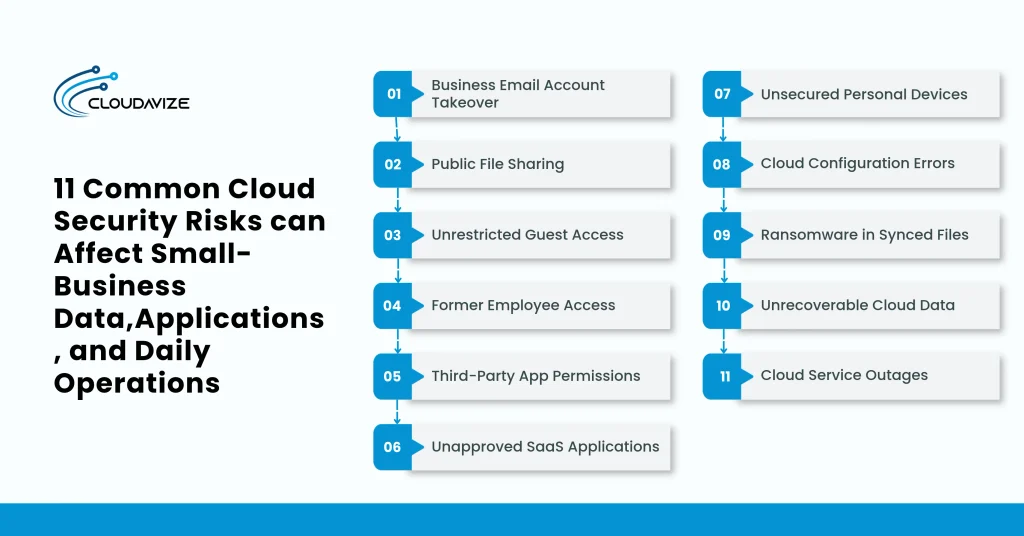
- Business Email Account Takeover
Cybercriminals can compromise SMBs’ Microsoft 365 or Google Workspace accounts through phishing pages, reused passwords, stolen credentials, or hijacked sign-in sessions. Unauthorized mailbox access exposes customer correspondence, invoices, confidential attachments, and payment instructions. Attackers may also create forwarding rules to monitor business conversations without the account owner’s knowledge.
Business email compromise resulted in approximately $3.05 billion in reported losses in 2025, according to the FBI’s Internet Crime Report. For example, an attacker could access an employee’s mailbox, intercept an outstanding invoice, and send a customer fraudulent bank details. The customer might transfer payment to the attacker’s account, causing financial loss and payment disputes. Multi-factor authentication, suspicious sign-in monitoring, and prompt session revocation help reduce account takeover risks for SMBs.
- Public File Sharing
SMB employees using OneDrive, SharePoint, or Google Drive may accidentally expose confidential documents by creating unrestricted sharing links. Anyone possessing a publicly accessible link may view or download customer records, contracts, quotations, or financial spreadsheets, depending on the configured permissions. Links that allow editing can also enable unauthorized document modifications. The Cloud Security Alliance’s 2025 SaaS security research found that 63% of surveyed organizations reported external data oversharing, highlighting the risks of inappropriate information sharing across SaaS environments.
A sales employee might create an unrestricted Google Drive link for a customer quotation and accidentally include a folder containing other customers’ pricing information. The exposure can continue as long as the link remains active. Restricting sharing to named recipients, reviewing link permissions, and disabling unnecessary public access helps protect sensitive business documents.
- Unrestricted Guest Access
External collaborators, including suppliers, freelancers, contractors, and customers, often receive guest access to Microsoft Teams, SharePoint, or Google Workspace resources. These permissions may remain active after a project finishes or a supplier relationship ends. Guest accounts with access to entire document libraries can expose business information unrelated to their original assignments.
A freelance accountant who receives access to financial statements may continue viewing shared accounting folders after completing the engagement. This unnecessary access increases exposure when invitations remain active, or permissions extend beyond the assigned project. Small businesses should designate guest account owners, restrict access to relevant folders, review outstanding invitations, and remove permissions when external collaboration ends.
- Former Employee Access
Departed employees may retain access to Microsoft 365, Google Workspace, cloud accounting systems, or other SaaS applications when offboarding procedures are incomplete. Active sign-in sessions, mobile applications, and automatic email forwarding rules can preserve access even after an employee stops working. Delayed communication between management and IT administrators increases this risk.
For example, a former sales representative might continue accessing customer correspondence, pricing documents, or company-owned files through an authenticated laptop session. Gaps in identity lifecycle management can complicate these transitions, with 54% of organizations surveyed by the Cloud Security Alliance in 2025 reporting a lack of lifecycle-management automation. SMBs should disable departing employees’ accounts, revoke active sessions, remove forwarding rules, and transfer required business records. A documented offboarding checklist helps administrators complete these actions consistently.
- Third-Party App Permissions
Connected applications can access Microsoft 365 or Google Workspace information through OAuth authorization grants. Employees may approve productivity tools that request extensive permissions to read mailboxes, manage calendars, or access cloud documents. Compromised integrations and forgotten application connections can retain these permissions long after their business purpose ends. Microsoft Threat Intelligence identified about 17,000 malicious multitenant OAuth applications in a 2023 campaign, with permissions that let attackers read emails, modify mailbox content, and send messages through Microsoft Graph.
An email scheduling application, for instance, might request permission to read an employee’s entire mailbox when its intended function requires narrower access. Such consent can expose confidential correspondence if the application becomes compromised. Small-business administrators should audit application permissions, limit sensitive consent grants, and revoke unnecessary integrations without disrupting approved workflows.
- Unapproved SaaS Applications
Staff members sometimes adopt cloud applications for file transfers, customer management, or team collaboration without informing business owners or IT administrators. This practice, commonly called shadow IT, can place customer records, contracts, and business documents in personal accounts outside company oversight. Administrators may lack visibility into application ownership, access permissions, and retention policies.
The extent of unauthorized SaaS usage is reflected in the Cloud Security Alliance’s 2025 findings, where 56% of surveyed organizations reported employees uploading sensitive data to unauthorized SaaS applications. For example, an employee might upload customer spreadsheets to a personal file-sharing account and leave the company without transferring ownership. A small business could lose control over stored information or struggle to retrieve it. An approved SaaS application register and simple software approval process help maintain accountability.
- Unsecured Personal Devices
Remote employees frequently access Microsoft 365, Google Workspace, and business cloud storage through personal laptops, smartphones, or shared computers. Unmanaged devices may lack operating system updates, device encryption, malware protection, or adequate screen locks. Lost phones and unattended browser sessions can expose downloaded documents, cached emails, and other company information.
Sensitive customer files stored on an unencrypted personal laptop may become accessible to unauthorized individuals if the device is stolen or infected with malware. Outdated operating systems and unmanaged applications can increase exposure to known security vulnerabilities. Small businesses can set minimum device security requirements, enable application-level protection, enforce software updates, and, where supported, remotely remove corporate information.
- Cloud Configuration Errors
Incorrect tenant configurations can expose Microsoft 365 and Google Workspace environments even when the underlying cloud platforms remain secure. Disabled security defaults, legacy authentication, excessive administrator privileges, and missing activity logging can weaken account protection and threat visibility. Cloud providers maintain their underlying infrastructure, while customers manage relevant identity, access, and tenant settings.
Legacy authentication settings illustrate how an overlooked administrative decision can weaken account security by allowing certain applications to use authentication methods that bypass modern MFA requirements. Excessive administrator privileges and inadequate audit logging can further limit security oversight. Regular configuration reviews should examine provider recommendations, administrative roles, authentication policies, and activity logging to identify weaknesses before attackers exploit them.
- Ransomware in Synced Files
Malware infecting an employee’s computer can encrypt or modify local business documents that synchronize with OneDrive, SharePoint, or Google Drive. Cloud synchronization services may replicate these unauthorized changes, affecting shared folders and other employees who access synchronized information. Synchronization alone does not prevent ransomware-related file damage.
Ransomware remains a significant threat to smaller organizations. The 2026 Verizon Data Breach Investigations Report found that about 96% of ransomware victims in its dataset were small and medium-sized businesses. For example, ransomware on an office laptop could encrypt current project spreadsheets before the synchronization client uploads the modified files. Colleagues may then encounter unusable documents in shared cloud folders. Endpoint protection, restricted modification permissions, software updates, and prompt device isolation help limit damage. Available file restoration features may support recovery.
- Unrecoverable Cloud Data
Accidental deletion, overwritten documents, expired retention periods, and removed employee mailboxes can make important cloud information unavailable. Microsoft 365 and Google Workspace offer recovery capabilities, but recycle bins, file version histories, and retention features vary by configuration. Synchronization also cannot guarantee recovery of information deleted or changed across connected locations.
Consider a small business discovering that deleted customer invoices are no longer recoverable after the applicable retention period expires. Missing correspondence or financial records can disrupt accounting and customer service. Independent cloud backups, suitable retention policies, and scheduled restoration tests help businesses verify that important information remains recoverable.
- Cloud Service Outages
Interruptions affecting Microsoft 365, Google Workspace, cloud accounting software, or other SaaS platforms can prevent employees from accessing customer records, processing orders, and communicating with clients. Provider infrastructure failures, application disruptions, and internet connectivity problems can produce similar operational consequences, even without a security breach.
Daily operations may slow considerably when a retailer cannot access its cloud accounting or order management platform during a service interruption. Delayed invoicing, unavailable customer records, and interrupted payment processing can affect revenue and customer satisfaction. Businesses should identify critical applications, establish alternative communication channels, keep data exports accessible, and document temporary manual workflows to support continuity during outages.
Which Risks Should Be Fixed First?
Small businesses should prioritize compromised administrator accounts, publicly exposed sensitive files, weak authentication, and critical backup failures before addressing lower-risk cloud configuration issues. Assess which Microsoft 365, Google Workspace, and SaaS systems hold confidential data, who can access them, and the potential financial or operational consequences of an incident. Following NIST’s risk-based guidance, rank issues by exposure, likelihood, and business impact. Schedule corrections based on available IT resources, implementation costs, and operational disruption, adjusting priorities to meet individual business requirements.
How Can Small Businesses Prevent These Risks?
Small businesses can prevent cloud security risks by enforcing MFA, restricting public sharing links, expiring guest access, revoking former employee access, reviewing third-party app consent, approving SaaS applications, securing devices, reviewing security settings, protecting file synchronization, maintaining independent backups, and preparing for outages. These measures reduce unauthorized access, data exposure, ransomware damage, and operational disruptions. Regular permission audits, security monitoring, recovery testing, and documented procedures help businesses maintain consistent protection across Microsoft 365, Google Workspace, and other cloud applications.
The following measures address common cloud security risks and help protect business data:
- Enforce MFA on Cloud Accounts
Multi-factor authentication (MFA) reduces unauthorized access to Microsoft 365, Google Workspace, and other cloud accounts by requiring verification beyond passwords. Small businesses should enforce MFA for employees, administrators, and privileged users. A 2023 Microsoft Research study by Meyer et al. found that MFA reduced account compromise risk by 99.22% across its analyzed population.
Phishing-resistant methods, including FIDO2 security keys and passkeys, provide additional resistance to fraudulent login pages. Administrators should monitor enrollment, address accounts without enforced MFA, and review suspicious sign-ins. Emergency administrator accounts also require appropriate access controls. Available authentication methods and enforcement capabilities depend on the cloud subscription.
- Restrict Public Sharing Links
Restricting public sharing links prevents confidential documents from becoming accessible to unintended recipients through OneDrive, SharePoint, or Google Drive. Small and mid-sized businesses should set sharing defaults to specific people rather than anyone with a link. Permissions should reflect whether recipients need to view, download, or edit customer records, contracts, and financial documents.
Link expiration dates, view-only permissions, and external sharing restrictions provide additional controls where supported. Regular permission reviews should identify unrestricted links, unnecessarily shared folders, and outdated access arrangements. Employees can continue collaborating with customers and suppliers through named-recipient sharing while limiting public exposure of sensitive business information.
- Expire Guest Access
Time-limited guest access allows small businesses to manage external collaboration across Microsoft Teams, SharePoint, and Google Workspace. Contractors, suppliers, and freelancers should receive permissions restricted to their assigned projects. Administrators can use supported expiration settings or scheduled access reviews to prevent accounts from remaining active unnecessarily. Each guest should have an identifiable business owner.
When projects end, administrators should review associated accounts, shared folders, and document permissions. Guests without an active business purpose should lose access promptly. Maintaining an updated guest register helps identify forgotten invitations, excessive permissions, and collaborators whose original sponsoring employee has left the organization.
- Revoke Former Employee Access
A documented offboarding process helps small businesses disable departing employees’ access to Microsoft 365, Google Workspace, cloud accounting software, and other SaaS applications. Managers should notify administrators when employment ends so they can disable accounts, revoke active sessions, remove connected devices, and inspect forwarding rules. Shared credentials may also require changes.
Business records must be transferred before permanent account deletion. Google Workspace allows deleted-user restoration within 20 days, while Microsoft 365 provides a 30-day restoration window, subject to applicable conditions. These limitations make timely ownership transfers and account management particularly important.
- Review Third-Party App Consent
OAuth consent reviews identify third-party applications with unnecessary access to business email, calendars, and cloud documents. Microsoft Threat Intelligence documented approximately 17,000 malicious multitenant OAuth applications created during a 2023 campaign. These applications had permissions that allowed mailbox access and phishing email distribution, showing how application authorization can be abused.
SMBs should examine existing consent grants, application publishers, permission scopes, and legitimate business requirements. Sensitive access requests should undergo approval before authorization. Removing unused connections and excessive permissions reduces opportunities for compromised integrations to access company information while preserving necessary workplace applications.
- Approve Workplace SaaS Apps
An approved SaaS application process helps businesses control software used for collaboration, document transfers, and customer management. Administrators should review ownership, data handling, account controls, and retention requirements before approving an application. IBM’s 2025 Cost of a Data Breach Report found that one in five organizations studied experienced breaches involving shadow AI, a specific example of risks associated with unauthorized applications.
Although shadow AI differs from general shadow IT, both show the importance of overseeing applications. Businesses should maintain a software register, assign responsible administrators, provide approved alternatives, and identify company information stored in personal accounts.
- Secure Employee Devices
Employee device requirements reduce exposure when employees access company cloud applications from laptops, smartphones, and remote workstations. Small businesses should require updated operating systems, device encryption, malware protection, and strong screen locks. These measures address weaknesses associated with stolen equipment, outdated software, and locally stored business information.
Verizon’s 2025 Data Breach Investigations Report identified vulnerability exploitation as an initial access method in 20% of analyzed breaches, though this finding covers broader systems, not employee devices alone. Businesses should keep devices updated, establish loss-reporting procedures, and enable remote removal of corporate data where supported. Device-management tools can help enforce minimum requirements.
- Review SaaS Security Settings
Regular SaaS configuration reviews help administrators identify weaknesses in authentication settings, administrator privileges, external sharing, and activity logging. Google Cloud’s H2 2025 Threat Horizons Report found that misconfigurations accounted for 29.4% of observed initial cloud access incidents during the first half of 2025. These findings concern Google Cloud environments rather than Microsoft 365 or Google Workspace tenants specifically.
Small and mid-sized businesses should use Microsoft Secure Score, Google Workspace recommendations, and supported configuration reports to examine existing settings. Reviewing legacy authentication, excessive permissions, and logging configurations helps identify gaps. Document approved exceptions, and recheck settings after major administrative changes.
- Protect Cloud File Synchronization
Endpoint protection and restricted editing permissions help limit ransomware damage to synchronized OneDrive, SharePoint, and Google Drive files. Verizon’s 2025 Data Breach Investigations Report identified ransomware in 44% of analyzed breaches, demonstrating its significance across investigated incidents. However, this figure does not specifically measure ransomware spreading through cloud synchronization.
Small businesses should update synchronization software, restrict unnecessary file-modification access, and monitor for unusual document changes. Isolate suspected infected devices promptly to limit further malicious synchronization. File version history and supported restoration functions may assist recovery, but administrators should test these capabilities before relying on them.
- Maintain Independent Cloud Backups
Independent backups help small businesses recover critical emails, customer records, financial documents, and shared files when native cloud recovery becomes insufficient. Backup frequency and retention should reflect business requirements, not rely solely on synchronization or recycle bins. Google Workspace documentation, for example, specifies a 20-day restoration window for deleted user accounts, underscoring why recovery limitations matter.
Administrators should maintain separate backup access, enforce MFA, restrict deletion privileges, and monitor failed jobs. Scheduled restoration tests should confirm that representative emails and files remain accessible and usable. Documenting recovery procedures also clarifies responsibilities during data-loss incidents.
- Prepare for SaaS Outages
Business continuity planning helps small businesses continue essential operations during Microsoft 365, Google Workspace, accounting platform, or internet outages. Uptime Institute’s 2025 analysis found that IT and networking issues accounted for 23% of impactful data-center outages in 2024. Although this research covers infrastructure outages rather than small-business SaaS interruptions, it shows the importance of planning for external service failures.
Businesses should identify critical applications, establish alternative communication channels, and keep contact information accessible. Temporary manual procedures, provider status notifications, and designated outage coordinators help operations continue. Periodic continuity exercises help employees understand responsibilities when cloud applications become temporarily unavailable.
How Can Small Businesses Check Their Cloud Security?
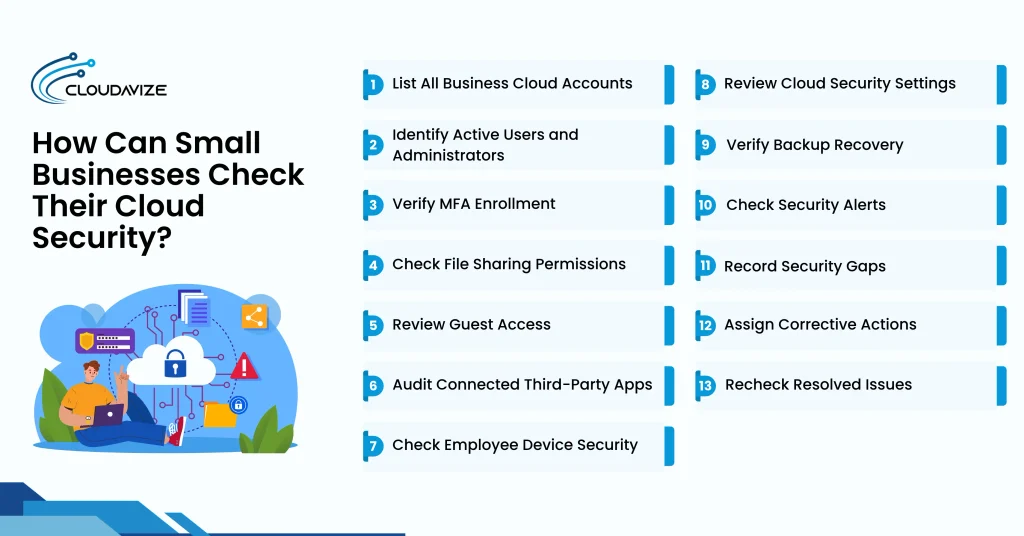
Small businesses can check cloud security by listing accounts, identifying users, verifying MFA, checking file sharing, reviewing guests, auditing third-party apps, inspecting devices, reviewing settings, testing backups, checking alerts, recording gaps, assigning corrections, and rechecking fixes. This structured assessment helps identify unauthorized access, configuration weaknesses, and recovery limitations across Microsoft 365, Google Workspace, and other SaaS platforms. Each check should produce documented findings that business owners or IT administrators can review and address systematically.
- List All Business Cloud Accounts
A cloud security review can begin with identifying applications used for email, file storage, accounting, and collaboration. Microsoft 365, Google Workspace, and CRM subscriptions provide useful starting points. Comparing administrator dashboards with invoices and employee application lists helps identify overlooked services. A simple inventory can document each application’s purpose, administrator, and business owner, including accounts requiring further review.
- Identify Active Users and Administrators
Reviewing active accounts against the current employee directory helps businesses understand who can access their cloud systems. Microsoft 365 and Google Workspace user directories can reveal duplicate accounts, former employees, and unnecessary administrator privileges. Privileged accounts deserve particular attention because they control important settings. Recording usernames, assigned roles, and discrepancies provides a clearer basis for reviewing access permissions and authentication requirements.
- Verify MFA Enrollment
Authentication reports can help determine whether multi-factor authentication is enforced across employee and administrator accounts. Microsoft Entra and Google Workspace provide relevant settings and reports, depending on subscription capabilities. The review should distinguish registered authentication methods from enforced MFA requirements. Document enrollment gaps, policy exceptions, and affected accounts to help administrators identify where additional verification or security adjustments may be needed.
- Check File Sharing Permissions
File sharing reviews help businesses understand who can access documents stored in OneDrive, SharePoint, and Google Drive. Customer records, contracts, and financial spreadsheets deserve particular attention. Checking public links, editing permissions, and external recipients can reveal unintended exposure. Compare these findings with approved sharing arrangements to distinguish legitimate collaboration from unnecessary access, and document affected files and their responsible owners.
- Review Guest Access
Review external guest accounts as contractor agreements, supplier relationships, and customer projects change. Microsoft Teams, SharePoint, and Google Workspace administration tools can provide relevant access records. Comparing guest permissions with active business relationships helps identify outdated invitations or excessive access. Recording each guest’s business purpose, assigned resources, and responsible owner makes future reviews easier and more consistent.
- Audit Connected Third-Party Apps
Connected application reviews provide visibility into software authorized to access business email, calendars, contacts, and cloud documents. Microsoft Entra and Google Workspace consent records can help identify OAuth permissions and application publishers. Checking whether integrations remain approved and actively used may reveal unnecessary access. Document unfamiliar applications and excessive permissions to support informed decisions without interrupting essential business workflows or integrations.
- Check Employee Device Security
Employee device reviews can help businesses understand how securely laptops, smartphones, and personal computers access cloud applications. Available Microsoft Intune or Google endpoint management records may show encryption, software updates, malware protection, and screen-lock status. Where centralized management is unavailable, documenting unverifiable requirements remains useful. The assessment can focus on devices accessing business information rather than unrelated personal equipment.
- Review Cloud Security Settings
Cloud configuration reviews help businesses understand whether their security settings align with internal policies and provider recommendations. Microsoft Secure Score, Google Workspace reports, and administrative dashboards can provide supporting information. Authentication policies, administrator privileges, external sharing, and audit logging are useful areas to examine. Document configured controls, potential weaknesses, and subscription limitations to create a clearer picture of the current security environment.
- Verify Backup Recovery
A controlled restoration test offers a practical way to assess whether cloud backups can recover important business information. Selecting a representative email, customer document, or shared folder provides a manageable starting point. Recent backup reports can support the assessment, but also check restored content for completeness and usability. Recording recovery time, test results, and missing information helps clarify recovery readiness.
- Check Security Alerts
Reviewing security alerts helps businesses understand how suspicious cloud activity is reported and handled. Microsoft 365, Google Workspace, and other SaaS platforms may provide notifications for unusual sign-ins, administrative changes, and security threats. Checking notification recipients and previous investigation records can reveal monitoring gaps. Available alert histories or supported notification tests can help confirm whether important warnings reach responsible personnel.
- Record Security Gaps
A cloud security register provides a convenient place to organize findings from account, permission, configuration, and backup reviews. Each entry can describe the affected application, observed issue, supporting evidence, potential impact, and review date. Separating confirmed weaknesses from unverified items improves clarity. Unique reference numbers also make it easier to follow individual findings through subsequent assessments.
- Assign Corrective Actions
Once you document security gaps, assign responsibility to manage next steps. Link each finding to a business owner, office administrator, internal IT contact, or outsourced technician. Correction dates may reflect the issue’s potential impact and operational requirements. Recording expected changes, responsible personnel, and necessary approvals provides accountability while keeping implementation progress separate from final verification.
- Recheck Resolved Issues
Follow-up reviews help confirm whether completed security changes have addressed the original findings. You can compare updated MFA policies, sharing permissions, cloud configurations, or backup results with previous records. Documenting verification dates and supporting evidence provides a reliable record of progress. Unresolved issues can remain open for further attention, while periodic assessments help maintain security as cloud applications change.
When Should Small Businesses Seek External Security Support?
Small businesses should seek external security support when they lack expertise to assess cloud permissions, investigate suspicious activity, resolve recurring configuration issues, or verify backups. Repeated incidents, sensitive customer records, and client security requirements also justify professional assistance. A managed IT provider can run security assessments, fix misconfigurations, manage employee access, monitor threats, and conduct ongoing reviews. Professional cloud security services help businesses address unresolved security gaps and maintain consistent protection across Microsoft 365, Google Workspace, and other SaaS applications.