7 Cloud Migration Strategies
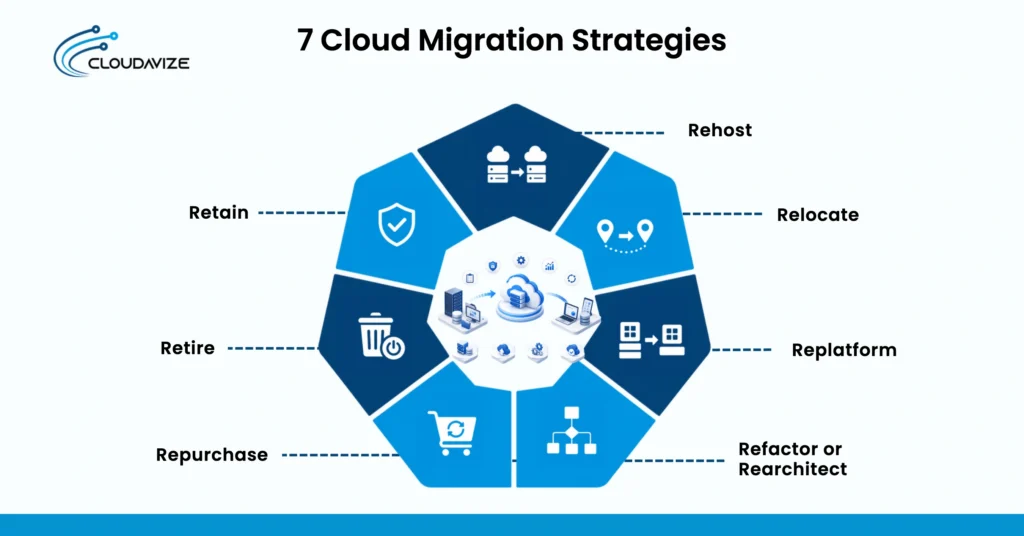
The 7 cloud migration strategies, commonly known as the “7 Rs” framework, are rehost, relocate, replatform, refactor or rearchitect, repurchase, retire, and retain. Each cloud migration strategy determines how much an application, workload, or infrastructure environment changes during migration. Rehosting and relocation preserve most existing configurations, while replatforming introduces selected managed cloud services. Refactoring or rearchitecting requires deeper application changes to support cloud-native capabilities. Repurchasing replaces existing software with a SaaS product, while retiring removes unnecessary workloads, and retaining keeps suitable systems in their current environment.
Choosing among these cloud migration strategies requires businesses to evaluate workload compatibility, dependencies, business goals, migration complexity, costs, security requirements, and downtime tolerance. For SMBs with limited internal IT resources, an MSP can assess workloads and match each system to an appropriate migration approach, rather than applying a single strategy across the entire environment. The MSP can also support cloud migration planning, implementation, testing, security, and ongoing cloud management, allowing internal teams to focus on business operations while reducing unnecessary migration complexity.
7 Cloud Migration Strategies are:
- Rehost
Rehosting migrates physical or virtual servers directly to public cloud infrastructure with no changes to the underlying application code or configuration files. Commonly known as “lift and shift,” this strategy appeals to organizations facing hardware end-of-life dates or urgent office lease expirations because of its speed and low technical risk. It allows IT teams to quickly establish a baseline cloud footprint using familiar administrative workflows.
For smaller businesses lacking dedicated software development staff, rehosting offers an accessible entry point to modern hosting without expensive refactoring projects. An MSP can also help assess resource requirements and optimize rehosted workloads after migration. Flexera reports that 53% of surveyed SMBs use AWS, showing substantial cloud adoption among smaller organizations. Flexera also estimates that 27% of cloud spending is wasted, reinforcing the need to optimize rehosted workloads after migration. - Relocate
Relocation seamlessly shifts hypervisor-level virtual machines between compatible cloud environments without changing network configurations, IP schemes, or security access policies. Unlike standard rehosting, which often converts virtual formats, the relocate strategy keeps the existing hypervisor management layer fully intact. This cloud migration strategy suits mid-market companies that require operational continuity with minimal application changes and downtime.
Growing SMBs operating virtualized clusters can gain cloud capacity without redesigning applications or retraining IT teams on different architectures. Relocation also supports hybrid infrastructure by letting businesses keep existing management practices and select on-premises systems while moving compatible workloads to the cloud. Gartner predicts that 90% of organizations will adopt a hybrid cloud approach by 2027, reinforcing the viability of relocation as a practical option for businesses that combine existing infrastructure with cloud capacity. - Replatform
Replatforming targets specific, high-value infrastructure upgrades around an application while preserving its core codebase intact. Organizations swap self-managed components, such as local relational databases or file queues, for fully managed cloud platform services. This middle-ground cloud migration strategy relieves operational strain caused by routine OS patching, database tuning, and manual backup routines.
Lean SMB technology teams find tremendous value here because it eliminates heavy administrative overhead without requiring costly software developer hires. By delegating infrastructure maintenance to cloud providers, small teams stay focused on core business priorities. An MSP can further support SMBs by managing cloud infrastructure, configurations, and ongoing platform requirements. Implementation involves an SMB migrating a custom web platform running on an aging local server. The core web code is rehosted, and the backend MySQL database is migrated to a managed cloud database service, which instantly automates backups and system updates. - Refactor or Rearchitect
Refactoring completely reimagines an application’s architecture to leverage cloud-native features such as microservices, serverless compute, and automated elasticity. This cloud migration approach suits core revenue-generating systems where feature velocity, high performance, and global availability directly impact the bottom line. While it demands significant developer talent, longer timelines, and upfront capital, it delivers unmatched long-term efficiency and lower operational costs.
Although complete architectural rewrites remain difficult for many traditional small businesses, technology-focused SMBs and SaaS companies may justify the investment when existing architecture limits growth. Research on monolith-to-microservices migration highlights the substantial effort and organizational implications of architectural refactoring. The potential benefit is an application designed around. A fast-growing e-commerce company can separate functions like checkout into scalable services, handling holiday traffic spikes without scaling the entire application. - Repurchase
Repurchasing retires a legacy internal system entirely, replacing its functionality with a cloud-native Software-as-a-Service product, such as replacing a self-hosted CRM or an on-premises email server. Organizations apply this strategy to standard business functions, such as payroll, email, or customer relationship management, where proprietary software offers no real market differentiation. Shifting to SaaS transfers all maintenance, security compliance, and version upgrades directly to the third-party platform provider.
For suitable SMB workloads, repurchasing can provide a practical cloud migration strategy when replacing legacy software is preferable to migrating it. Rather than funding server hardware or software maintenance, small firms buy predictable per-user subscriptions and instantly gain enterprise-grade capabilities. The primary effort centers on data migration and staff onboarding. A widespread example is a small business replacing an aging on-premises Exchange email server with Microsoft 365, transferring mailboxes and file libraries directly to the cloud while completely decommissioning local servers. - Retire
Retiring involves systematically shutting down obsolete applications, redundant services, or abandoned test environments discovered during pre-migration discovery. Over years of operation, IT environments naturally accumulate digital sprawl, unmonitored utility servers, and outdated software. Decommissioning these unused workloads shrinks overall project scope, cuts cloud licensing fees, and eliminates security vulnerabilities stemming from unpatched systems.
For growing SMBs that have accumulated technical clutter from unmanaged expansion, retiring obsolete systems immediately reduces operational costs and software renewal expenses. Before pulling the plug, teams must verify user logs and compliance retention rules to protect active business operations. A clear scenario arises when an SMB migration audit uncovers an old inventory server that was superseded by new software two years prior. Archiving the database to low-cost cold storage and powering off the machine eliminates needless migration work. - Retain
Retaining leaves specific applications in their current on-premises or co-location environment without modification. Often called “do nothing” or “keep-as-is,” this strategy applies when businesses choose not to migrate a workload because of strict regulatory compliance, data sovereignty rules, low-latency needs for local factory hardware, or recent hardware investments that have not fully depreciated. Leaving stable systems in place avoids unnecessary capital expenditure and operational risk when immediate cloud migration provides limited financial or technical value.
For cash-conscious businesses, retention can preserve the value of recent server investments while directing capital toward higher-priority digital initiatives. Review retained systems periodically as cloud technology and business requirements evolve. A practical example involves a local manufacturing firm operating a real-time production-line control system. Because physical machinery requires sub-millisecond network response times, the control server stays on-site while sales data synchronizes with the cloud.
How Do You Choose the Right Cloud Migration Strategy?
Choose the right cloud migration strategy by evaluating application compatibility, business goals, complexity, costs, compliance, and downtime tolerance. These factors determine which cloud migration strategy should be assigned to each workload: rehost, relocate, replatform, refactor, repurchase, retire, or retain. SMBs should align approaches with available budgets, technical skills, and growth goals. When internal cloud expertise is limited, a Managed Service Provider (MSP) can assess these requirements and successfully match each workload with the most appropriate migration path.
Here is how you can choose the right cloud migration strategy for your business:
- Application and workload compatibility
Evaluate your current architecture, operating systems, and dependencies to determine which cloud migration strategy fits your technical foundation. Legacy applications tightly coupled to specific hardware or outdated OS versions often require simple rehosting or relocation, as immediate modernization could cause breaking changes. Conversely, modern modular applications with flexible APIs are prime candidates for replatforming or refactoring. Carefully assess your internal code, database structures, and third-party integrations to choose a path that ensures operational continuity without introducing unexpected functional errors during migration. - Business goals
Align your cloud migration strategy directly with your organization’s broader strategic objectives and immediate growth milestones. If your primary goal is rapid market expansion, vacating a physical facility, or drastically cutting data center overhead, prioritize speed through rehosting or relocating. If your business focuses on accelerating feature delivery, driving continuous innovation, or enhancing product scalability, invest in refactoring or adopting SaaS solutions. Always measure the technical trade-offs against your long-term roadmap to ensure your selected path actively drives commercial value and agility. - Migration complexity
Measure the technical effort, staffing resources, and timeline required before committing to a specific migration strategy. Complex applications with deep technical debt, custom codebases, and intricate system dependencies require significant refactoring, thereby increasing project scope and technical risk. If your IT team lacks specialized cloud-native development skills or faces tight delivery windows, reduce complexity by choosing rehosting or replatforming. Staggering your migration into manageable, low-complexity phases helps maintain control, mitigates operational risk, and builds internal expertise without overwhelming your engineering resources. - Cost requirements
Analyze both immediate migration expenses and ongoing operational costs to select a financially sustainable approach. Upfront capital varies dramatically: refactoring requires heavy initial engineering investment but lowers long-term cloud compute costs, whereas rehosting minimizes initial spending but can lead to higher monthly runtime bills if unoptimized. For resource-constrained SMBs, leveraging replatforming or SaaS repurchasing often delivers the ideal financial balance. Calculate your total cost of ownership, factor in licensing shifts, and ensure your chosen strategy matches your operational budget and capital allocation strategy. - Security and compliance requirements
Map your regulatory mandates, data sovereignty rules, and privacy frameworks directly to your migration approach. Highly regulated industries that handle sensitive medical, financial, or personal data must evaluate whether public cloud environments meet strict compliance requirements. If certain workloads carry extreme regulatory exposure or strict data residency mandates, retaining them on-premises or using a hybrid relocation strategy is often the safest path. Thoroughly audit your encryption standards, access controls, and auditing capabilities before migrating workloads to maintain compliance and protect proprietary assets. - Downtime tolerance
Determine how much service disruption your business operations and end users can tolerate during the transition. Mission-critical systems that require 24/7 availability may require zero-downtime migration approaches, such as relocation or phased replatforming, supported by live migration, data synchronization, and failover mechanisms. If your business can accommodate planned maintenance windows, straightforward rehosting may provide a simpler migration path. Align the migration approach with recovery time objectives and availability requirements to minimize operational disruption and revenue risk. - Cloud-native capability requirements
Evaluate whether your application requires advanced cloud features such as auto-scaling, serverless compute, and managed services to meet performance demands. If your goal is simply shifting server hosting, rehosting achieves basic infrastructure offloading. However, if your workloads demand dynamic elasticity, global low-latency deployment, or automated resource allocation, you must refactor your software architecture or replatform supporting databases. Choose a strategy that directly unlocks the specific cloud-native capabilities your application needs to deliver optimal end-user performance and resilience.
What Are the Steps in a Cloud Migration Strategy?
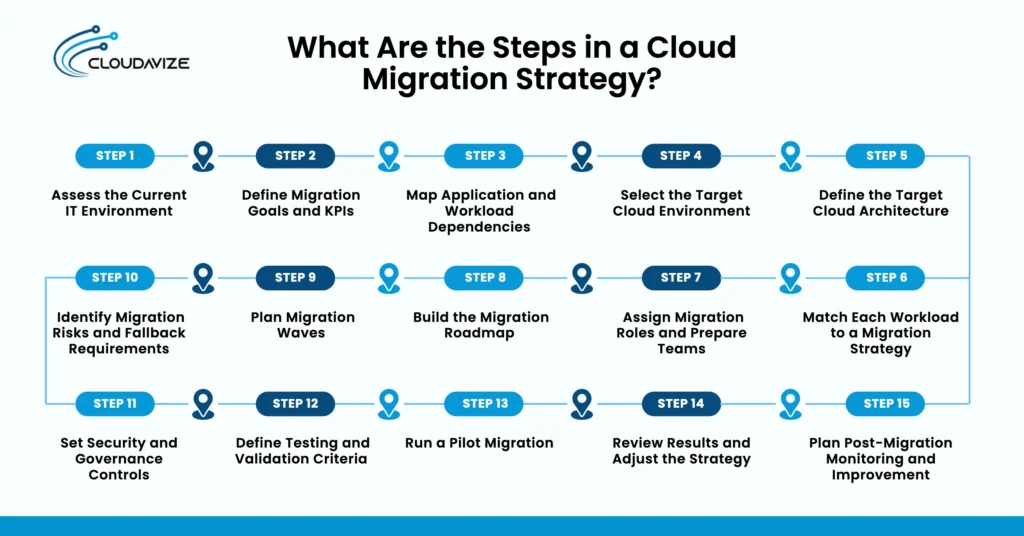
A cloud migration strategy starts with assessing the current IT environment, defining goals and KPIs, and mapping workload dependencies. Businesses then select the target cloud environment, define the cloud architecture, assign cloud migration strategies to workloads, and build a phased roadmap. A pilot validates the approach before broader migration waves, while post-migration monitoring tracks performance, costs, security, and operational results.
Here are the steps involved in a cloud migration strategy:
- Step 1: Assess the Current IT Environment
Catalog every on-premises asset, license, and workload to create a complete infrastructure baseline. Use automated discovery tools to audit server configurations, CPU utilization, storage footprints, and network settings. Uncovering legacy debt and shadow IT early prevents cutover cost overruns. Document technical specifications, operating system versions, and performance bottlenecks across your entire portfolio to ensure you don’t overlook critical dependencies during planning. - Step 2: Define Migration Goals and KPIs
Establish quantifiable business metrics and technical benchmarks to objectively measure migration success. Define key performance indicators, including target deployment timelines, cost-reduction percentages, latency thresholds, and uptime requirements. Align these goals directly with executive stakeholders to maintain organizational momentum. Tracking concrete baseline metrics before migrating allows your team to validate performance improvements and calculate a clear return on investment. - Step 3: Map Application and Workload Dependencies
Diagram every inter-service communication path, database connection, and API integration across your applications. Trace data flows using dynamic network mapping tools to identify tightly coupled systems that must migrate together. Failing to map hidden dependencies risks unexpected application outages, broken data pipelines, and severe latency bottlenecks. Group interdependent applications logically into isolated clusters to ensure seamless operational continuity during transition. - Step 4: Select the Target Cloud Environment
Choose public, private, or hybrid cloud environments based on performance, cost, and compliance needs. Evaluate major cloud providers against your specific workload requirements, geographic deployment regions, and vendor lock-in concerns. Consider multi-cloud architectures if vendor redundancy is critical, or hybrid models if latency and regulatory mandates require on-premises data retention. Select platforms offering native services that support your long-term vision. - Step 5: Define the Target Cloud Architecture
Design scalable, resilient cloud landing zones with standardized networking, identity, and access structures. Establish virtual private clouds, subnets, routing tables, and perimeter security controls before transferring data. Build infrastructure-as-code templates to automate environment provisioning and enforce a consistent security baseline. Designing robust landing zones ensures your cloud environment scales gracefully while maintaining operational control, regulatory compliance, and governance overall. - Step 6: Match Each Workload to a Migration Strategy
Assign one of the 7 R’s to every cataloged application based on business value and technical complexity. Rehost time-sensitive systems, replatform stable databases to managed services, and refactor core applications demanding cloud-native scalability. Retire redundant software and retain legacy systems that offer low return on effort. Matching strategies carefully prevent over-engineering simple applications and ensure adequate funding for major projects. - Step 7: Assign Migration Roles and Prepare Teams
Form dedicated cross-functional cloud execution teams and upskill personnel on target technologies. Define clear operational ownership across cloud architects, security engineers, database administrators, and DevOps specialists. Address internal skill gaps through formal vendor certifications and hands-on training labs. An MSP can supplement the internal team with cloud architecture, security, networking, or migration expertise where required. Empowering well-defined governance committees and execution units prevents operational bottlenecks, minimizes resistance to change, and accelerates decision-making throughout the entire migration lifecycle. - Step 8: Build the Migration Roadmap
Construct a timeline detailing milestones, resource allocations, and dependencies for the entire migration effort. Sequence activities logically, factoring in licensing contract expirations, peak business seasons, and staff availability. Include clear decision gates and budget checkpoints to systematically evaluate progress. A realistic, well-communicated roadmap aligns business leadership with technical execution teams, manages expectations, and keeps project costs strictly within baseline projections. - Step 9: Plan Migration Waves
Group workloads into phased migration waves based on dependency clusters and business risk profiles. Schedule low-risk, non-critical applications in initial waves to refine execution processes and validate tooling. Move complex, core business systems in later stages once your team gains operational confidence. Phasing migrations reduces the widespread blast radius, limits simultaneous business disruption, and allows continuous operational learning between execution cycles. - Step 10: Identify Migration Risks and Fallback Requirements
Develop comprehensive risk mitigation strategies and rollback procedures for every scheduled cutover wave. Document precise step-by-step fallback plans to restore on-premises operations instantly if critical failures occur during migration windows. Test data sync mechanisms continuously to prevent data corruption or loss. Predefining failure thresholds and automated recovery protocols ensures business continuity, protects data integrity, and minimizes unbudgeted operational downtime overall. - Step 11: Set Security and Governance Controls
Enforce strict identity management, continuous data encryption, and automated compliance auditing across the cloud ecosystem. Implement least-privilege access controls, multi-factor authentication, and centralized logging from the outset. Configure automated guardrails to detect configuration drift and unauthorized access attempts in real time. Embedding security directly into your cloud architecture protects sensitive assets, maintains regulatory compliance, and simplifies post-migration audit requirements overall. - Step 12: Define Testing and Validation Criteria
Establish rigorous performance, functional, and security validation protocols for each migrated application. Formulate test scripts covering load handling, database queries, API endpoints, and failover scenarios. Compare post-migration performance metrics directly against pre-migration baselines to verify functional parity completely. Require formal sign-off from application owners and security teams before declaring a workload successfully migrated and decommissioning the original source system infrastructure. - Step 13: Run a Pilot Migration
Execute a trial migration using a non-critical application to test processes, tools, and timelines in practice. Validate data transfer speeds, network connectivity, security policies, and team coordination during this trial run. Use the pilot to uncover hidden operational friction, technical gaps, and timing inaccuracies without risking core business operations. Refine your execution playbook based on pilot outcomes before launching enterprise waves. - Step 14: Review Results and Adjust the Strategy
Analyze pilot performance metrics, operational challenges, and execution timelines to optimize your overall migration playbook. Conduct thorough post-mortem reviews with technical teams and business stakeholders following initial deployments. Adjust wave scheduling, automation scripts, resource allocations, and communication flows based on empirical data. Continuous refinement transforms lessons learned into actionable process improvements, driving greater efficiency across all subsequent execution phases overall. - Step 15: Plan Post-Migration Monitoring and Improvement
Deploy continuous cloud monitoring, cost optimization, and performance tuning mechanisms after completing the cutover. Implement cloud financial management tools to eliminate idle resources, right-size instances, and manage reserved capacity effectively. Continuously analyze application performance logs to optimize responsiveness and resource utilization. Post-migration governance ensures your cloud footprint remains secure, cost-effective, and fully aligned with evolving business goals moving forward indefinitely.
What Are Tips for a Successful Cloud Migration Strategy?
To ensure a successful cloud migration strategy, prioritize workloads by business impact, partner with cloud providers, document application-specific plans, start with low-risk systems, maintain rollback options, validate through pilot testing, automate repeatable tasks, track KPIs, and review costs after each wave. Adopting these structured best practices minimizes operational downtime, eliminates budget overruns, and accelerates time-to-value while keeping core business functions secure.
Below are the tips for a successful cloud migration strategy:
- Prioritize Workloads by Business Impact
Analyze application criticality, complexity, and strategic value to determine migration sequencing. Transitioning high-impact, low-complexity systems early generates quick business wins and builds organizational momentum. Conversely, deferring deeply integrated core systems ensures your team gains operational maturity before tackling high-risk assets, effectively minimizing business disruption throughout the modernization journey. - Hire a Cloud Migration Provider
Partner with experienced cloud consultants or managed service providers to bridge internal skill gaps and accelerate timelines. Specialized cloud migration partners bring proven migration frameworks, automated tooling, and deep architectural expertise that prevent costly trial-and-error mistakes. Their guidance ensures your infrastructure aligns with industry best practices, regulatory standards, and long-term optimization goals. - Document the Migration Strategy for Each Workload
Create comprehensive architectural diagrams, runbooks, and strategy mappings for every application in your portfolio. Standardizing documentation for target configurations, data dependencies, and cutover procedures ensures clear operational alignment across cross-functional teams. Detailed migration documentation simplifies troubleshooting, accelerates technical decision-making, and serves as an essential reference for post-migration management. - Start With Lower-Risk Workloads
Begin your execution phase by migrating non-critical applications, dev/test environments, or standalone internal tools. Moving low-risk systems allows technical teams to test automation scripts, validate network connectivity, and refine cutover processes without threatening core revenue streams. Lessons learned from these early deployments help optimize the playbook for mission-critical systems. - Keep a Rollback Option for Critical Systems
Maintain parallel on-premises environments and real-time data synchronization during cutover windows to ensure instant recovery capabilities. Predefining clear failure thresholds and step-by-step rollback protocols protects data integrity if unexpected performance bottlenecks occur. A reliable fallback mechanism minimizes operational risk and ensures continuous business availability during complex transitions. - Validate the Migration Strategy With a Pilot
Execute an end-to-end trial migration with a representative workload to stress-test your deployment framework. A pilot migration uncovers hidden dependency gaps, network latency issues, and timing inaccuracies under real-world conditions. Analyzing pilot outcomes allows your team to recalibrate timelines, adjust automation scripts, and eliminate friction before launching major migration waves. - Use Automation for Repeatable Migration Tasks
Leverage Infrastructure as Code (IaC), automated configuration management, and server discovery tools to streamline deployment execution. Automating repetitive data replication, environment provisioning, and security policy enforcement drastically reduces human error and accelerates timeline delivery. Standardized automation pipelines ensure high consistency, repeatability, and operational efficiency across every migration phase. - Track Migration KPIs Throughout Execution
Continuously monitor key performance indicators such as migration speed, cost variance, system latency, and service availability against baseline targets. Real-time metric tracking provides immediate visibility into operational bottlenecks and budget overruns, enabling proactive adjustments to strategy. Clear KPI reporting keeps executive stakeholders informed and validates business value at each cutover stage. - Review Cloud Costs After Each Migration Wave
Audit resource utilization, licensing expenses, and billing statements immediately following every completed migration wave. Identifying over-provisioned instances, idle capacity, and unoptimized storage tiers enables your team to right-size workloads immediately. Routine financial reviews prevent cloud spend sprawl and ensure your new infrastructure delivers expected cost efficiencies.