5 Types of Cloud Migration
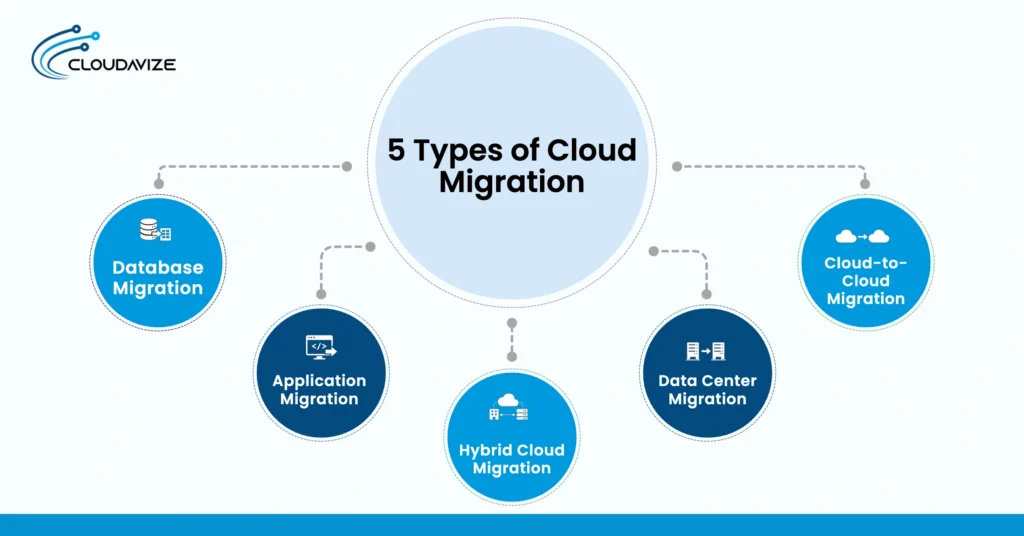
The five types of cloud migration are database migration, application migration, hybrid cloud migration, data center migration, and cloud-to-cloud migration. Database migration focuses on business data, while application migration moves operational software. Hybrid cloud migration combines cloud resources with retained on-premises systems. Data center migration transfers broader infrastructure, and cloud-to-cloud migration moves workloads between cloud environments or providers. These cloud migration types help businesses classify a move according to its primary scope and destination.
For SMBs, different types of cloud migration can address distinct requirements related to modernization, scalability, security, business continuity, and existing IT infrastructure. The types of migration in cloud computing should not be confused with cloud migration strategies, which define how workloads are rehosted, modified, replaced, retained, or retired. When an SMB has limited internal cloud expertise, an MSP can support migration by coordinating technical dependencies, infrastructure requirements, workload transitions, and continuity considerations while keeping the selected migration type aligned with operational needs and long-term cloud goals.
The 5 types of cloud migration are:
- Database Migration
Database migration is the process of moving a database and its structured data from an existing source environment to a target cloud environment, or between cloud environments, while preserving schema, data relationships, compatibility, and integrity. When part of a broader cloud data migration, it can move an on-premises database to cloud infrastructure such as AWS or Microsoft Azure. Among the types of cloud migration, database migration is specifically concerned with transferring and maintaining database systems and their structured data.
Depending on the source and target systems, the move can be homogeneous, heterogeneous, or a version upgrade. Homogeneous migration uses the same database engine, heterogeneous migration transfers data between different database engines, and a version upgrade moves a database to a newer version of the same system. These requirements are increasingly relevant as SMB cloud workloads expand. Flexera reported that public cloud workloads increased from 55% to 63% among SMBs year over year, compared with 52% to 54% among enterprises. An MSP can support SMBs by coordinating compatibility, transfer, validation, and acceptable downtime. - Application Migration
Application migration transfers business software from on-premises infrastructure or an existing cloud environment to a target cloud platform. During an application migration to the cloud, application code, runtime components, databases, APIs, and supporting services must remain compatible with the target environment. This distinguishes application migration from types of cloud migration centered primarily on data or infrastructure.
Cloud software migration may use rehosting, replatforming, or refactoring, depending on the extent of required application changes. Modernizing applications during migration can also enable continuous integration and continuous deployment (CI/CD) pipelines, supporting more frequent and consistent software releases. This can benefit SMBs modernizing existing software and development processes. Red Hat reported that 75% of surveyed companies had completed at least one small-scale application modernization project, while 51% planned to modernize their custom applications. The study also found that 85% of applications would undergo two or three iterative modernization steps, including rehosting, replatforming, and refactoring. - Hybrid Cloud Migration
Hybrid cloud migration moves selected workloads to cloud infrastructure while other applications, data, or systems remain in an on-premises or private cloud environment. This type of cloud migration creates an operating model in which cloud resources and existing infrastructure continue to work together. Connectivity, integration, and data exchange matter because cloud-hosted applications may still depend on systems that remain outside the public cloud.
For SMBs, hybrid cloud models retain on-premises systems required for compliance, latency, security, operations, or legacy dependencies while moving other workloads to cloud infrastructure. Flexera’s 2026 report found that 73% of organizations use hybrid cloud, up 3 percentage points year over year. Hybrid and multi-cloud environments can also emerge from inherited architectures or siloed teams, making MSP support valuable for coordinating connectivity, workloads, and dependencies across infrastructure. - Data Center Migration
Data center migration relocates part or all of an organization’s physical and virtual IT resources from an existing data center to cloud infrastructure to modernize systems, consolidate computing resources, and reduce dependence on on-premises hardware. A cloud data center migration can include servers, storage, networking, databases, virtual machines, applications, and workloads, not just a single computing resource. It can include server, physical-to-cloud, VM, or infrastructure migrations, helping SMBs replace aging systems and transition broader IT environments to scalable cloud resources. Compared with other types of cloud migration, data center migration typically has a broader infrastructure scope because multiple interconnected IT resources may move together.
Demand for data center migration also reflects the broader movement toward cloud-based infrastructure. According to the Data Center Migration Market Report 2026, the global market is valued at USD 16.81 billion in 2026 and is projected to reach USD 31.22 billion by 2030, at a CAGR of 16.7%. The report connects this projected growth with increasing cloud adoption and enterprise modernization initiatives, which require existing infrastructure and workloads to move between computing environments. - Cloud-to-Cloud Migration
Unlike migration that begins with on-premises infrastructure, cloud-to-cloud migration transfers applications, data, workloads, or infrastructure from one cloud to another. The move occurs between different providers or cloud environments, making workload portability, dependencies, interoperability, data transfer, and platform compatibility important factors. For SMBs, this migration becomes relevant when changing cloud providers, consolidating cloud services, or operating workloads in a multi-cloud environment. It differs from types of cloud migration that originate on-premises because both the source and target environments are cloud-based.
Growth in multi-cloud management provides context for the environments in which these transfers can occur. Fortune Business Insights valued the global multi-cloud management market at USD 13.43 billion in 2025 and projects it to reach USD 17.05 billion in 2026 (Source: Fortune Business Insights, Multi-Cloud Management Market). The figure does not measure cloud-to-cloud migration itself, but reflects a growing ecosystem for managing applications and workloads across platforms such as AWS and Azure.
What are the Cloud Migration Strategies?
The seven strategies are rehosting, replatforming, refactoring, relocating, repurchasing, retaining, and retiring. Unlike the types of cloud migration, which identify what is moving or the environments involved, cloud migration strategies define the level and nature of change applied to individual workloads during migration. They also determine whether an application or workload moves with minimal changes, undergoes modification, gets replaced, remains in place, or is decommissioned.
Below are the cloud migration strategies:
- Rehosting
Rehosting transfers an existing application or workload to cloud infrastructure while preserving most of its current architecture, configuration, and operating model. Because development changes remain limited, an SMB can use rehosting when the immediate objective is to leave on-premises infrastructure without redesigning working software. An example is moving an on-premises virtual machine to a cloud compute instance. The application changes location, but its underlying architecture largely remains intact during cloud migration. - Replatforming
Cloud replatforming introduces targeted cloud optimizations while preserving the application’s core architecture, placing it between a direct rehost and a larger architectural redesign. An SMB might choose this approach when an existing application still meets business requirements, but selected infrastructure components can operate through managed cloud services. For example, a business can move its existing database to a managed cloud database service. This demonstrates how organizations replatform in cloud migration without rebuilding the application. - Refactoring
Applications that need deeper modernization can undergo cloud refactoring, in which developers redesign code or architecture to leverage cloud-native capabilities rather than simply changing the hosting environment. This cloud migration strategy requires greater architectural change than rehosting or replatforming and can alter how application components communicate, scale, or operate. For example, a monolithic application can be converted into independently deployed microservices. Cloud native migration through refactoring therefore changes the application itself as part of its cloud transition. - Relocating
Rather than migrating applications individually, relocating transfers the broader environment in which existing applications and workloads operate. The applications remain largely unchanged, making migration scope the key distinction between relocating and rehosting. A business might relocate an existing virtualized environment, including multiple virtual machines and their supporting configuration, to compatible cloud infrastructure without redesigning each application. This cloud migration approach moves an established workload environment while preserving the application architecture that operates within it. - Repurchasing
Repurchasing replaces an existing application with a cloud-based product when adopting new software fits better than migrating and maintaining the current application. Instead of transferring the original application architecture, the business moves the required functionality and relevant data to the replacement system. This can suit an SMB whose existing software no longer meets its cloud or operational requirements. For example, the business can replace an on-premises CRM with a SaaS CRM platform and transfer relevant customer data to the new system. - Retaining
Retaining keeps an application or workload in its existing environment when technical dependencies, operational requirements, or migration constraints make moving it to the cloud unsuitable or unnecessary. As a result, organizations can migrate suitable workloads without requiring every system to follow the same migration path. For example, an SMB might retain a legacy application on-premises because it depends on dedicated hardware or another existing system that cannot currently move. The retained application continues operating while the broader cloud migration proceeds. - Retiring
Retiring permanently decommissions applications or systems that are obsolete, duplicated, or no longer needed, removing them from the cloud migration scope instead of transferring unnecessary workloads to the target environment. This avoids allocating migration effort and cloud resources to systems that no longer serve a required business function. For example, an SMB may retire an outdated internal application when another system already provides the same functionality. Unlike retaining, retiring removes the application from active use rather than keeping it in its existing environment.
What Are the Steps in the Cloud Migration Process?
The cloud migration process follows seven high-level stages, including assessing the current environment, defining goals and scope, choosing the migration type and strategy, planning the migration, migrating resources, testing and validating, and optimizing and monitoring the cloud environment. Each stage prepares applications, data, workloads, and cloud infrastructure for the next phase while controlling dependencies, downtime, and business continuity requirements throughout the migration.
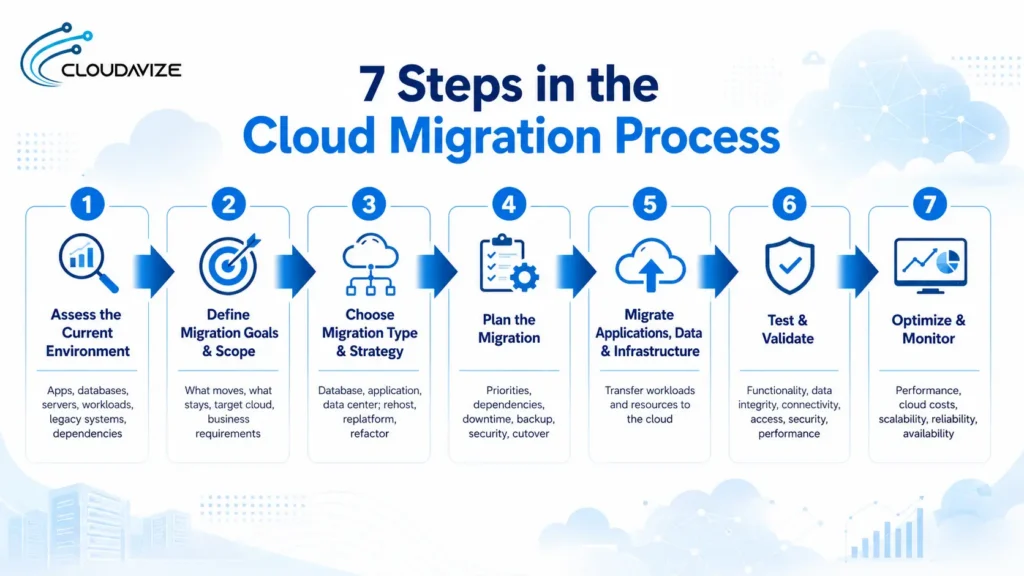
Below are the 7 steps of the cloud migration process:
- Step 1: Assess the Current Environment
Create a clear inventory of what the business currently operates before deciding what will move to the cloud. Identify applications, databases, servers, data, workloads, existing infrastructure, and legacy systems, then document the dependencies connecting these resources. For an SMB, this establishes the practical scope of migration and prevents dependent systems from being treated as isolated assets. The assessment should clarify the current environment and relationships between resources rather than expanding into detailed audits, assessment tools, or migration execution. - Step 2: Define Migration Goals and Scope
Determine what will move, what will remain, where migrated resources will operate, and what business requirement the migration must address. The scope should connect the target cloud environment with a defined business case, such as supporting scalability, changing existing infrastructure, or modernizing selected systems. SMBs should also consider business continuity when determining which workloads can move and which must remain available. Clear boundaries keep the migration focused on resources that support the intended business and infrastructure changes. - Step 3: Choose the Migration Type and Strategy
Match each workload with both the appropriate migration type and the amount of technical change it requires. The right choice among cloud migration types should reflect what you’re moving, such as a database, application, or data center environment. The strategy should then establish how that resource will move, using an approach such as rehosting, replatforming, or refactoring. For SMBs, separating these two decisions helps distinguish migration scope from technical treatment and prevents every application or workload from being assigned the same migration approach. - Step 4: Plan the Migration
Set the migration sequence around workload priority, application dependencies, data transfer requirements, expected downtime, backup availability, security, access, and cutover timing. Applications and systems with dependencies should be coordinated so connected resources move in an order that supports continued operation. SMBs should give particular attention to business continuity when customer-facing or operational systems cannot tolerate extended disruption. The plan should establish how migration activities fit together without becoming a detailed technical procedure for transferring every individual resource. - Step 5: Migrate Applications, Data, and Infrastructure
Transfer the selected applications, data, servers, workloads, and infrastructure to the target cloud environment in accordance with the migration plan and chosen strategy. Moving applications may involve direct transfers or planned modifications, while data and infrastructure must be migrated to the selected cloud services for their target state. For an SMB, execution should remain aligned with established dependencies and availability requirements so connected systems continue functioning as intended. This stage puts the planned cloud infrastructure and workload changes into operation. - Step 6: Test and Validate the Migration
Confirm that the migrated environment functions as intended before considering the transfer complete. Check application functionality, data integrity, connectivity, user and system access, security controls, performance, and dependencies within the target cloud environment. Validation should establish that migrated records remain accurate and that connected applications and services communicate correctly. For SMBs, testing operational workflows is particularly relevant because failures in customer-facing, financial, or internal systems can affect normal business activity even when the underlying migration itself has completed successfully. - Step 7: Optimize and Monitor the Cloud Environment
Track performance, resource consumption, cloud costs, scalability, reliability, and service availability after workloads begin operating in the target environment. Monitoring shows whether cloud services are supporting expected workload requirements, while cost optimization identifies resources whose capacity or use does not match actual demand. SMBs can use this stage to keep cloud infrastructure aligned with changing operational requirements without treating migration as finished at cutover. Continued monitoring also supports business continuity by identifying performance or reliability issues after migration.
What Are the Common Challenges of Cloud Migration?
The most common cloud migration challenges are application compatibility, data security and compliance, downtime, data integrity risks, legacy system dependencies, migration complexity, cloud cost management, and skills gaps. These technical, operational, security, and cost challenges can affect how reliably applications, data, workloads, and infrastructure move to the target cloud environment. Each challenge requires a different response based on the systems, dependencies, and business requirements involved.
8 common challenges of cloud migration include:
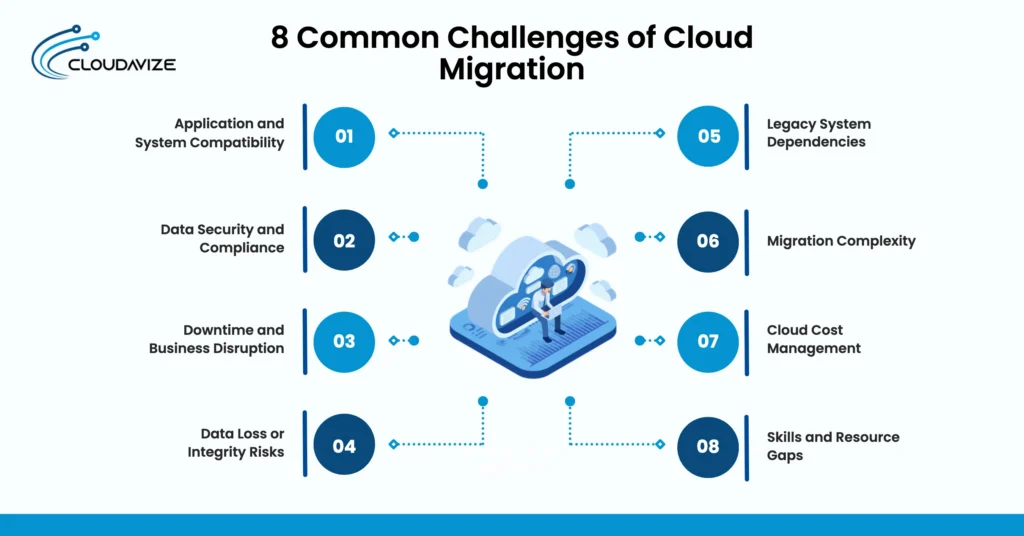
- Application and System Compatibility
Legacy applications and existing systems may not operate correctly in the target cloud environment because their operating systems, configurations, software components, or dependencies were designed for different infrastructure. Unsupported components can prevent workloads from functioning as expected after migration. Businesses can address compatibility issues by identifying dependencies before migration and determining whether affected applications should be rehosted, replatformed, refactored, or retained. - Data Security and Compliance
Sensitive business and customer data can face additional exposure while records are transferred, permissions change, and access controls are recreated in the target environment. Regulatory and industry requirements, such as GDPR, HIPAA, or PCI DSS, may also govern data location, retention, authorized access, and security controls throughout migration. Organizations can reduce this exposure by maintaining required access controls, encryption, permissions, and applicable compliance requirements across both the source and target environments during the transfer. - Downtime and Business Disruption
Migration activities can temporarily interrupt access to applications, data, and cloud services during transfer, testing, synchronization, or final cutover. Even planned downtime can affect employees, customers, transactions, and connected business processes when systems become unavailable. For SMBs with fewer alternative systems, these interruptions can have wider operational effects. Downtime therefore directly affects business continuity and service availability during the cloud migration process. - Data Loss or Integrity Risks
Records can go missing, become corrupted, duplicated, or become inconsistent when data moves from source databases and storage systems into a cloud environment. These errors can also disrupt applications that depend on accurate relationships between datasets. Organizations can control this risk by validating record counts, database relationships, data completeness, and integrity before and after transfer, so they can identify discrepancies before migrated data supports production workloads. - Legacy System Dependencies
A legacy application may depend on specific hardware, operating systems, databases, integrations, or other applications within existing on-premises infrastructure. For SMBs with older technology, one legacy system can support several interconnected business processes, making isolated migration difficult. Businesses can manage these dependencies by mapping connected components and deciding which systems must migrate together, remain on-premises, or undergo modification before dependent workloads move. - Migration Complexity
Interconnected applications, databases, networks, workloads, servers, and infrastructure create coordination challenges because changing one component can affect the availability or functionality of others. Complexity increases further when several workloads must move while existing business systems remain operational. A phased migration can make these relationships more manageable by grouping dependent workloads, establishing migration order, and validating each group before additional systems move to cloud infrastructure. - Cloud Cost Management
Data transfer fees, overprovisioned resources, duplicate source and cloud environments, and unsuitable cloud services can cause actual spending to differ from the cost optimization assumptions in the original business case. This can be significant for SMBs operating with tighter IT budgets. Businesses can control cloud costs through proactive cloud financial management (FinOps) practices, such as aligning resource capacity with workload demand, monitoring cloud consumption, reviewing service selection, and removing unnecessary resources or duplicate environments after migration. - Skills and Resource Gaps
Cloud migration may require expertise across architecture, networking, security, databases, applications, infrastructure, and specific cloud platforms that an internal IT team does not fully possess. Smaller SMB teams can face greater pressure when several technical responsibilities overlap during migration. Businesses can address capability gaps by defining required expertise early and using qualified external support, such as an MSP, for migration activities that exceed available internal cloud skills or resources.
Which Cloud Migration Type Is Right for Your Business?
Database migration fits businesses modernizing business-critical data, while application migration suits those moving operational, customer-facing, or internal software. Hybrid cloud migration suits businesses that must retain some on-premises systems because of compliance, security, latency, legacy dependencies, or operational requirements.
For broader infrastructure changes, data center migration helps businesses reduce dependence on physical IT infrastructure. Cloud-to-cloud migration, in comparison, supports organizations changing cloud providers, consolidating cloud environments, or adopting a multi-cloud strategy.
For SMBs, suitability also varies with business size, workload criticality, scalability needs, security and compliance requirements, acceptable downtime, existing IT infrastructure, migration scope, and long-term cloud goals. Businesses that need external expertise to align these requirements with an appropriate migration approach can work with cloud migration services in Dallas.