
Top 10 Benefits of Azure for Your Business
The benefits of using Microsoft Azure include scalable infrastructure, lower hardware costs, stronger security, centralized user access, reliable data protection, improved uptime, hybrid cloud integration, AI readiness, faster IT workflows, and reduced server maintenance. Together, these capabilities help businesses modernize their IT operations, support changing workload demands, strengthen operational resilience, and extend existing Microsoft environments without requiring a complete infrastructure replacement.
Business requirements often vary depending on company size, existing Microsoft investments, and cloud adoption goals. Small businesses typically focus on reducing infrastructure costs and improving resilience; midsize organizations prioritize workload scalability and operational consistency; while Microsoft-based businesses look for seamless integration and hybrid migration. Successful Azure adoption also depends on careful infrastructure planning, cost management, access control, backup preparation, and understanding the platform’s operational considerations before moving business-critical workloads to the cloud.
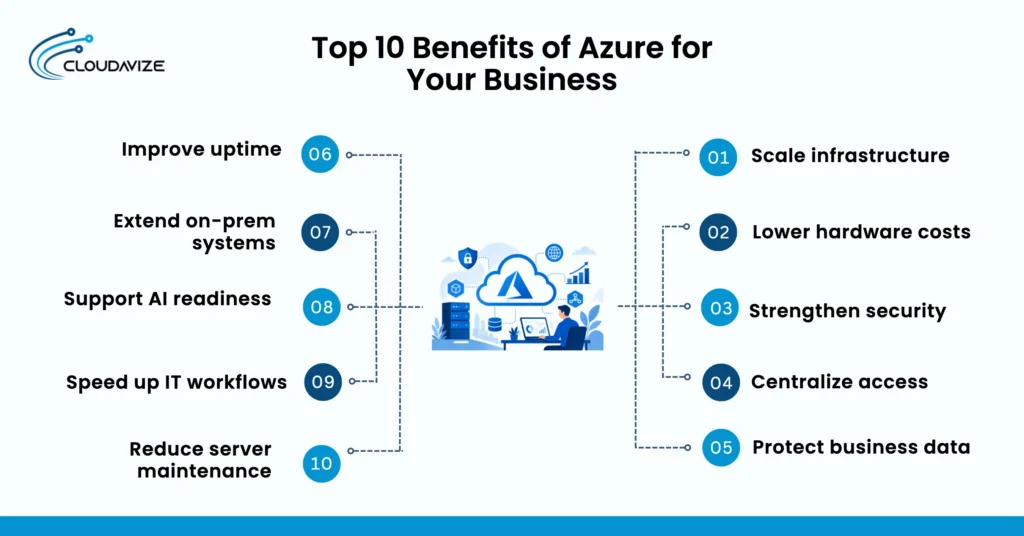
Here are the top 10 benefits of Azure for your business:
- Scale Infrastructure
Scalable infrastructure allows businesses to increase or reduce cloud resources as workload demands change without replacing physical hardware. This flexibility helps organizations maintain application performance during periods of growth while avoiding unnecessary infrastructure investments when demand declines.
Instead of purchasing additional servers to prepare for future demand, businesses can allocate compute, storage, and networking resources based on actual usage. Azure supports vertical and horizontal scaling for workloads such as web applications, databases, and virtual machines, allowing IT teams to respond more quickly to changing business requirements.
For example, an eCommerce business can automatically increase application capacity during seasonal sales events and reduce resources after traffic returns to normal. This approach helps maintain a responsive customer experience while using cloud infrastructure more efficiently.
- Reduce Hardware Costs
Lower hardware costs are one of the primary financial benefits of adopting Microsoft Azure because businesses can shift from purchasing physical infrastructure to paying only for the cloud resources they use. This consumption-based model gives organizations greater flexibility when planning IT budgets and expanding operations.
Traditional infrastructure often requires significant capital investment in servers, storage devices, and networking equipment before workloads can grow. Azure replaces much of that upfront spending with scalable cloud services, allowing businesses to increase or decrease resource usage as operational requirements change.
A growing company, for example, can launch a new application without investing in additional server hardware, reducing capital expenditure while maintaining the flexibility to scale as demand increases.
- Strengthen Security
Stronger security helps businesses protect applications, data, and user identities against evolving cyber threats. Azure combines multiple security services into a centralized platform, making it easier to implement consistent protection across cloud workloads.
Security capabilities such as Microsoft Defender for Cloud, Microsoft Entra ID, encryption, and built-in compliance tools help organizations monitor risks, manage user access, and respond to potential threats before they disrupt business operations. Centralized security policies also improve governance across multiple cloud resources.
For example, a professional services firm can require multifactor authentication for remote employees while continuously monitoring workloads for suspicious activity from a single management platform.
- Simplify User Access
Centralized identity management makes it easier to control how employees, contractors, and partners access business applications. Managing users from a single platform reduces administrative effort while improving security across the organization.
Microsoft Entra ID allows businesses to create role-based access controls, enable single sign-on, and apply conditional access policies based on user identity, device status, or location. These capabilities reduce password-related issues while helping organizations enforce consistent access policies.
As an example, new employees can receive secure access to Microsoft 365, Azure resources, and approved business applications through a single identity instead of separate user accounts for each system.
- Protect Business Data
Reliable data protection helps businesses recover important information after accidental deletion, hardware failures, ransomware attacks, or other unexpected events. A well-designed backup strategy also supports business continuity by reducing the impact of data loss.
Azure Backup and Azure Site Recovery allow organizations to protect virtual machines, databases, and critical workloads using automated backup schedules and disaster recovery plans. Centralized management simplifies backup administration while supporting recovery objectives.
For example, a healthcare provider can restore patient records from secure cloud backups after a server failure, minimizing operational disruption and reducing downtime.
- Improve Business Continuity
Improved business continuity enables organizations to maintain essential operations during system outages, cyber incidents, or infrastructure failures. Preparing recovery processes before disruptions occur helps reduce downtime and improve service availability.
Azure supports high availability through geographically distributed data centers, redundancy options, and disaster recovery services that replicate workloads across multiple locations. These capabilities allow businesses to restore applications more quickly when unexpected events occur.
For instance, an online retailer can continue serving customers from a secondary Azure region if its primary environment becomes unavailable, helping maintain sales and customer confidence.
- Support Hybrid Cloud Environments
Hybrid cloud capabilities allow businesses to integrate existing on-premises infrastructure with Azure instead of replacing everything at once. This approach supports gradual cloud adoption while protecting previous technology investments.
Services such as Azure Arc, Azure VPN Gateway, and Azure ExpressRoute help connect local servers, applications, and cloud resources into a unified environment. Businesses can migrate workloads in phases while continuing to operate critical systems on-premises when necessary.
A manufacturing company, for example, can keep production systems running locally while moving backup services, analytics, and customer applications to Azure over time.
- Prepare for AI Adoption
Artificial intelligence initiatives depend on scalable infrastructure, secure data management, and modern cloud services that support model development and deployment. Azure provides these foundational capabilities without requiring organizations to build specialized infrastructure from scratch.
Businesses can combine services such as Azure AI, Azure Machine Learning, Azure OpenAI Service, and cloud data platforms to develop intelligent applications, automate workflows, and analyze business information more effectively.
For example, a customer support team can implement AI-powered chat assistance that answers routine questions while allowing staff to focus on more complex customer requests.
- Increase IT Efficiency
Higher IT efficiency allows technical teams to spend less time managing infrastructure and more time supporting business initiatives. Automation and centralized management reduce repetitive administrative tasks across cloud environments.
Azure provides monitoring, automation, policy management, and infrastructure deployment tools that simplify routine operations while improving consistency across workloads. Standardized processes also reduce configuration errors during system changes.
An IT department managing multiple business locations, for instance, can deploy updates and monitor cloud resources centrally instead of maintaining each environment independently.
- Reduce Server Maintenance
Reduced server maintenance frees businesses from many routine infrastructure responsibilities, including hardware replacement, firmware updates, and physical capacity planning. Shifting these responsibilities to managed cloud services allows IT teams to focus on higher-value projects.
Microsoft manages the underlying cloud infrastructure while organizations continue administering their applications, data, and business configurations. This shared responsibility model decreases the amount of physical infrastructure that businesses must maintain themselves.
A small business migrating file storage and virtual machines to Azure, for example, can reduce time spent maintaining aging server hardware while improving the reliability of its IT environment.
How Do Small Businesses Benefit From Azure?
Small businesses benefit from Azure by reducing dependence on physical servers, protecting business data, and supporting recovery after outages. These advantages help a business with a limited budget and lean IT capacity operate cloud services without maintaining the same amount of local infrastructure.
3 ways small businesses benefit from Azure:
- Reduce Server Spending
Moving selected applications, storage, or virtual machines to Azure can reduce the need for upfront server purchases and repeated hardware upgrades. This usage-based cloud model benefits a small business by shifting part of its infrastructure spending from physical equipment to controlled service consumption, provided the owner monitors variable costs and removes idle resources.
- Strengthen Data Protection
Cloud backup services strengthen data protection by storing recoverable copies of files, applications, and supported workloads outside the business location. This centralized backup approach helps a small business protect information without maintaining a separate local backup server, while role-based access and recovery controls restrict who can restore protected data.
- Recover From Outages
Faster outage recovery becomes possible when a business prepares backup restoration, disaster recovery, and redundant cloud resources before a disruption occurs. Azure Backup and Site Recovery can help restore data or workloads after a server failure or site outage, but the business must define recovery targets and test the configuration to maintain practical business continuity.
How Do Midsize Businesses Benefit From Azure?
Midsize businesses benefit from Azure by supporting larger workloads, standardizing application deployment, and providing better visibility into cloud resources. As departments grow and more users rely on shared systems, Azure helps maintain operational consistency without requiring every team to manage infrastructure differently.
Here are 3 ways midsize businesses benefit from Azure:
- Scale Department Workloads
Growing departments can expand computing resources as application demand, storage requirements, or user activity increases. This flexibility allows individual teams, such as finance, sales, or customer support, to run their workloads without purchasing dedicated hardware for every growth phase while maintaining centralized infrastructure management.
- Standardize App Deployment
Consistent deployment processes reduce configuration differences between development, testing, and production environments. Azure supports deployment automation, DevOps workflows, and managed cloud services that help midsize businesses release applications more reliably while reducing manual configuration across departments.
- Monitor Resource Usage
Centralized monitoring helps IT teams identify resource utilization, application performance, and cloud spending from a single management view. Services such as Azure Monitor and Azure Advisor provide operational insights and recommendations that help midsize businesses detect underused resources, improve workload reliability, and make informed capacity decisions as cloud usage grows.
How Do Growing Microsoft-Based Businesses Benefit From Azure?
Growing businesses already using Microsoft technologies benefit from Azure by extending familiar tools into a cloud environment while maintaining operational continuity. Instead of replacing existing systems immediately, Azure supports phased modernization by connecting Microsoft 365, Microsoft Entra ID, Windows Server, and other business workloads through a hybrid cloud approach.
3 ways growing Microsoft-based businesses benefit from Azure:
- Simplify User Management
Centralized identity management makes it easier to manage users, permissions, and authentication from a single platform. Microsoft Entra ID allows businesses to apply role-based access control, multifactor authentication, and single sign-on across Microsoft 365, Azure services, and supported business applications, reducing administrative effort while improving security.
- Connect Microsoft Tools
Existing Microsoft services work together more efficiently when they share the same cloud platform and identity system. Azure integrates with Microsoft 365, Windows Server, SQL Server, and Microsoft Entra ID so businesses can manage collaboration, application hosting, identity, and cloud resources through a connected ecosystem instead of isolated systems.
- Ease Hybrid Migration
A phased migration strategy allows organizations to move suitable workloads to Azure without disrupting critical business operations. Hybrid cloud capabilities let businesses continue using on-premises infrastructure while gradually migrating applications, identities, and data, giving IT teams time to validate compatibility, manage dependencies, and reduce migration risk.
What Azure Setup Tips Should Businesses Follow?
Businesses should audit their existing infrastructure, map workload requirements, estimate cloud costs, establish access controls, plan backup and recovery, and configure Azure services correctly before deployment. Taking these steps before rollout helps reduce migration risks, avoid unexpected costs, and create a cloud environment that aligns with business and operational requirements.
Here are key Azure setup tips to follow:
- Audit Current Infrastructure
An infrastructure assessment identifies the servers, applications, storage, databases, users, and network dependencies that support daily business operations. This inventory helps determine which workloads are suitable for Azure, which should remain on-premises, and which require changes before migration begins.
- Map Workload Migration Needs
Every workload should have a defined migration plan based on its performance requirements, dependencies, compliance obligations, and availability expectations. Grouping business applications into migration phases helps IT teams prioritize low-risk workloads before moving business-critical systems to the cloud.
- Estimate Azure Pricing
Usage-based pricing should be estimated before deployment to establish realistic operating budgets and prevent unexpected cloud spending. Tools such as the Azure Pricing Calculator and Azure Cost Management help businesses forecast resource costs, monitor consumption, and identify opportunities to optimize ongoing cloud expenses.
- Set Access Control Rules
Clearly defined identity and access policies reduce the risk of unauthorized administrative changes after deployment. Microsoft Entra ID, role-based access control (RBAC), and multifactor authentication (MFA) help businesses assign appropriate permissions while protecting privileged accounts and sensitive cloud resources.
- Plan Backup and Recovery
Backup and recovery requirements should be established before production workloads move to Azure. Defining recovery point objectives (RPO), recovery time objectives (RTO), backup schedules, and disaster recovery procedures helps businesses restore applications and data more efficiently if an outage or cyber incident occurs.
- Configure Azure Services With Support
Professional Azure guidance can simplify service selection, architecture planning, and initial configuration for businesses without dedicated cloud specialists. Working with an experienced Azure support provider also helps validate security settings, optimize resource deployment, and align the environment with operational and business objectives before production workloads go live.
What Are the Limitations of Azure?
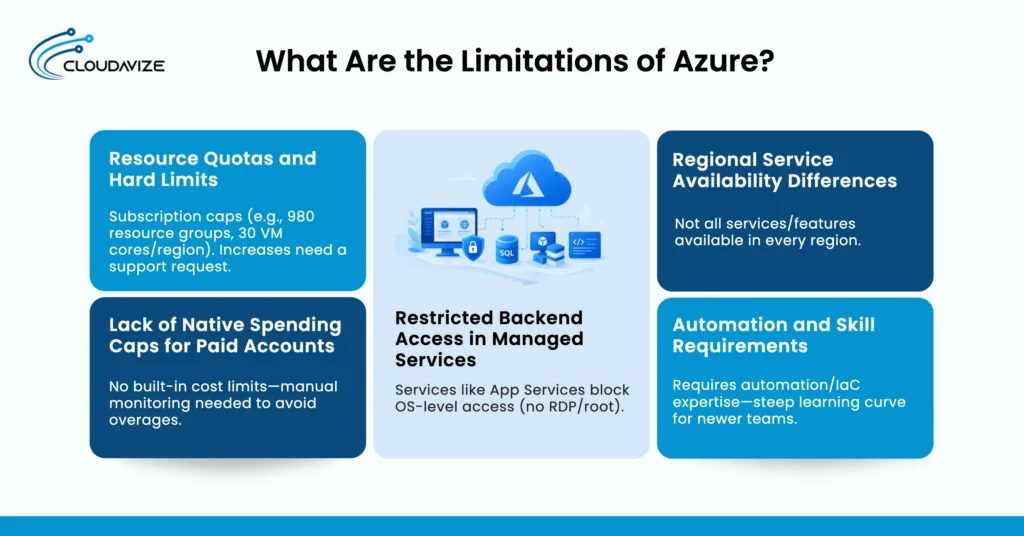
The main limitations of Azure involve capacity planning, cost management, backend service control, regional service availability, and the technical skills needed to manage cloud environments effectively. Understanding these areas helps businesses set realistic expectations and make informed decisions when designing, deploying, and maintaining Azure workloads.
Major limitations of Azure:
- Requires Quota Planning
Azure services operate within subscription and service quotas that may affect resource deployment and scaling. While many quotas can be increased through a support request, businesses should review expected capacity requirements before launching new workloads to avoid delays during expansion.
- Needs Active Cost Monitoring
Cloud spending requires ongoing monitoring because compute resources, storage, networking, and idle services continue to generate usage-based charges. Regularly reviewing Azure Cost Management reports, budgets, and resource utilization helps businesses control operating expenses as their cloud environment grows.
- Limits Backend Service Access
Some Azure managed services reduce the amount of direct operating system and infrastructure control available to administrators. This trade-off simplifies maintenance, patching, and platform management, but businesses should evaluate whether a managed service or infrastructure-based deployment better matches their operational and technical requirements.
- Depends on Regional Availability
Service availability, capacity, and supported features can vary between Azure regions depending on the selected architecture and service. Choosing appropriate deployment regions, redundancy options, and disaster recovery strategies helps maintain application availability and supports business continuity during regional service disruptions.
- Requires Cloud Automation Skills
Managing Azure efficiently often involves automation, infrastructure as code, monitoring, and standardized configuration practices. Developing these capabilities or working with an experienced Azure partner helps businesses reduce manual administration, maintain consistent deployments, and manage cloud resources more effectively as the environment expands.